







Description
When an exception occurs during a major compaction of OceanBase clusters, a major compaction timeout or major compaction error alert is triggered on OCP.
In addition, OceanBase Database logs contain the following major compaction error information.
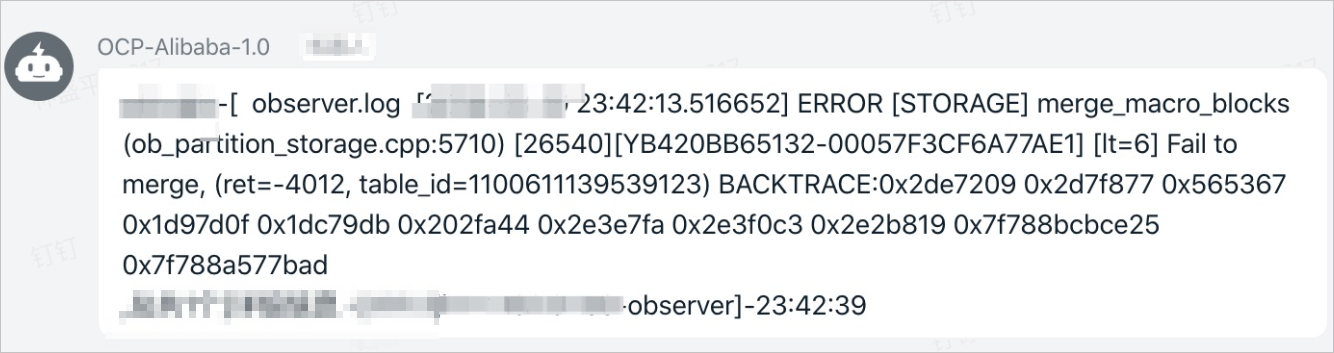
After the exception alert is received, the administrator can log on to the sys tenant of the OceanBase cluster that generates the alert to locate the cause.
Locate the server with the major compaction exception
Log on to the sys tenant. Run the following command to query the __all_zone table for the major compaction status and locate the zone on which the major compaction fails:
obclient> SELECT * FROM __all_zone WHERE name IN ('merge_status','all_merged_version');
If the major compaction status is normal, the following output is displayed:
obclient> SELECT * FROM __all_zone WHERE name IN ('merge_status','all_merged_version');
+----------------------------+----------------------------+---------+--------------------+-------+---------+
| gmt_create                 | gmt_modified               | zone    | name               | value | info    |
+----------------------------+----------------------------+---------+--------------------+-------+---------+
| 2019-06-24 11:19:00.559234 | 2020-02-18 14:02:28.997661 |         | merge_status       |     1 | MERGING |
| 2019-08-28 13:34:31.182559 | 2020-02-18 08:48:28.447141 | ET15_10 | all_merged_version |   773 |         |
| 2019-08-28 13:34:31.182986 | 2020-02-18 14:02:31.640651 | ET15_10 | merge_status       |     1 | MERGING |
| 2019-08-28 14:37:25.685870 | 2020-02-18 08:40:52.009764 | ET15_11 | all_merged_version |   773 |         |
| 2019-08-28 14:37:25.686322 | 2020-02-18 14:02:31.643109 | ET15_11 | merge_status       |     1 | MERGING |
| 2019-08-28 13:33:17.273600 | 2020-02-18 08:30:00.087549 | ET15_9  | all_merged_version |   773 |         |
| 2019-08-28 13:33:17.273964 | 2020-02-18 14:02:31.645466 | ET15_9  | merge_status       |     1 | MERGING |
+----------------------------+----------------------------+---------+--------------------+-------+---------+
When a major compaction error occurs in a zone of a cluster, the value in the info column for the zone is TIMEOUT. In addition, the value in the value column is 773 for the zone whose value in the name column is the value of all_merged_version, indicating that the version under major compaction is 773.
Set the major_version to 773 in the WHERE condition of the SQL statement for querying the major compaction progress to locate the IP address of the server with the major compaction exception. In the statement output, the value of svr_ip is the IP address of the server with the major compaction exception. Sample statement:
obclient> SELECT zone, svr_ip, major_version, macro_block_count, use_old_macro_block_count
 , merge_start_time, merge_finish_time, merge_process, merge_finish_time - merge_start_time AS cost_time
 , macro_block_count - use_old_macro_block_count AS merge_macro_block_count
 , (macro_block_count - use_old_macro_block_count) / (merge_finish_time - merge_start_time) AS avg_per_sec
FROM __all_virtual_partition_sstable_image_info
WHERE major_version = 773
 AND merge_process <> 100
ORDER BY zone, svr_ip, major_version;
Locate the exception cause
Locate the cause of the server exception
After you obtain the IP address of the server with the major compaction exception, log on to the server in SSH mode and check whether a hardware or software exception occurs. Generally, you can check whether:
The I/O performance is low.
You can run the
iostat -x -k 1command to check whether I/O waiting times out. If I/O usage is 100%, the major compaction is affected.The disk is full.
If the disk is full, new data cannot be written to the
/home/admin/oceanbase/log, Clog, and containerized Docker directories. You can run thedf -lhcommand to check the disk space.A hardware exception has occurred.
Run the following statement to check for hardware exceptions. If a value is returned, a hardware exception has occurred.
dmesg|grep -E "Failed status, reset controller|Controller encountered a fatal error and was reset|Controller encountered a fatal error and was reset"Run the following command for servers with RAID cards to check for RAID card exceptions. If a value is returned, a RAID card exception has occurred.
tbraid log | grep -E "Read Medium ERR|Error"

tbraid log | grep -E 'host IOs were blocked|I2C 4 cannot find idle bus'
A kernel bug exists.
Run the following statement to check the kernel. If information similar to
task xxx blocked for more than 120 secondsis displayed, a kernel bug exists.dmesg |grep blocked
The network is abnormal.
View the Message log or run the
TSARcommand to check whether the network is normal. If the following information is displayed, the network is abnormal:May 26 04:34:23 db142151114.na62 lldpd[67883]: iface_eth_recv: error while receiving frame on eno1: Network is down May 26 04:34:23 db142151114.na62 lldpd[67883]: iface_eth_recv: error while receiving frame on eno2: Network is down May 26 04:34:23 db142151114.na62 lldpd[67883]: iface_eth_recv: error while receiving frame on enp7s0f0: Network is down May 26 04:34:23 db142151114.na62 lldpd[67883]: iface_eth_recv: error while receiving frame on enp7s0f1: Network is downIf one or more of the preceding problems have occurred, contact O&M engineers. If a server needs to be replaced, the OBServer node needs to be replaced.
Locate the cause of an internal exception
An internal exception, including network jitter, I/O timeout, or invalid parameter settings, can also cause the major compaction exception. You can check whether:
The internal macroblock is abnormal.
Run the following SQL statement in which data_version is set to the version under major compaction to locate the abnormal partition. In this example, the version under major compaction is 773. The SQL statement varies with the OceanBase Database version.
For OceanBase Database V1.x, the SQL statement is as follows:
obclient> SELECT * FROM __all_meta_table WHERE data_version != 773;For OceanBase Database V2.x, the SQL statement is as follows:
obclient> SELECT * FROM __all_virtual_meta_table WHERE data_version != 773;The statement returns information about the partition where the major compaction error occurred, including the IP address and zone of the server where the partition resides.
The parameter settings are invalid.
If OceanBase cluster parameters for controlling major compactions of the cluster are invalid, the major compaction will fail.
Run the following statement to check whether the value of enable_manual_merge is
false. If the value is not false, you can only run manual major compaction commands to perform major compactions.obclient> SHOW PARAMETERS LIKE '%enable_manual_merge%';Run the following statement to check whether the value of enable_upgrade is
false. If the value is not false, all major compactions will be blocked.obclient> SHOW PARAMETERS LIKE '%enable_upgrade%';
Solutions
The solution varies with the exception cause.
Solutions to server exceptions
For an intermittent server exception, ensure that the exception will not occur, run
STOP SERVERto stop the faulty server, and then restart the server. For more information, see OBServer management.For a persistent server exception, ask O&M engineers to bring the abnormal server offline for maintenance. Before you bring the abnormal server offline, run
STOP SERVERto stop the faulty server, and replace it with a new server. For more information, see OBServer management.
Internal exception
The solution to an internal macroblock exception is similar to that to an intermittent server exception. Run
STOP SERVERto stop the faulty server and then restart the server. For more information, see OBServer management.To rectify parameter setting errors, run the
ALTERcommand to set the parameters to valid values. For example:ALTER SYSTEM SET `parameter_name`= 'True';