







You can drop custom roles but not default roles.
Drop a role by using an SQL statement
You can use the DROP ROLE statement to drop a role that you no longer need. To drop a role, you must have the DROP ANY ROLE privilege and are granted the WITH ADMIN OPTION privilege of the role to be dropped.
For information about how to view your privileges, see View user privileges. If you do not have the required privilege, contact an administrator. For more information, see Modify user privileges.
When you drop a role, the system revokes the role from all users and roles and then drops the role from the database.
Notice
Dropping a role does not affect user sessions in which the role is enabled. However, after the role is dropped, the role can no longer be enabled in new user sessions.
The syntax for dropping a role is as follows:
obclient> DROP ROLE role_name;
Here is an example:
obclient> DROP ROLE role1;
Query OK, 0 rows affected
For more information about the DROP ROLE statement, see DROP ROLE.
Drop a role in the OCP console
Prerequisites
The TENANT_MANAGER role is assigned to you. Otherwise, request the OceanBase Cloud Platform (OCP) administrator to assign the role. For more information, see "Edit a user" in the OCP User Guide of the corresponding version.
Procedure
Log on to the OCP console.
In the left-side navigation pane, click Tenants to go to the Tenants page.
In the Tenants section, click the name of an Oracle tenant to go to the details page of the tenant.
In the left-side navigation pane, click User Management.
Click the Roles tab, find the role that you want to drop, and then click Delete in the Actions column.
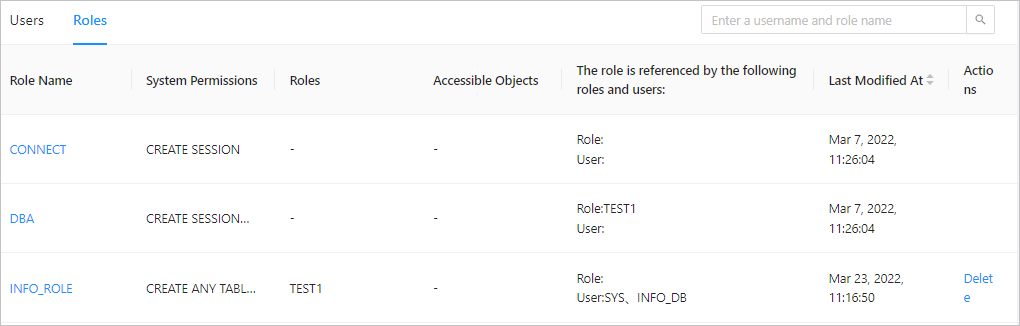
In the dialog box that appears, enter delete and click Delete.