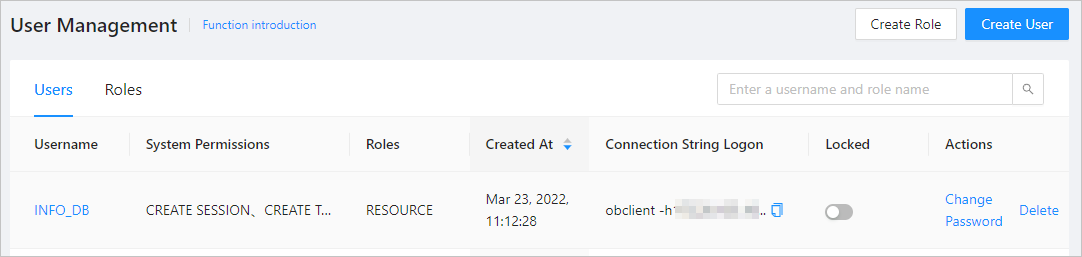
You can lock a user that does not need to access OceanBase Database. The locked user cannot log on to OceanBase Database. You can unlock the user as an administrator.
Lock and unlock a user by using SQL statements
You can use the ALTER USER statement to lock and unlock a user. In most cases, administrators lock and unlock users. If you need to lock and unlock a user, you must be granted the global ALTER USER privilege. After you lock a user, the locked user cannot log on to OceanBase Database.
For information about how to view your privileges, see View user privileges. If you do not have the ALTER USER privilege, contact an administrator. For more information, see Modify user privileges.
The syntax is as follows:
ALTER USER user_name {ACCOUNT LOCK | ACCOUNT UNLOCK};
Here are some examples:
Lock a user
obclient> ALTER USER demo ACCOUNT LOCK;
Query OK, 0 rows affected

obclient -udemo@demo0_111 -P2881 -h10.10.10.1   -p******
obclient: [Warning] Using a password on the command line interface can be insecure.
ERROR 3118 (HY000): User locked
Unlock a user
obclient> ALTER USER demo ACCOUNT UNLOCK;
Query OK, 0 rows affected

obclient -udemo@demo0_111 -P2881 -h10.10.10.1 -p -A
Enter password:
Welcome to the OceanBase.  Commands end with ; or \g.
Your OceanBase connection id is 3221583828
Server version: OceanBase 3.2.4.0 (r100000072022102819-2a28da9e758e2d232c41fa1a1b0070a08b77dd7d) (Built Oct 28 2022 19:46:38)

Copyright (c) 2000, 2018, OceanBase Corporation Ab and others.

Type 'help;' or '\h' for help. Type '\c' to clear the current input statement.
After you lock or unlock a user, you can query the __all_user table and view the is_locked field to confirm the lock status of the user as an administrator. If the value of the is_locked field is 1, the user is locked. If the value of the is_locked field is 0, the user is unlocked.
obclient> SELECT user_name,is_locked FROM oceanbase.__all_user WHERE user_name='demo';
+-----------+-----------+
| user_name | is_locked |
+-----------+-----------+
| demo      |         0 |
+-----------+-----------+
1 row in set
For more information about the ALTER USER statement, see ALTER USER.
Lock and unlock a user in the OCP console
Prerequisites
Before you lock or unlock a user, ensure that:
The TENANT_MANAGER role is assigned to you. Otherwise, request the OceanBase Cloud Platform (OCP) administrator to assign the role. For more information, see "Edit a user" in the OCP User Guide of the corresponding version.
Your password box contains the
rootpassword of the tenant. For more information about the password box, see the OCP User Guide of the corresponding version.
Procedure
Log on to the OCP console.
In the left-side navigation pane, click Tenants to go to the Tenants page.
In the tenant list, find the target tenant to which the user belongs and click the tenant name. Then, the Overview page appears.
In the left-side navigation pane, click User Management.
In the user list, find the target user and set the switch to On or Off in the Lock column.
Note
If the lock switch is set to On, the user is not allowed to log on to the database. Proceed with caution.