







Before you deploy OceanBase Cloud Platform (OCP), you must add an OCP configuration file.
Prerequisites
Make sure that you have added, configured, and initialized an OCP server.
If you want to use a custom OCP docker image, make sure that the custom image file has been uploaded to the /data_dir/ocp directory on the OceanBase Admin Toolkit (OAT) server.
Single-node deployment
In the left-side navigation pane, choose Service Deployment > Config Files.
In the upper-right corner of the page, choose Add Config File > OCP. The Add OCP Config Files page appears.

In the Basic Information step, enter the basic information of the configuration file, and click Next.
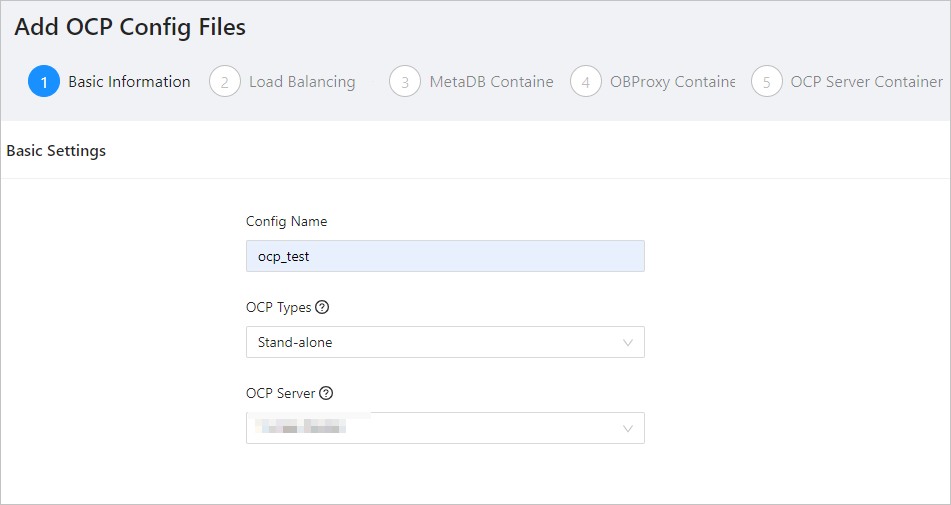
The following table describes fields in the basic information.
FieldDescriptionConfig Name The name of the configuration file. It distinguishes the file from configuration files for other deployment scenarios of the products. OCP Type Select Stand-alone. OCP Server Select one server to deploy OCP. Configure load balancing and click Next.
By default, Load Balancing Mode is set to none. You do not need to modify it.
Configure the MetaDB container and click Next.
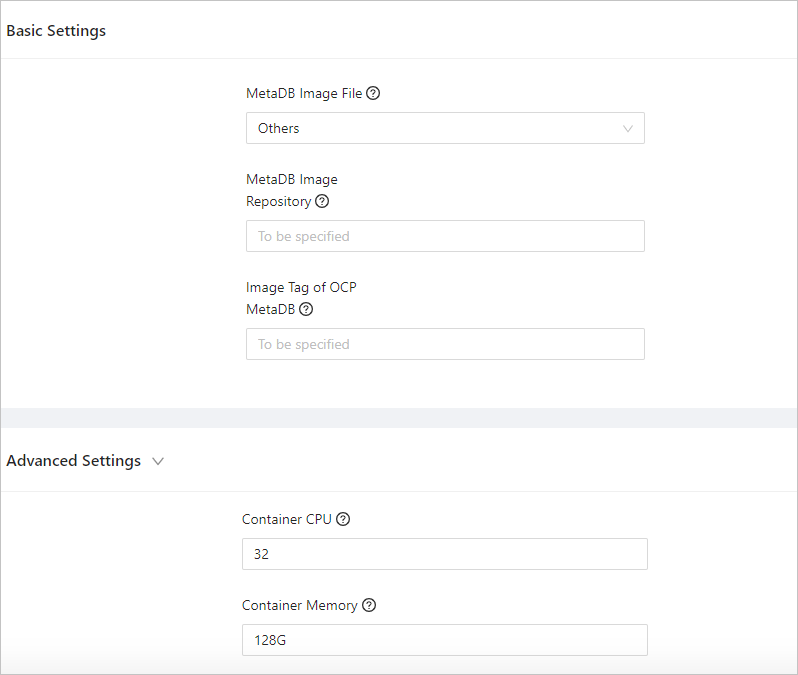
The following table describes the fields of the MetaDB container.
FieldDescriptionBasic Settings MetaDB Image File The TAR package of the MetaDB image. You can either select the default TAR package or click Others to select the package of a custom remote image. MetaDB Image Repository The address of the MetaDB image. If you select the default TAR package, the system automatically fills in the field with the corresponding image address. MetaDB Image Tags The tag of the MetaDB image. If you select the default TAR package, the system automatically fills in the field with the corresponding image tag. Advanced Settings Container CPU The number of CPU cores allocated to the MetaDB container. Default value: 32. Container Memory The memory allocated to the MetaDB container. Default value: 128G. MetaDB Service Port The actual service port of the MetaDB. Default value: 2881. MetaDB RPC Port The RPC port of the MetaDB. Default value: 2882. MetaDB Data Directory The directory where the MetaDB data is stored. Default value: /data1. MetaDB Log Directory The directory where MetaDB logs are stored. Default value: /data/log1. MetaDB Cluster Name The name of the MetaDB cluster. Pre-allocated Disk Space (%) Default value: 90. Enable Backup Specifies whether to enable backup. Default value: FALSE. MetaDB Backup Directory The backup directory of the MetaDB data. Default value: /obbackup. IDC Name The name of the IDC where OCP is deployed. Region Name The name of the region where OCP is deployed. Configure the OceanBase Database Proxy (ODP) container and click Next.
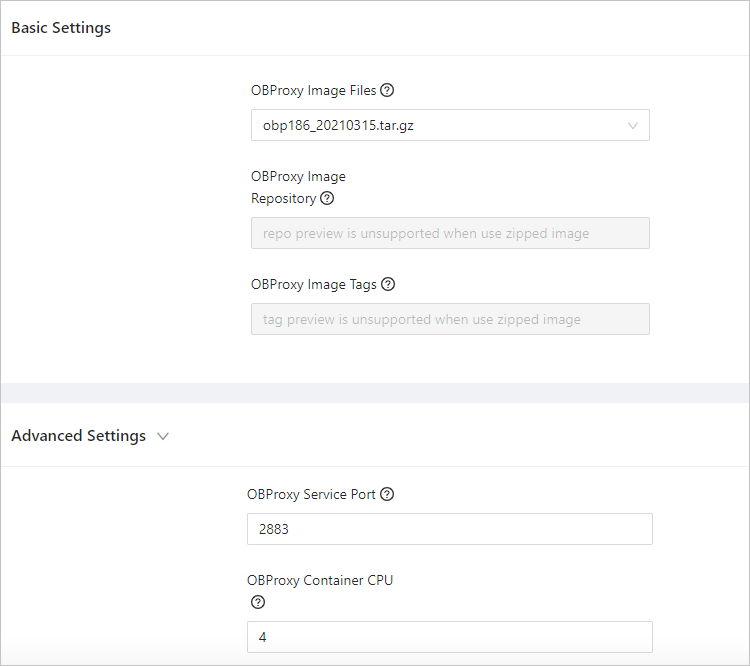
The following table describes the fields of the ODP container.
FieldDescriptionBasic Settings OBProxy Image File The TAR package of the ODP image. You can either select the default TAR package or click Others to select the package of a custom remote image. OBProxy Image Repository The address of the ODP image. OBProxy Image Tags The tag of the ODP image. Advanced Settings OBProxy Service Port The service port of ODP. Default value: 2883. OBProxy Container CPU The number of CPU cores allocated to the ODP container. Default value: 4. OBProxy Container Memory The memory allocated to the ODP container. Default value: 6G. OBProxy Container Name The name of the ODP container. Default value: obproxy. Configure the OCP server container.
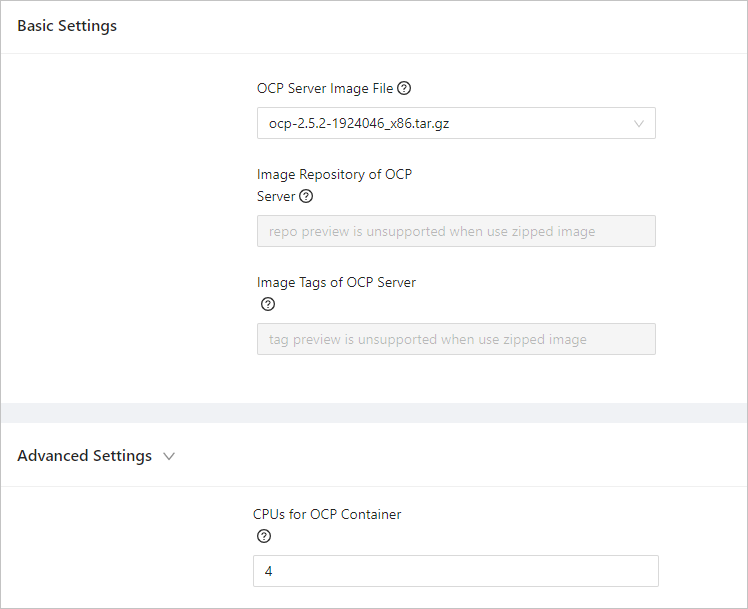
The following table describes the fields of the OCP server container.
FieldDescriptionBasic Settings OCP Server Image File The TAR package of the OCP server image. You can either select the default TAR package or click Others to select the package of a custom remote image. Image Repository of OCP Server The address of the OCP server image. Note
Contact OceanBase Technical Support to obtain the address of the latest OCP server image.Image Tags of OCP Server The tag of the OCP server image. Advanced Settings CPUs for OCP Container The number of CPU cores allocated to the OCP server. Default value: 4. Container Memory of OCP Server The memory allocated to the OCP server container. Default value: 16G. OCP Server Port The service port of the OCP server. Default value: 8080. Container Name of OCP Server The name of the OCP server container. Default value: ocp. Click OK.
The system generates a task flow and starts to deploy OCP. You can view its progress on the Task Management page.
Three-node deployment
In the left-side navigation pane, choose Service Deployment > Config Files.
In the upper-right corner of the page, choose Add Config File > OCP. The Add OCP Config Files page appears.

In the Basic Information step, enter the basic information of the configuration file, and click Next.
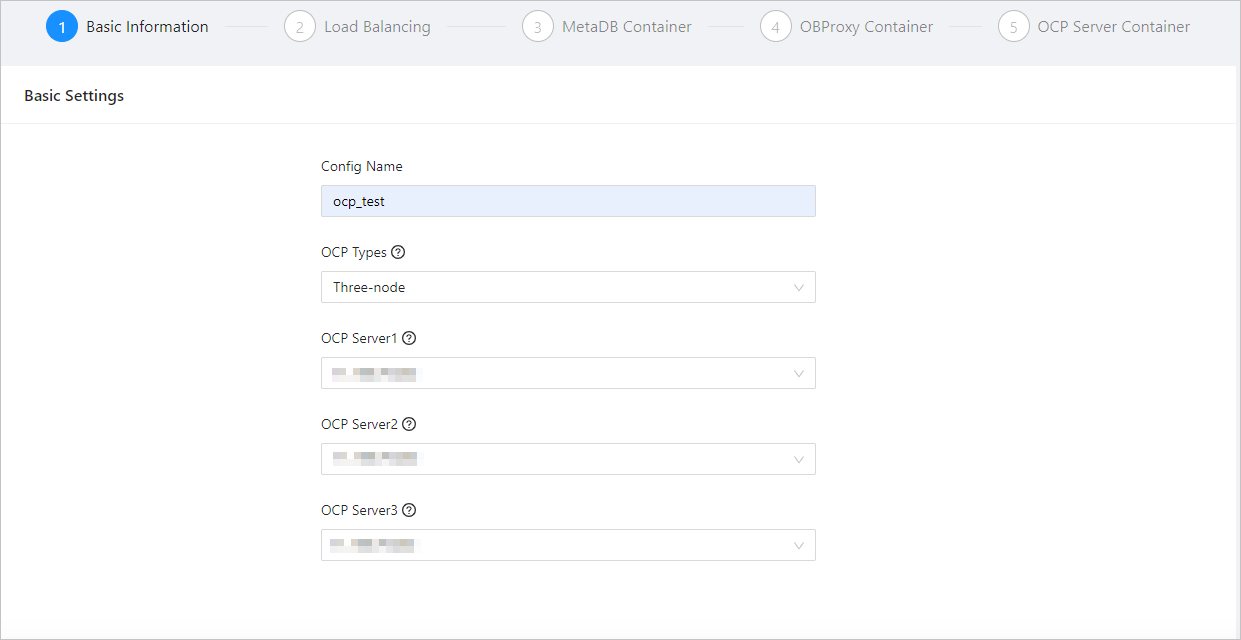
The following table describes the fields in the Basic Information step.
FieldDescriptionConfig Name The name of the configuration file. It distinguishes the file from configuration files for other deployment scenarios of the products. OCP Type Select Three-node. OCP Server Select three servers to deploy OCP. Configure load balancing and click Next.
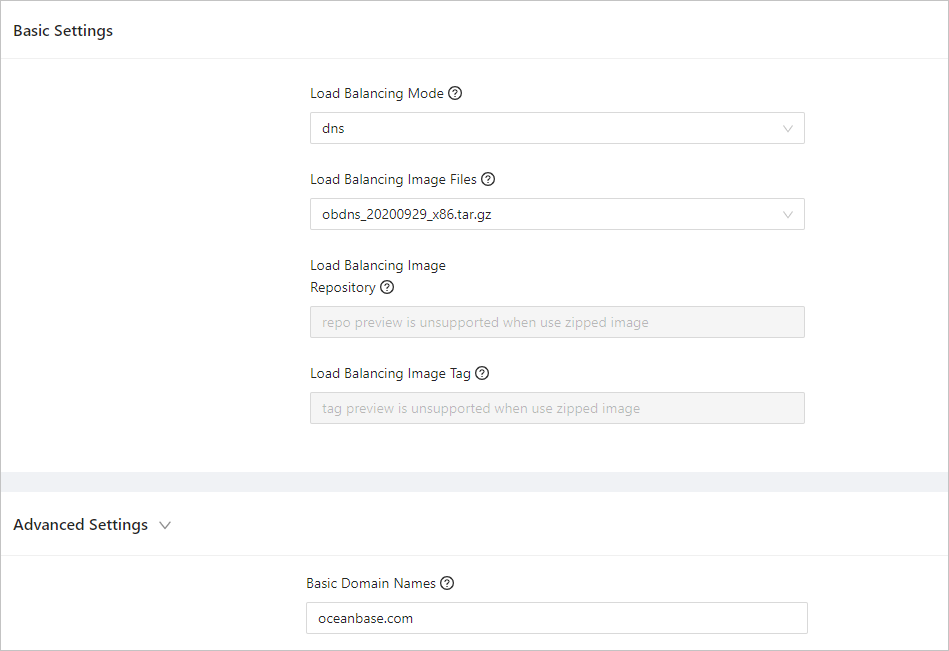
The following table describes the fields of load balancing.
FieldDescriptionBasic Settings Load Balancing Mode In three-node deployment, the valid values of the Load Balancing Mode field are:
- dns: If you select this option, you must specify the load balancing image file, load balancing image repository address, and the load balancing image tag. You can also set fields in advanced settings as needed.
- f5: If you select this option, you must set the following fields: OCP Proxy IP Address, OCP Proxy Port, OBProxy IP Address, and OBProxy Port.
Load Balancing Image File The TAR package of the load balancing image.
You can select the default TAR package or click Others to select a custom remote image.Load Balancing Image Repository The address of the load balancing image. Load Balancing Image Tag The tag of the load balancing image. OCP Proxy IP The virtual IP address (VIP) of OCP. You must apply for the VIP before you deploy OCP. OCP Proxy Port The virtual port (VPort) of OCP. OBProxy IP Address The VIP of ODP. You must apply for the VIP before you deploy OCP. OBProxy Port The VPort of ODP. Advanced Settings Basic Domain Name By default, oceanbase.com is recommended. This domain name can be accessed only through OCP nodes. If a non-OCP node needs to access this domain name, /etc/hosts parsing must be configured. OCP Proxy Port The VPort of OCP. Default value: 80. OCP Subdomain Name Default value: ocp. OBProxy Subdomain Name Default value: obproxy. Load Balancing Container Name Default value: ob_dns. Load Balancing Listening Port Default value: 85. Configure the MetaDB container and click Next.
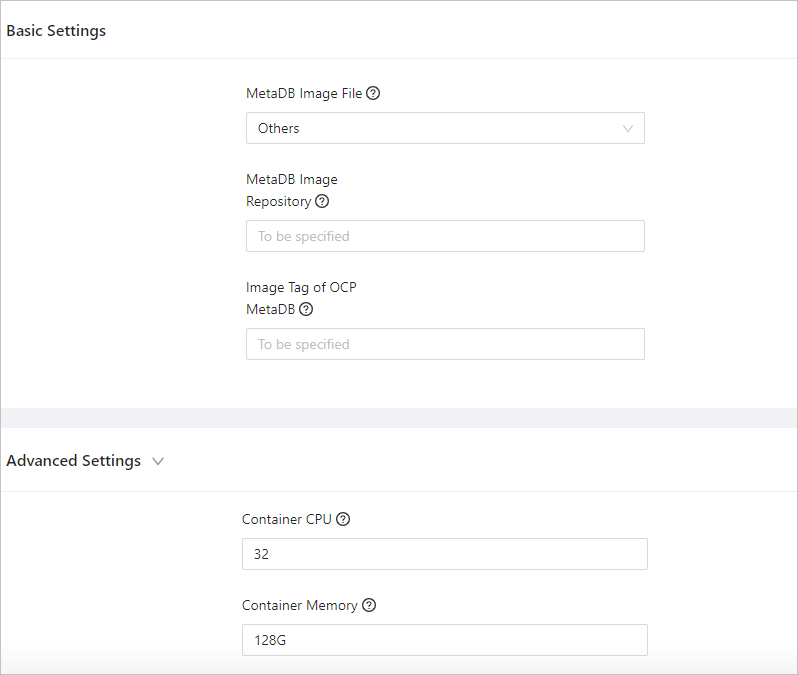
The following table describes the fields of the MetaDB container.
FieldDescriptionBasic Settings MetaDB Image File The TAR package of the MetaDB image.
You can select the default TAR package or click Others to select a custom remote image.MetaDB Image Repository The address of the MetaDB image. MetaDB Image Tags The tag of the MetaDB image. Advanced Settings Container CPU The number of CPU cores allocated to the MetaDB container. Default value: 32. Container Memory The memory allocated to the MetaDB container. Default value: 128G. MetaDB Service Port The actual service port of the MetaDB. Default value: 2881. MetaDB RPC Port The RPC port of the MetaDB. Default value: 2882. MetaDB Data Directory The directory where the MetaDB data is stored. Default value: /data1. MetaDB Log Directory The directory where MetaDB logs are stored. Default value: /data/log1. MetaDB Cluster Name The name of the MetaDB cluster. Pre-allocated Disk Space (%) Default value: 90. Enable Backup Specifies whether to enable backup. Default value: FALSE. MetaDB Backup Directory The backup directory of the MetaDB data. Default value: /obbackup. IDC Name The name of the IDC where OCP is deployed. Region Name The name of the region where OCP is deployed. Configure the ODP container and click Next.
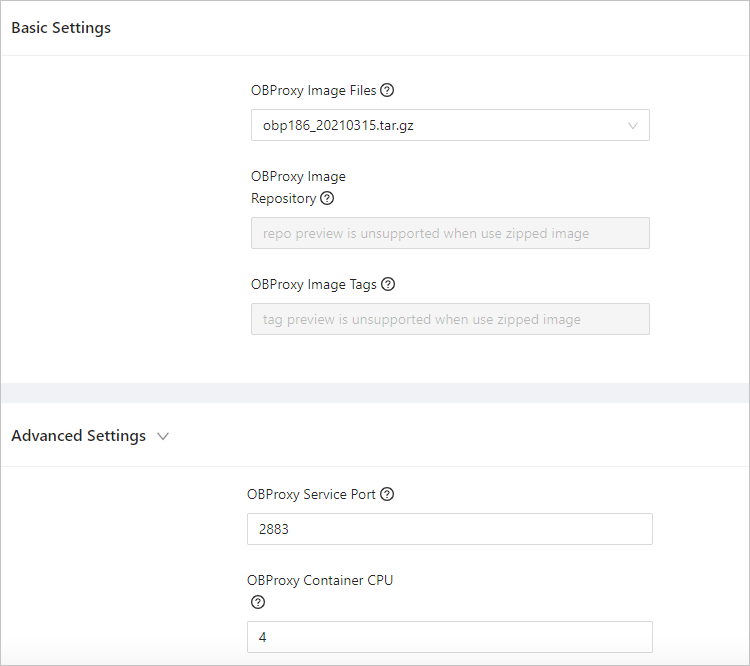
The following table describes the fields of the ODP container.
FieldDescriptionBasic Settings OBProxy Image File The TAR package of the ODP image.
You can select the default TAR package or click Others to select a custom remote image.OBProxy Image Repository The address of the ODP image. OBProxy Image Tags The tag of the ODP image. Advanced Settings OBProxy Service Port The service port of ODP. Default value: 2883. OBProxy Container CPU The number of CPU cores allocated to the ODP container. Default value: 4. OBProxy Container Memory The memory allocated to the ODP container. Default value: 6G. OBProxy Container Name The name of the ODP container. Default value: obproxy. Configure the OCP server container.
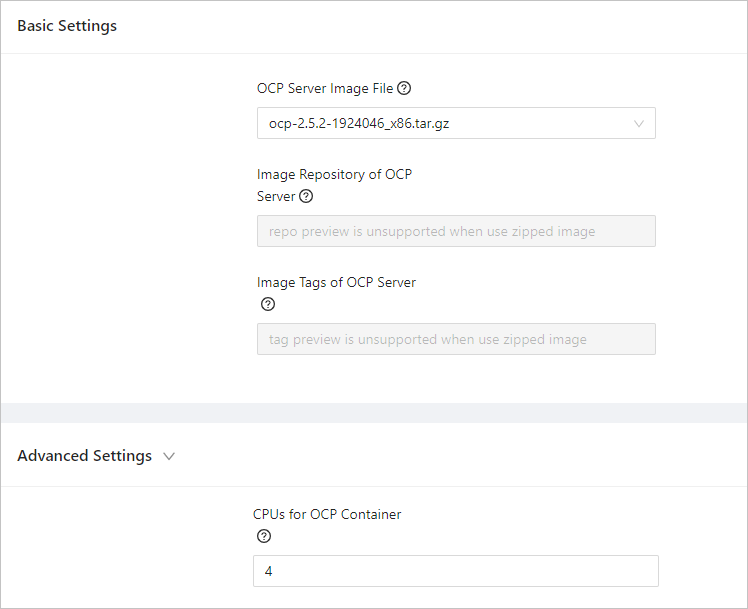
The following table describes the configuration fields of the OCP server container.
FieldDescriptionBasic Settings OCP Server Image File The TAR package of the OCP server image.
You can select the default TAR package or click Others to select a custom remote image.Image Repository of OCP Server The address of the OCP server image. Image Tags of OCP Server The tag of the OCP server image. Advanced Settings CPUs for OCP Container The number of CPU cores allocated to the OCP server. Default value: 4. Container Memory of OCP Server The memory allocated to the OCP server container. Default value: 16G. OCP Server Port The service port of the OCP server. Default value: 8080. Container Name of OCP Server The name of the OCP server container. Default value: ocp. Click OK.
The system generates a task flow and starts to deploy OCP. You can view its progress on the Task Management page.