







You can increase and decrease the resources of a tenant by modifying the unit_config parameter. The parameter specifies the resource unit configuration.
You can modify the unit_config parameter by executing SQL statements or using OceanBase Cloud Platform (OCP).
Prerequisites
Before you perform a scale-in or scale-out operation on a tenant, you must perform the following steps:
If the tenant is deleted, delete the resource pool of the tenant to release resources. Resources in an idle resource pool are also considered occupied resources.
For more information about how to delete a resource pool, see Delete a resource pool.
Perform a round of minor compaction to release the occupied memory resources.
For more information about how to manually trigger a minor compaction, see Manually trigger a minor compaction.
View the allocation of resources in the cluster to understand resource usage.
For more information about how to view the total amount of resources and the resource allocation on OBServer nodes, see View resource information of a cluster.
Modify the resource unit configs of a tenant by using SQL statements
The modifications on resource unit configs involve the following two scenarios:
If the current tenant uses independent resource unit configs, you can directly modify the resource unit configs.
If the tenant uses the same resource unit configuration as other tenants do, you must create a resource unit for the tenant.
The following content describes the detailed information.
Considerations
If you want to upgrade the unit configs, the total amount of resources after adjustment must meet the following requirements:
Sum(min_cpu) <= CPU_CAPACITY;
Sum(min_memory) <= MEM_CAPACITY;
Sum(max_cpu) <= CPU_CAPACITY * resource_hard_limit;
Sum(max_mem) <= MEM_CAPACITY * resource_hard_limit;
Otherwise, the system returns an error, indicating that the scale-out fails.
Parameters:
CPU_CAPACITY: the total CPU capacity.MEM_CAPACITY: the total memory capacity.resource_hard_limit: a specific system parameter.During resource unit allocation, the system determines whether over-allocation of resources is allowed based on the value of
resource_hard_limit. Valid values: 1 to 10000. The default value is100, indicating that over-allocation is not allowed. If the value of this parameter is set to200, tenants can be allocated twice the resource quota.For more information about the
resource_hard_limitparameter, see resource_hard_limit.
Background
Assume that you have a cluster that has three zones, which are z1, z2, and z3, and each zone has three OBServer nodes. The cluster has a user tenant named tenant1. The following code shows the resource distribution of the tenant:
obclient> CREATE RESOURCE UNIT unit1 MAX_CPU 6,MAX_MEMORY '36G',MAX_IOPS 128, MAX_DISK_SIZE '2T', MAX_SESSION_NUM 64, MIN_CPU 6, MIN_MEMORY '36G', MIN_IOPS 128;

obclient> CREATE RESOURCE POOL pool1 UNIT 'unit1', UNIT_NUM 2, ZONE_LIST ('z1','z2','z3');

obclient>CREATE TENANT tenant1 resource_pool_list=('pool1');
Scenario 1: The current tenant uses independent resource unit configs
If the current tenant uses independent resource unit configs, you can directly modify the unit_config parameter to scale in or out the resources of the tenant.
Perform the following steps:
Log on to the
systenant as therootuser.Access the database named
oceanbase.obclient>USE oceanbase;Execute the following statement to obtain the resource allocation information about the tenant:
obclient>SELECT * FROM gv$unit;Find the information about all resource pools and the unit_config parameter of the current tenant in the query results.
Modify the specifications of the
unit1resource unit based on the obtained information.Upgrade the specifications of unit1
Notice
The current version of OceanBase Database strictly restricts the memory and CPU resources but does not implement strict tenant isolation on the disk space and connections.
In high-concurrency scenarios, only the specified minimum values for memory and CPU resources can be ensured. Therefore, we recommend that you set the maximum and minimum values to the same value for a type of resource.
obclient> ALTER RESOURCE UNIT unit1 MAX_CPU 8, MAX_MEMORY '40G', MAX_IOPS 128, MAX_DISK_SIZE '10G', MAX_SESSION_NUM 64, MIN_CPU=8, MIN_MEMORY='40G', MIN_IOPS=128;Downgrade the specifications of
unit1obclient> ALTER RESOURCE UNIT unit1 MAX_CPU 5, MAX_MEMORY '20G', MAX_IOPS 128, MAX_DISK_SIZE '10G', MAX_SESSION_NUM 64, MIN_CPU=5, MIN_MEMORY='20G', MIN_IOPS=128;
Scenario 2: The current tenant uses the same resource unit configs as other tenants
If the current tenant uses the same resource unit configs as that of other tenants, you cannot simply upgrade or downgrade the specifications to increase or decrease tenant resources. If you modify the resource unit configs for a tenant, the modification applies to all tenants that use the same resource unit configs.
In this scenario, you must create an independent resource unit and replace the original resource unit with the new one.
For example, tenant1 requires scaling, and both tenant1 and tenant2 use the same resource unit unit1. In this case, you need to create a new resource unit for tenant1.
Log on to the
systenant as therootuser.Access the database named
oceanbase.Create an independent resource unit.
Specify a name for the new resource unit, such as
unit2. Resource unit names must be globally unique.Create
unit2with higher specifications than those of the current resource unitobclient> CREATE RESOURCE UNIT unit2 MAX_CPU 8, MAX_MEMORY '40G', MAX_IOPS 128, MAX_DISK_SIZE '10G', MAX_SESSION_NUM 64, MIN_CPU=8, MIN_MEMORY='40G', MIN_IOPS=128;Create
unit3with lower specifications than those of the current resource unitobclient> CREATE RESOURCE UNIT unit3 MAX_CPU 5, MAX_MEMORY '20G', MAX_IOPS 128, MAX_DISK_SIZE '10G', MAX_SESSION_NUM 64, MIN_CPU=5, MIN_MEMORY='20G', MIN_IOPS=128;
Replace the current resource unit of the resource pool with the newly created resource unit.
In this example,
unit2andunit3are newly created resource units.obclient> ALTER RESOURCE POOL pool1 unit='unit2'; obclient> ALTER RESOURCE POOL pool1 unit='unit3';
What to do next
You can check whether the resource unit is successfully changed for the current tenant by using the gv$unit view.
obclient> SELECT * FROM oceanbase.gv$unit
For more information about fields in the gv$unit view, see gv$unit.
Modify the resource unit specifications of a tenant in OCP
You can also modify the resource unit specifications of a tenant in OceanBase Cloud Platform (OCP).
Scenario 1: The relevant tenant uses custom or independent resource unit configurations
If you specify custom resource unit configurations or the relevant tenant uses independent resource unit configurations in OCP, you can directly modify the resource unit configurations to perform scale-out or scale-in.
Note
For more information about how to modify a custom resource unit configuration that is used by multiple tenants, see Scenario 2: The relevant tenant uses built-in resource unit specifications or uses the same resource unit specifications as other tenants.
Procedure:
Log on to the OCP console.
In the left-side navigation pane, click Tenants.
On the page that appears, click Unit Specification Management in the upper-right corner. The Unit Specification Management page appears.
In the resource units with Unit Types set to Custom, find the resource unit to be modified and click Edit in the Actions column.
Modify the valid ranges of CPU and memory resources and click OK.
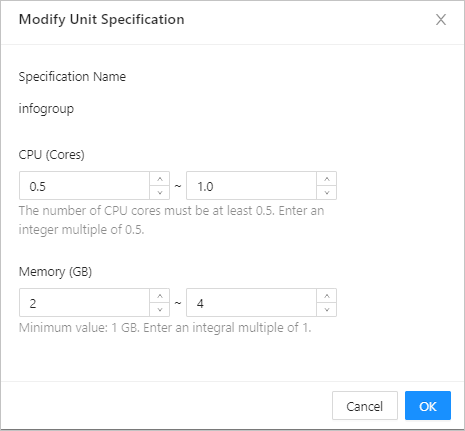
Scenario 2: The relevant tenant uses built-in resource unit specifications or uses the same resource unit specifications as other tenants
If you specify built-in resource unit configurations or the relevant tenant uses the same resource unit configurations as other tenants in OCP, you need to specify new resource unit configurations for the tenant.
Procedure:
Log on to the OCP console.
In the left-side navigation pane, click Tenants.
In the Tenants section, find the tenant whose resource configurations you want to view and click the tenant name.
In the Replica Details section of the Overview page, find the zone for which you want to change the number of resource units and click Edit in the Actions column.
In the Unit Specification column, select or specify resource unit specifications as required.
You can select built-in resource unit specifications or specify custom resource unit specifications. For more information about built-in specifications, see OCP User Guide of the required version.
Click OK.
More information
During resource scaling for tenants, you can obtain resource information about the tenants in one of the following ways:
Use the
oceanbase__all_unit_configinternal tableThe
oceanbase.__all_unit_configinternal table records all unit_config settings in the current cluster.Example:
obclient> SELECT * FROM oceanbase.__all_unit_config;
+----------------------------+----------------------------+----------------+-----------------------------+---------+---------+-------------+-------------+----------+----------+---------------+---------------------+
| gmt_create                 | gmt_modified               | unit_config_id | name                        | max_cpu | min_cpu | max_memory  | min_memory  | max_iops | min_iops | max_disk_size | max_session_num     |
+----------------------------+----------------------------+----------------+-----------------------------+---------+---------+-------------+-------------+----------+----------+---------------+---------------------+
| 2021-11-11 14:29:24.847092 | 2021-11-11 14:29:24.847092 |              1 | sys_unit_config             |       5 |     2.5 | 16106127360 | 12884901888 |    10000 |     5000 |  179593805824 | 9223372036854775807 |
| 2021-11-11 14:43:01.449090 | 2021-11-11 14:43:01.449090 |           1002 | config_Oracle_zone1_S1_rhf  |     1.5 |     1.5 |  6442450944 |  6442450944 |     1250 |     1250 |  536870912000 |
375 |
| 2021-11-15 11:25:48.371781 | 2021-11-15 11:25:48.371781 |           1003 | config_MySQL_zone1_S1_zlz   |     1.5 |     1.5 |  6442450944 |  6442450944 |     1250 |     1250 |  536870912000 |
375 |
| 2021-11-15 11:26:38.979746 | 2021-11-15 11:26:38.979746 |           1004 | config_MySQL1_zone1_S1_cey  |     1.5 |     1.5 |  6442450944 |  6442450944 |     1250 |     1250 |  536870912000 |
375 |
| 2021-11-15 11:27:09.347510 | 2021-11-15 11:27:09.347510 |           1005 | config_MySQL2_zone1_S1_ydf  |     1.5 |     1.5 |  6442450944 |  6442450944 |     1250 |     1250 |  536870912000 |
375 |
| 2021-11-15 11:27:42.442706 | 2021-11-15 11:27:42.442706 |           1006 | config_Oracle1_zone1_S1_dfl |     1.5 |     1.5 |  6442450944 |  6442450944 |     1250 |     1250 |  536870912000 |
375 |
| 2021-11-17 14:29:09.458317 | 2021-11-17 14:29:09.458317 |           1022 | unit1                       |       5 |       5 | 38654705664 | 34359738368 |      128 |      128 | 2199023255552 |
 64 |
+----------------------------+----------------------------+----------------+-----------------------------+---------+---------+-------------+-------------+----------+----------+---------------+---------------------+
7 rows in set
Use the
gv$unitviewThe
gv$unitview records the resource allocation of all tenants in the current cluster.Example:
obclient> SELECT * FROM oceanbase.gv$unit;
+---------+----------------+-----------------------------+------------------+------------------------+-------+-----------+-------------+----------------+----------+---------------------+-----------------------+---------+---------+-------------+-------------+----------+----------+---------------+---------------------+
| unit_id | unit_config_id | unit_config_name            | resource_pool_id | resource_pool_name     | zone  | tenant_id | tenant_name | svr_ip         | svr_port | migrate_from_svr_ip | migrate_from_svr_port | max_cpu | min_cpu | max_memory  | min_memory  | max_iops | min_iops | max_disk_size | max_session_num     |
+---------+----------------+-----------------------------+------------------+------------------------+-------+-----------+-------------+----------------+----------+---------------------+-----------------------+---------+---------+-------------+-------------+----------+----------+---------------+---------------------+
|       1 |              1 | sys_unit_config             |                1 | sys_pool               | zone1 |         1 | sys         | xxx.xx.xxx.xxx |     2882 |                     |                     0 |       5 |     2.5 | 16106127360 | 12884901888 |    10000 |     5000 |  179593805824 | 9223372036854775807 |
|    1002 |           1002 | config_Oracle_zone1_S1_rhf  |             1002 | pool_Oracle_zone1_rhf  | zone1 |      1002 | Oracle      | xxx.xx.xxx.xxx |     2882 |                     |                     0 |     1.5 |     1.5 |  6442450944 |  6442450944 |     1250 |     1250 |  536870912000 |                 375 |
|    1003 |           1003 | config_MySQL_zone1_S1_zlz   |             1003 | pool_MySQL_zone1_zlz   | zone1 |      1003 | MySQL       | xxx.xx.xxx.xxx |     2882 |                     |                     0 |     1.5 |     1.5 |  6442450944 |  6442450944 |     1250 |     1250 |  536870912000 |                 375 |
|    1004 |           1004 | config_MySQL1_zone1_S1_cey  |             1004 | pool_MySQL1_zone1_cey  | zone1 |      1004 | MySQL1      | xxx.xx.xxx.xxx |     2882 |                     |                     0 |     1.5 |     1.5 |  6442450944 |  6442450944 |     1250 |     1250 |  536870912000 |                 375 |
|    1005 |           1005 | config_MySQL2_zone1_S1_ydf  |             1005 | pool_MySQL2_zone1_ydf  | zone1 |      1005 | MySQL2      | xxx.xx.xxx.xxx |     2882 |                     |                     0 |     1.5 |     1.5 |  6442450944 |  6442450944 |     1250 |     1250 |  536870912000 |                 375 |
|    1006 |           1006 | config_Oracle1_zone1_S1_dfl |             1006 | pool_Oracle1_zone1_dfl | zone1 |      1006 | Oracle1     | xxx.xx.xxx.xxx |     2882 |                     |                     0 |     1.5 |     1.5 |  6442450944 |  6442450944 |     1250 |     1250 |  536870912000 |                 375 |
+---------+----------------+-----------------------------+------------------+------------------------+-------+-----------+-------------+----------------+----------+---------------------+-----------------------+---------+---------+-------------+-------------+----------+----------+---------------+---------------------+
Use the
oceanbase__all_resource_poolinternal tableThe
oceanbase__all_resource_poolinternal table records the resource configurations of all resource pools in the current cluster.unit_countindicates the number of resource units in the resource pool.Example:
obclient> select * from oceanbase.__all_resource_pool;
+----------------------------+----------------------------+------------------+------------------------+------------+----------------+-------------+-----------+--------------+--------------------+
| gmt_create                 | gmt_modified               | resource_pool_id | name                   | unit_count | unit_config_id | zone_list   | tenant_id | replica_type | is_tenant_sys_pool |
+----------------------------+----------------------------+------------------+------------------------+------------+----------------+-------------+-----------+--------------+--------------------+
| 2021-11-11 14:29:24.849909 | 2021-11-11 14:29:24.854242 |                1 | sys_pool               |          1 |              1 | zone1       |         1 |            0 |                  0 |
| 2021-11-11 14:43:01.455415 | 2021-11-11 14:43:01.466884 |             1002 | pool_Oracle_zone1_rhf  |          1 |           1002 | zone1       |      1002 |            0 |                  0 |
| 2021-11-15 11:25:48.384105 | 2021-11-15 11:25:48.406186 |             1003 | pool_MySQL_zone1_zlz   |          1 |           1003 | zone1       |      1003 |            0 |                  0 |
| 2021-11-15 11:26:38.986014 | 2021-11-15 11:26:38.997594 |             1004 | pool_MySQL1_zone1_cey  |          1 |           1004 | zone1       |      1004 |            0 |                  0 |
| 2021-11-15 11:27:42.454288 | 2021-11-15 11:27:42.467915 |             1006 | pool_Oracle1_zone1_dfl |          1 |           1006 | zone1       |      1006 |            0 |                  0 |
| 2021-11-17 14:38:03.945051 | 2021-11-17 14:38:03.945051 |             1022 | zyc_1117               |          1 |           1023 | zone1;zone2 |        -1 |            0 |                  0 |
+----------------------------+----------------------------+------------------+------------------------+------------+----------------+-------------+-----------+--------------+--------------------+
6 rows in set