







Before you create a tenant, it is important to determine the configuration of resource units and define the scope of resource usage. You have the option to create resource units either through SQL statements or by using OceanBase Cloud Platform (OCP).
Create a resource unit by using an SQL statement
The resources available to a tenant are limited by the specified resource units. If the configurations of existing resource unit cannot meet the needs of the new tenant, you can create a new resource unit.
The syntax for creating a resource unit is as follows:
CREATE RESOURCE UNIT unitname
MAX_CPU [=] cpunum,
MAX_MEMORY [=] memsize,
MAX_IOPS [=] iopsnum,
MAX_DISK_SIZE [=] disksize,
MAX_SESSION_NUM [=] sessionnum,
[MIN_CPU [=] cpunum,]
[MIN_MEMORY [=] memsize,]
[MIN_IOPS [=] iopsnum] ;
Some notes about this:
This statement can be executed only by the administrator of the
systenant.All parameters in the preceding syntax must be specified.
Notice
Only the
MIN_CPU,MAX_CPU,MIN_MEMORY, andMAX_MEMORYfields in the statement take effect. Other fields are required, but do not take effect.When you specify a value for a parameter, you can use a number without quotation marks ('), or a number and a unit enclosed in quotation marks (for example,
'1T','1G','1M', or'1K').For example,
max_memory='10G'is equivalent tomax_memory=10737418240.Note
We recommend that you do not enclose a number without a unit in quotation marks.
The value range of
MAX_MEMORYis [1073741824, +∞) in bytes. In other words, the minimum value is 1 GB.The value range of
MAX_IOPSis [128, +∞).The value range of
MAX_DISK_SIZEis [536870912, +∞] in bytes. In other words, the minimum value is 512 MB.The value range of
MAX_SESSION_NUMis [64, + ∞).MAX_CPUandMAX_MEMORYspecify the maximum CPU and memory resources that can be provided by a resource unit that uses the resource unit configuration.MIN_CPUandMIN_MEMORYspecify the minimum CPU and memory resources that can be provided by a resource unit that uses the resource unit configuration.
The following example shows how to create a resource unit named unit1.
obclient> CREATE RESOURCE UNIT unit1 MAX_CPU 1, MAX_MEMORY '1G', MAX_IOPS 128,MAX_DISK_SIZE '10G', MAX_SESSION_NUM 64, MIN_CPU=1, MIN_MEMORY='1G', MIN_IOPS=128;

obclient> CREATE RESOURCE UNIT unit1 MAX_CPU 1, MAX_MEMORY 1073741824, MAX_IOPS 128, MAX_DISK_SIZE 10737418240, MAX_SESSION_NUM 64, MIN_CPU=1, MIN_MEMORY=1073741824, MIN_IOPS=128;
A resource unit is a template of resources that can be used by different resource pools. For example, after you create the resource unit unit1, you can use the resource configuration of unit1 to create resource pools pool1 and pool2.
Create a resource unit in OCP
A resource unit configuration is also referred to as unit specifications. Unit specifications specify the total amount of allocatable resources on a single server in a single zone. A tenant can store data on a server only when the tenant has a resource unit on the server.
OCP provides a set of built-in unit specifications. You can also create custom unit specifications in OCP as needed.
Log on to the OCP console.
The Cluster page automatically appears.
In the left-side navigation pane, click Tenants.
On the page that appears, click Unit Specification Management in the upper-right corner. The Unit Specification Management page appears.
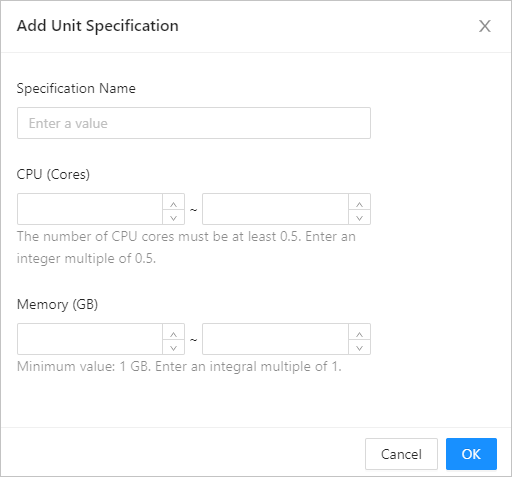
Click Add Unit Specification. On the page that appears, specify Specification Name, CPU (Core), and Memory (GB) as prompted.
More information
After you create a resource unit, you can select the resource unit when you create a resource pool and assign the resource pool to the corresponding tenant. For more information about resource unit management, see the following topics: