You can modify the CPU and memory configurations of a resource unit.
Prerequisites
If you want to upgrade the configurations of a resource unit that is being used by a tenant, make sure that the OBServer node has sufficient resources for allocation. You can query the oceanbase.__all_virtual_server_stat table for the total resources and allocated resources of the OBServer node and determine, through calculation, whether the configurations of the resource unit can be modified.
Modify configurations of a resource unit by using an SQL statement
You can modify one or more of the CPU, memory, storage space, and IOPS configurations of a resource unit. The configurations that are not modified remain unchanged.
The syntax for modifying a resource unit is as follows:
ALTER RESOURCE UNIT unitname
MAX_CPU [=] cpunum,
MAX_MEMORY [=] memsize,
MAX_IOPS [=] iopsnum,
MAX_DISK_SIZE [=] disksize,
MAX_SESSION_NUM [=] sessionnum,
[MIN_CPU [=] cpunum,]
[MIN_MEMORY [=] memsize,]
[MIN_IOPS [=] iopsnum] ;
Example:
Log on to the sys tenant as the root user and modify the configurations of unit1.
obclient> ALTER RESOURCE UNIT unit1 MAX_CPU 15, MAX_MEMORY '20G', MAX_IOPS 128,max_disk_size '100G', MAX_SESSION_NUM 64, MIN_CPU=10, MIN_MEMORY='10G', MIN_IOPS=128;
Modify custom unit specifications in OCP
You can define unit specifications for resource units and modify custom unit specifications as needed. However, built-in unit specifications in OceanBase Cloud Platform (OCP) cannot be modified. If you want to increase or decrease resources available for a tenant that is using built-in unit specifications, you can switch the unit specifications as needed.
Log on to the OCP console.
In the left-side navigation pane, click Tenants.
On the page that appears, click Unit Specification Management in the upper-right corner. The Unit Specification Management page appears.
In the resource units with Unit Types set to Custom, find the resource unit to be modified and click Edit in the Actions column.
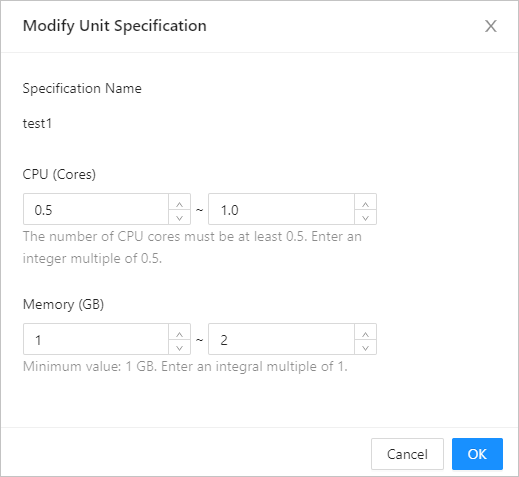
Modify the valid ranges of CPU and memory resources and click OK.