







You can view tenant sessions by using SQL statements or in the OceanBase Cloud Platform (OCP) console.
View tenant sessions by using SQL statements
You can use the SHOW PROCESSLIST statement or SHOW FULL PROCESSLIST statement to view tenant sessions. Note that the results of the SHOW PROCESSLIST statement depend on the method how the tenant is connected to the database. If the tenant is connected to the database through OceanBase Database Proxy (ODP), the session information on the corresponding ODP node is displayed. If the tenant is directly connected to the database, the session information on the corresponding OBServer node is displayed.
Tenant administrators can view all current sessions within the tenant, while common users can only view their own session information. If you have the PROCESS privilege, you can view all sessions within the tenant.
Note
- For information about how to view privileges in Oracle mode, see View user privileges. If you do not have the required privileges, contact the administrator. For more information, see Modify user privileges.
- For more information about how to view your privileges in MySQL mode, see View user privileges. If you do not have the required privileges, contact the administrator. For more information, see Modify user privileges.
Log on to a MySQL tenant or an Oracle tenant.
Execute the following statement to view tenant sessions.
If you connected to the database directly, use the
SHOW PROCESSLISTstatement to view tenant sessions:SHOW PROCESSLIST;The query result is as follows:
+------------+------+---------------------+-----------+---------+------+--------+-----------------------+
| Id         | User | Host                | db        | Command | Time | State  | Info                  |
+------------+------+---------------------+-----------+---------+------+--------+-----------------------+
| 3221576252 | root | xx.xx.xx.57:29832   | test      | Sleep   |  383 | SLEEP  | NULL                  |
| 3221576261 | root | xx.xx.xx.57:30000   | test      | Query   |    0 | ACTIVE | SHOW FULL PROCESSLIST |
| 3221576254 | root | xx.xx.xx.57:29876   | oceanbase | Sleep   |  225 | SLEEP  | NULL                  |
| 3221576255 | root | xx.xx.xx.57:29896   | oceanbase | Sleep   |  383 | SLEEP  | NULL                  |
+------------+------+---------------------+-----------+---------+------+--------+-----------------------+
4 rows in set
The fields are described as follows:
Id: The ID of the session.User: The user to which the session belongs.Host: The client IP and port that initiated the session.db: The name of the currently connected database. In Oracle mode, it is displayed as the schema name that is the same as the username.Command: The type of command the session is currently executing.Time: The time elapsed since the current command started, in seconds. If the command was retried, the timer will reset.State: The current state of the session.Info: The statement executed by the session.
If you connected to the database directly or through ODP, use the
SHOW FULL PROCESSLISTstatement to view tenant sessions:SHOW FULL PROCESSLIST;The query result is as follows:
+------------+------+--------+---------------------+-----------+---------+------+--------+-----------------------+---------------+-------+
| Id         | User | Tenant | Host                | db        | Command | Time | State  | Info                  | Ip            | Port  |
+------------+------+--------+---------------------+-----------+---------+------+--------+-----------------------+---------------+-------+
| 3221576252 | root | mysql  | xx.xx.xx.57:29832   | test      | Sleep   |  383 | SLEEP  | NULL                  | xx.xx.xx.57   | 10056 |
| 3221576261 | root | mysql  | xx.xx.xx.57:30000   | test      | Query   |    0 | ACTIVE | SHOW FULL PROCESSLIST | xx.xx.xx.57   | 10056 |
| 3221576254 | root | mysql  | xx.xx.xx.57:29876   | oceanbase | Sleep   |  225 | SLEEP  | NULL                  | xx.xx.xx.57   | 10056 |
| 3221576255 | root | mysql  | xx.xx.xx.57:29896   | oceanbase | Sleep   |  383 | SLEEP  | NULL                  | xx.xx.xx.57   | 10056 |
+------------+------+--------+---------------------+-----------+---------+------+--------+-----------------------+---------------+-------+
4 rows in set
The fields are described as follows:
Id: The ID of the session.User: The user to which the session belongs.Tenant: The name of the tenant accessed in the session.Host: The client IP and port that initiated the session. If you connected to the database through ODP, this field is the host IP and port of the ODP.db: The name of the currently connected database. In Oracle mode, it is displayed as the schema name that is the same as the username.Command: The type of command the session is currently executing.Time: The time elapsed since the current command started, in seconds. If the command was retried, the timer will reset.State: The current state of the session.Info: The statement executed by the session.IP: The IP address of the server to which the session belongs, that is, the IP address of the OBServer node.PORT: The SQL port number of the server to which the session belongs, that is, the SQL port number of the OBServer node.
View tenant sessions in the OCP console
Log on to the OCP console.
In the left-side navigation pane, click Tenants.
The Tenants page automatically appears.
In the left-side navigation pane, click Session Management.
The Tenant Session tab shows the following information about all current tenant sessions: Session ID, SQL, User, Source, Database Name, Command, Execution Time (s), Status, and OBProxy.
On the Tenant Session tab, perform the following operations as needed:
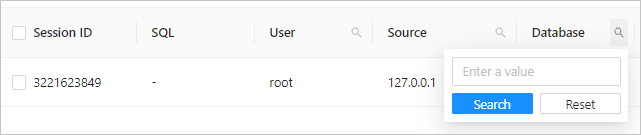
Click the search icon on the right of the user, source, or database column and enter a keyword to search for a session.
Select View Active Sessions Only in the upper-right corner of the session list to view only the sessions in the ACTIVE state.

View sessions statistics in the OCP console
Log on to the OCP console.
In the left-side navigation pane, click Tenants.
The Tenants page automatically appears.
In the left-side navigation pane, click Session Management.
Click the Session Statistics tab to view the statistics of sessions.
The Session Statistics tab shows the statistics of all current tenant sessions, including the total number of sessions, number of active sessions, and maximum duration of active sessions. You can view the number of active sessions and total number of sessions by user, IP address, and database.
Notice
You can view session statistics by IP address only in OceanBase Database V2.2.30 and later.