







This topic describes how to delete a tenant replica from a zone. After a replica is deleted, its data cannot be restored. Proceed with caution.
Prerequisites
Before you alter replicas by deleting some of them, make sure that the target replicas are normal. For example, to change five replicas to four replicas, the four OBServers on which the target replicas are deployed must be online.
Notice
Assume that the sys tenant of an OceanBase cluster has five zones, with one replica distributed on each of them. If two of the zones are malfunctioning, do not delete any of the replicas. Even if you delete only one replica, the remaining replicas cannot form a majority. However, you can delete the two replicas in the malfunctioning zones at a time.
Delete a replica from a zone by executing SQL statements
You can use the following SQL syntaxes to delete replicas:
-- Modify the locality to delete a replica from a zone.
ALTER TENANT tenant_name [SET] LOCALITY [=] 'locality_description';
-- Cancel the reference relationship between a tenant and a resource pool.
ALTER TENANT tenant_name [SET] RESOURCE_POOL_LIST [=](pool_name [, pool_name...]) ;
-- Drop a resource pool.
DROP RESOURCE POOL pool_name;
-- Drop a resource unit.
DROP RESOURCE UNIT unit_name;
Note
Based on the locality change rule, you can delete the locality of only one zone at a time.
For RESOURCE_POOL_LIST, you can drop only one resource pool at a time.
Examples
Assume that the tenant1 tenant has one replica in each zone from zone1 to zone5, and you need to delete replicas in zone4 and zone5. You can execute the following SQL statement to delete the replicas by modifying the locality of tenant1:
-- Modify the locality to delete replicas in zone4 and zone5.
obclient> ALTER TENANT tenant1 LOCALITY = 'F@zone1,F@zone2,F@zone3,F@zone4';

obclient> ALTER TENANT tenant1 LOCALITY = 'F@zone1,F@zone2,F@zone3';

-- Cancel the reference relationship between a tenant and a resource pool.
obclient> ALTER TENANT tenant1 RESOURCE_POOL_LIST = ('pool1','pool2','pool3','pool4');

obclient> ALTER TENANT tenant1 RESOURCE_POOL_LIST = ('pool1','pool2','pool3');

-- Drop a resource pool.
obclient> DROP RESOURCE POOL pool4;

obclient> DROP RESOURCE POOL pool5;

-- Drop a resource unit.
obclient> DROP RESOURCE UNIT unit4;

obclient> DROP RESOURCE UNIT unit5;
Delete a tenant replica from a zone in OCP
Delete a single replica
Log on to the OCP console.
In the left-side navigation pane, click Tenants. The Tenant Overview page appears.
In the Tenants list, find the target tenant and click its name. The Tenant Details page appears.
In the Replica Details section, click Delete in the Actions column.
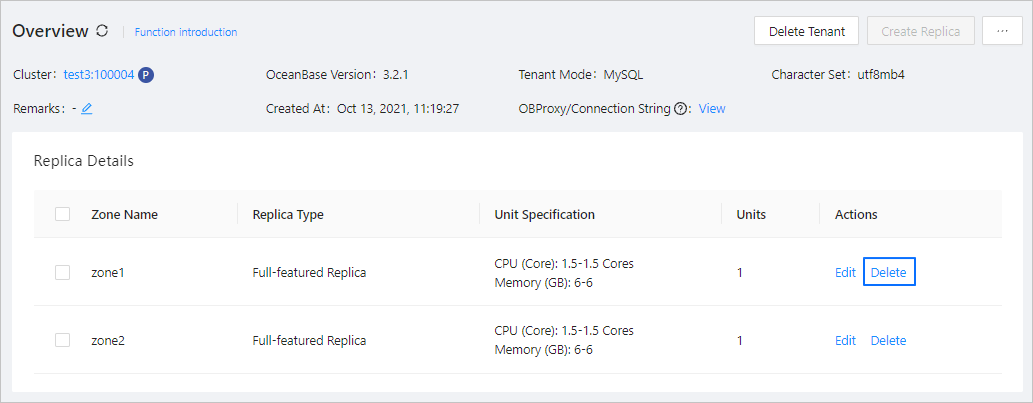
In the dialog box that appears, click Delete.
Batch delete replicas
OceanBase Cloud Platform (OCP) also supports batch deletion of replicas.
Log on to the OCP console.
In the left-side navigation pane, click Tenants.
Click the name of the target tenant in the Tenants list.
Select zones that host the replicas to be deleted and click Batch Delete in the Replica Details section.
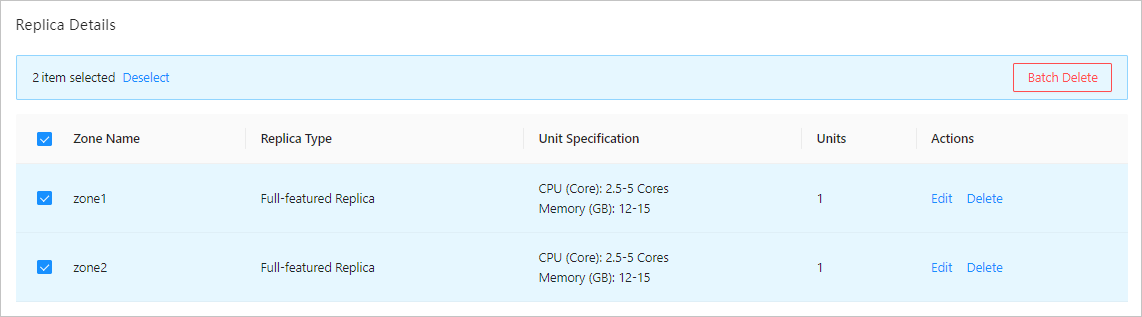
In the confirmation dialog box that appears, click Delete.