







You can view all replicas of a tenant and the replica details on the Overview page of the tenant. The Replica Details page displays the distribution information of the replicas in each zone, including the zone name, replica type, unit specifications, and the number of units. This topic describes how to edit a tenant replica in a zone.
Edit a tenant replica in a zone by using SQL statements
SQL syntax for modifying the replica type
ALTER TENANT tenant_name LOCALITY [=] 'locality_description';
SQL syntax for modifying the number of units in a resource pool
ALTER RESOURCE POOL pool_name UNIT_NUM [=] unit_num [DELETE UNIT = (unit_id_list)];
SQL syntax for modifying the unit configs
ALTER RESOURCE UNIT unit_name
MAX_CPU [=] cpu_num,
MAX_MEMORY [=] mem_size,
MAX_IOPS [=] iops_num,
MAX_DISK_SIZE [=] disk_size,
MAX_SESSION_NUM [=] session_num,
[MIN_CPU [=] cpu_num,]
[MIN_MEMORY [=] mem_size,]
[MIN_IOPS [=] iops_num];
Examples
The following SQL statement changes full-featured replicas in Zone 3 to read-only replicas:
obclient> ALTER TENANT tenant1 locality = 'F@zone1,F@zone2,R@zone3';
The following SQL statement changes the number of units in resource pool3 to 2:
obclient> ALTER RESOURCE POOL pool3 UNIT_NUM = 2;
The following SQL statement changes the unit specifications of unit1 to 2 CPUs and 5 GB memory:
obclient> ALTER RESOURCE UNIT unit1 MAX_CPU 2, MAX_MEMORY '5G';
Edit a tenant replica in a zone by using OCP
Procedure
Log on to the OCP console.
In the left-side navigation pane, click Tenants. The Tenant Overview page appears.
In the Tenants list, find the target tenant and click its name. The Tenant Details page appears.
In the Replica Details section, click Edit in the Actions column. You can modify the replica type, unit specification, and number of units.
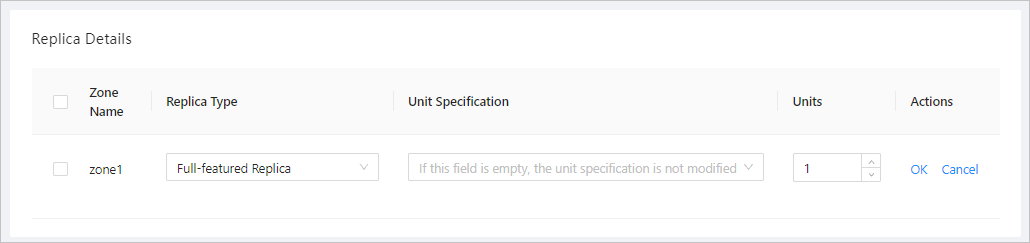
Click OK.