







This topic describes how to detect the absence of a leader and how to analyze the causes.
Applicable versions
The solution provided in this topic is applicable to all versions of OceanBase Database.
Symptom
In normal cases, each partition in an OceanBase cluster has a leader. If you shut down the server where the majority of replicas of your OceanBase cluster reside during O&M, no leader will be available. This is acceptable. You can continue with O&M without intervention. However, if no leader is available during the routine operation of the OceanBase cluster, you must identify the cause. When no leader is available, the observer.log file carries a -4038 or -7006 error. In this case, further diagnostics is needed.
Troubleshooting logic
First, verify the absence of a leader. Then, check whether the absence results from the following causes:
The
observer.logfile carries an error message.A clock offset has occurred.
A tenant, a table, or a partition has been deleted.
The majority of replicas fail.
A network error has occurred.
The clog module has failed to restore logs.
The load is excessively high.
The clog disk is full.
Troubleshooting procedure
Verify the absence of a leader
Run the corresponding commands to query background logs or query related tables in the database to check whether a partition has no leader.
Query background logs
Run the following command to query the
election.logfile of the election module:[admin@hostname log]$ grep 'lease is expire' election.loglease is expireindicates that the lease of the original leader expires. If the returned result is not empty, no leader is available in the current partition. In this case, the corresponding log contains a partition key.Run the following command to search the
election.logfile by thepartition_keykeyword:[admin@hostname log]$ grep '{tid:xxxxxxxxxxxxxxxx, partition_id:x, part_cnt:x}' election.logIf a
leader_revokeerror is reported, the original leader of a partition has retired, and no leader is available in the partition.Run the following command to search the
observer.logfile by thepartition_keykeyword:[admin@hostname log]$ grep '{tid:xxxxxxxxxxxxxxx, partition_id:x, part_cnt:x}' observer.logIf
ERRORlogs contain thereconfirmorleader_active_need_switchkeyword, no leader is available in a partition. If a-4038or-7006error is reported, search for ERROR logs of the corresponding time range in theobserver.logfile.
Query internal tables
Execute the following statements to query the __all_meta_table (__all_virtual_meta_table for OceanBase Database V2.X and later versions), __all_virtual_clog_stat, and __all_virtual_election_info tables to check whether a partition has no leader. Sample commands:
obclient> SELECT * FROM __all_meta_table WHERE table_id=xxx;
obclient> SELECT * FROM __all_virtual_meta_table WHERE table_id=xxx;
obclient> SELECT * FROM __all_virtual_clog_stat WHERE table_id=xxx AND partition_idx=xxxx;
obclient> SELECT * FROM __all_virtual_election_info WHERE table_id=xxx AND partition_idx=xxxx;
In the __all_meta_table and __all_virtual_meta_table tables, check the table_id and partition_idx parameters. In the __all_virtual_clog_stat and __all_virtual_election_info tables, if the value of the role parameter is 2 or the leader column is empty, the corresponding partition has no leader.
Common SQL statements
Query the partitions without a leader in the current
electionmodule.SELECT table_id, partition_idx FROM __all_virtual_election_info GROUP BY table_id, partition_idx) except (SELECT table_id, partition_idx FROM __all_virtual_election_info WHERE role = 1Query the partitions without a leader in the current
clogdirectory.SELECT table_id, partition_idx FROM __all_virtual_clog_stat GROUP BY table_id, partition_idx) except (SELECT table_id, partition_idx FROM __all_virtual_clog_stat WHERE role = 'LEADER') ;Query the partitions without a leader in RootService, including schemas without a leader and meta tables without a leader.
SELECT tenant_id, table_id, partition_id FROM __all_virtual_partition_table GROUP BY 1,2,3 having min(role) = 2;
Identify the issue causes
After you verify the absence of a leader, perform the following steps to identify the issue causes:
Search for
ERRORlogs in theobserver.logfile to identify errors such as memory allocation failures and full disk storage.[admin@hostname log]$ grep ERROR observer.logCheck the clock offset.
Run the
chronyc sources -vorntpq -pcommand to verify the clock.Check whether any tenant, table, or partition has been deleted.
When a tenant is deleted, multiple replicas may be deleted at different points in time. If the leader is the last to delete, it will fail to be re-elected because of the lack of votes. As a result, no leader is available when the lease of the leader expires. Sample log:
ipayus001-[ election.log [2019-03-05 00:13:28.061153] ERROR [ELECT] run_gt1_task (ob_election.cpp:1477) [1870][Y0-0000000000000000] [log=50]leader_revoke, please attention!(election={partition:{tid:1111606255681671, partition_id:0, part_cnt:0}, is_running:true, is_offline:false, is_changing_leader:false, self:"10.100.xx.xx:2882", proposal_leader:"0.0.0.0", cur_leader:"0.0.0.0", curr_candidates:3{server:"10.100.xx.xx:2882", timestamp:1550489755142437, flag:0}{server:"10.100.xx.xx:2882", timestamp:1550489755142437, flag:0}{server:"10.100.xx.xx:2882", timestamp:1550489755142437, flag:0}, curr_membership_version:1551693618713066, leader_lease:[0, 0], election_time_offset:60000, active_timestamp:1551275100257609, T1_timestamp:1551773608000000, leader_epoch:1551693701600000, state:0, role:0, stage:1, type:-1, replica_num:3, unconfirmed_leader:"10.100.xx.xx:2882", takeover_t1_timestamp:1551773596800000, is_need_query:false, valid_candidates:0, cluster_version:4295229513, change_leader_timestamp:0, ignore_log:false, leader_revoke_timestamp:1551773608001085, vote_period:4, lease_time:9800000})In this case, query the status of the table corresponding to the partition by using the
table_idparameter. If the table has been deleted, ignore the error.obclient> SELECT * FROM __all_meta_table WHERE table_id=xxx; obclient> SELECT * FROM __all_virtual_meta_table WHERE table_id=xxx;Note
Deletion of tenants, tables, or partitions causes the absence of a leader only in OceanBase Database V2.1.x and earlier versions.
Check whether the majority of replicas have failed.
If a replica fails and other normal replicas cannot constitute the majority of replicas, no leader will be available.
In this case, search the
election.logfiles on all replicas by using thepartition_keyandleader lease is expiredkeywords. Sample log:election.log [2018-09-27 23:09:04.950617] ERROR [ELECT] run_gt1_task (ob_election.cpp:1425) [38589][Y0-0000000000000000] [log=25]leader lease is expired(election={partition:{tid:1100611139458321, partition_id:710, part_cnt:0}, is_running:true, is_offline:false, is_changing_leader:false, self:"10.100.xx.xx:2882", proposal_leader:"0.0.0.0", cur_leader:"0.0.0.0", curr_candidates:3{server:"10.100.xx.xx:2882", timestamp:1538050146803352, flag:0}{server:"10.100.xx.xx:2882", timestamp:1538050146803352, flag:0}{server:"10.100.xx.xx:2882", timestamp:1538050146803352, flag:0}, curr_membership_version:0, leader_lease:[0, 0], election_time_offset:350000, active_timestamp:1538050146456812, T1_timestamp:1538069944600000, leader_epoch:1538050145800000, state:0, role:0, stage:1, type:-1, replica_num:3, unconfirmed_leader:"10.100.xx.xx:2882", takeover_t1_timestamp:1538069933400000, is_need_query:false, valid_candidates:0, cluster_version:4295229511, change_leader_timestamp:0, ignore_log:false, leader_revoke_timestamp:1538069944600553, vote_period:4, lease_time:9800000}, old_leader="10.100.xx.xx:2882")Check whether the OBServer nodes specified by the
curr_candidatesparameter are down. If replicas on OBServer nodes that operate properly cannot constitute the majority of replicas, no leader will be available. In this case, check whether each failed observer process is in the progress of restart and disk scan.You can search the
observer.logfile for logs similar to the following example. If the logs are found, the disk scan has not been completed, and the replica is being replayed, that is, the election module has not started working.estimated_rest_timeindicates the expected amount of time required for the disk scan. Wait until the replay is completed and check whether a leader is available.[2018-08-21 16:46:00.595078] INFO [CLOG] ob_log_scanner_v1.cpp:733 [119159][Y0-0000000000000000] [lt=16] [dc=0] scan process bar(clog)(param={file_id:57968, offset:48, partition_key:{tid:18446744073709551615, partition_id:-1, part_idx:268435455, subpart_idx:268435455}, log_id:18446744073709551615, read_len:0, timeout:10000000}, header={magic:17746, version:1, type:201, partition_key:{tid:1110506744103794, partition_id:0, part_cnt:0}, log_id:686524944, data_len:459, generation_timestamp:1534820857671385, epoch_id:1534819616115213, proposal_id:{time_to_usec:1534819616115213, server:"xx.xx.xx.xx:44433"}, submit_timestamp:1534820857670904, is_batch_committed:false, data_checksum:1992526323, active_memstore_version:"0-0-0", header_checksum:2540895702}, total_clog_file_cnt=4615, rest_clog_file_cnt=1648, estimated_rest_time(second)=455)Check for network errors.
If the majority of replicas are working properly and the
election.logfile contains theleader lease is expiredmessage, the leader has failed to be re-elected. This may be caused by network errors such as one-way or two-way network isolation and remote procedure call (RPC) request backlogs.Check for network isolation.
Run the following command to query the
iptableson the OBServer node where each replica resides to check whether the network is blocked:[admin@hostname ~]$ sudo iptables -LIf the network between the followers and the leader is blocked, and the leader fails to communicate with the majority of replicas (including the leader), no leader will be available. In this case, adjust the network conditions.
Check for request backlogs.
The election module must send and receive messages through RPCs to elect or re-elect a leader. If election messages are not delivered or processed in a timely manner because of RPC errors, the election will fail, and no leader will be available. In this case, perform the following steps to check for request backlogs:
If the logs of a replica contain the
leader lease is expiredmessage, check whether the RPCs for the replica are working properly.Run the following command to search the
observer.logfile and check therequest doingparameter. If the value of this parameter exceeds 1000, a severe backlog of RPC messages has occurred. In this case, continue to check for network errors.[admin@hostname log]$ grep 'RPC EASY STAT' observer.logRun the following command to search the
observer.logfile and check thetotal_sizeparameter of the request queue for tenant 500. If the value of thetotal_sizeparameter is excessively large, for example, the value exceeds 1000, the sys500 tenant has encountered a request backlog, and requests sent from the clog module are not processed.[admin@hostname log]$ grep 'dump tenant info' observer.logIf no errors are found after the preceding checks are performed on the current replica, perform the same checks on the OBServer node where the leader resides. No leader will be available if the current leader encounters RPC errors.
If RPCs are working properly for both the current replica and the leader, and the
election.logfile on the OBServer node where the leader resides contains theleader lease is expiredmessage, other replicas in the cluster may have failed, and the leader fails to be re-elected because of the lack of votes from the majority of replicas.
Check for RPC latencies.
Run the
tsarorvsarcommand to check for network errors on the OBServer node where the leader resides near the retirement time. Then, check the retransmission rate and bandwidth. The following figure shows the typical output of thetsarcommand with high network retransmission rates.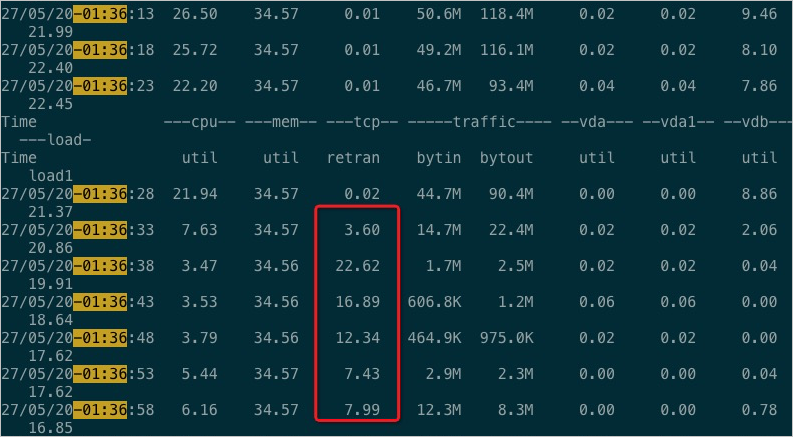
If no error is found in the
tsarcommand output, run the following command to search theelection.logfile. If the file contains any logs, election messages are delivered or processed with a latency.[admin@hostname log]$ grep 'message not in time' election.logContinue to search the
observer.logfile to check for RPC errors.Run the following command to search the observer.log file. If the file contains any logs, contact OceanBase Technical Support.
[admin@hostname log]$ grep 'packet fly cost too much' observer.log
Check for clog reconfirmation failures.
If the election module is working properly and has elected a leader based on the election protocol, but the clog module fails in the reconfirmation phase, the elected leader will retire. In this case, check whether the
election.logfile contains thetake the initiative leader revokemessage. Sample log:[2018-09-20 04:09:46.236304] INFO [ELECT] leader_revoke (ob_election_mgr.cpp:296) [39144][Y0-0000000000000000] [log=25]take the initiative leader revoke(partition={tid:1101710651081570, partition_id:0, part_cnt:0})Check whether the load is excessively high.
Run the
tsar -i1command to check theLoadvalue at the corresponding time. If the value is excessively large, the election module may fail to elect a leader.[root@hostname home]# tsar -i1Alternatively, run the following command to search the
election.logfile and check whether the Load value is excessively large:[admin@hostname log]$ grep 'run time out of range' election.logCheck whether the clog disk is full.
In an OceanBase cluster with a large number of partitions and write requests, clogs of some replicas may not be recycled in a timely manner because of slow minor compactions or heterogeneous resource unit specifications of tenants. When the clog disk usage reaches 95%, the observer process automatically stops writing clogs. As a result, a large number of replicas on the OBServer node are out of synchronization, causing the absence of a leader. You can run the
df -hcommand to query the current clog disk usage. If the value in theUse%column reaches the threshold specified by theclog_disk_usage_limit_percentageparameter, take further actions for troubleshooting.[root@hostname /]# df -h ... /dev/mapper/vglog-ob_log 196G 177G 9G 95% /observer/clog ...For information about the solution, see Full usage of OBServer clog disk.