This topic describes the transfer modes of the log transfer service and region-based cascading log transfer.
The log transfer service automatically synchronizes REDO logs from the primary cluster to standby clusters. It provides the following capabilities:
Enables the primary cluster to send REDO logs to a standby cluster.
Allows a standby cluster to pull REDO logs from the primary cluster when logs in the standby cluster are out-of-sync with those in the primary cluster.
Manages the synchronization parameters of all standby clusters, and supports cascading log transfer.
Transfer modes
OceanBase Database supports two log transfer modes, which must be configured for each standby cluster separately.
Synchronous mode (SYNC)
In this mode, the REDO logs of the primary cluster are synchronously transferred to the target standby cluster. A REDO log must be persistently stored in both the primary cluster and the standby cluster in
SYNCmode. The transaction submission latency increases the network latency of the primary and standby clusters and the log persistence time of the standby cluster.In maximum protection or maximum availability mode, you can set only one standby cluster to be in
SYNCmode for the primary cluster. In maximum performance mode, this transfer mode does not take effect, and you can set any number of standby clusters to be inSYNCmode.You can set the primary cluster to be in
SYNCmode, but this setting takes effect only when the cluster becomes a standby cluster after switchover. In maximum protection and maximum availability modes, the primary cluster must be configured inSYNCmode before switchover so that at least one standby cluster is inSYNCmode after the switchover.Asynchronous mode (ASYNC)
In this mode, the REDO logs of the primary cluster are asynchronously transferred to the target standby cluster. The transaction submission latency is not subject to the target standby cluster.
The log transfer mode defines whether to synchronously transfer logs from the primary cluster to a standby cluster. OceanBase supports one primary cluster and multiple standby clusters, and different standby clusters may have different log transfer modes. The log transfer mode varies with the protection mode. The following table describes log synchronization in different log transfer modes for standby clusters in different protection modes.
Protection mode |
Standby cluster in SYNC mode |
Standby cluster in ASYNC mode |
|---|---|---|
| Maximum protection | Logs are synchronously transferred from the primary cluster to the standby cluster. | Logs are asynchronously transferred from the primary cluster to the standby cluster. |
| Maximum performance | Logs are asynchronously transferred from the primary cluster to the standby cluster. | Logs are asynchronously transferred from the primary cluster to the standby cluster. |
| Maximum availability | Logs are synchronously or asynchronously transferred from the primary cluster to the standby cluster as required. | Logs are asynchronously transferred from the primary cluster to the standby cluster. |
Cascading log transfer
OceanBase Database provides multiple log streams. By default, each partition has one log stream. Logs are synchronized from the primary cluster to standby clusters by using log streams. Log streams are independent of each other.
After the leader of the primary cluster generates logs, the leader synchronizes the logs to the majority replicas of the primary cluster, and waits until persistence of the logs in the majority replicas is completed. If no standby cluster is in SYNC mode, the leader of the primary cluster immediately returns a log persistence success response. If a standby cluster in SYNC mode exists, the leader of the primary cluster sends the logs to the leader of the standby cluster. The leader of the standby cluster synchronizes the logs to the majority replicas of the standby cluster, waits until persistence of the majority replicas is completed, and returns a success response to the leader of the primary cluster. Then, the leader of the primary cluster returns a log persistence success response.
Therefore, in SYNC mode, a standby cluster directly synchronizes logs from the leader of the primary cluster, instead of from other replicas. However, in ASYNC mode, OceanBase Database supports region-based cascading log transfer, allowing a standby cluster to synchronize logs from a nearby upstream replica. Specifically, a standby cluster can synchronize logs from a replica of the primary cluster or a replica of another standby cluster replica in the same region as the primary cluster.
Region-based cascading log transfer ensures that only one copy of logs is transmitted in cross-region deployment scenarios, reducing cross-region network bandwidth consumption.
The following figure shows the cascading of standby clusters to a replica of the primary cluster in the same region. In this scenario:
The primary cluster is deployed across regions. The majority replicas and the leader are deployed in Region SH, and the minority replicas are deployed in Region HZ.
Standby cluster S1 is deployed in Region SH and is set to be in SYNC mode. Logs are synchronously transferred from the leader of the primary cluster to the leader of the standby cluster.
Standby cluster S2 is deployed in Region HZ and is set to be in ASYNC mode. One replica of the primary cluster is deployed in Region
HZ. Therefore, the standby cluster is automatically cascaded to the replica. The replica synchronizes logs from the leader of the primary cluster, and the leader of the standby cluster asynchronously transfers logs from the replica.

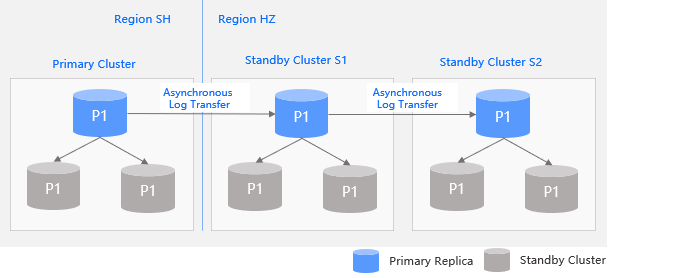
The following figure shows the cascading of standby clusters. In this scenario:
Standby clusters S1 and S2 are both set to be in ASYNC mode. The primary cluster has no replica in Region HZ. Therefore, standby cluster S1 asynchronously transfers logs from the leader of the primary cluster across regions.
Standby clusters S2 is deployed in the same region as standby cluster S1, and therefore automatically treats standby cluster S1 as an upstream replica and asynchronously transfers logs from the leader of standby cluster S1.