







Overview
As the core component for the high availability feature of OceanBase Database, the backup and restoration module ensures data security by preventing misoperations and damage to the storage media. If data is lost due to misoperations or damage to the storage media, you can restore the data.
OceanBase Database supports the backup, restoration, and management of data in three types of storage media: Object Storage Service (OSS), Network File System (NFS), and Cloud Object Storage (COS).
OceanBase Database supports cluster-level physical backup starting from V2.2.52. Physical backup data includes baseline data and log archive data. Therefore, physical backup consists of log archiving and data backup.
Log archiving refers to the automatic backup of log data. OBServers regularly archive log data to the specified backup path without manual triggering.
Data backup refers to the backup of baseline data, and includes full backup and incremental backup:
Full backup refers to the backup of all macroblocks that need to be stored as baseline data.
Incremental backup refers to the backup of macroblocks that are added or modified since the last backup.
OceanBase Database provides tenant-level restoration, allowing you to create a tenant based on the existing data backup. You can run the alter system restore tenant command to restore the data. The restoration process consists of restoration and recovery of the system table and user table of the tenant. Restoration returns the baseline data required for recovery to the OBServer of the target tenant, and recovery returns the logs corresponding to the baseline data to the OBServer.
OceanBase Database can automatically delete expired backups and also allow you to manually delete specified backups.
Physical backup architecture
The following figure shows the physical backup architecture of OceanBase Database.
 After you log on to the backup cluster by using the system tenant account, you must first initiate log archiving by running an SQL command. You can perform baseline backup only after log archiving is completed.
Log archiving regularly backs up logs to the backup destination. You need to run the alter system archivelog command only once, and log backup will continue in the background. During log archiving, the leader of each partition group (PG) regularly archives logs of the PG to the specified path of the backup medium, and RootService regularly checks the log archiving progress and updates it to the internal table.
Data backup is user-triggered. Generally, full backup is triggered on each Saturday, and incremental backup is triggered on Tuesday and Thursday each week. When you initiate a data backup request, the request is first forwarded to the node running RootService. RootService generates a data backup task based on the current tenant and the PGs of the tenant. The backup task is then distributed to OBServers for parallel execution. The OBServers back up the metadata and macroblocks of the PGs to the specified backup directories, and the macroblocks are managed by PG.
OceanBase Database allows you to use OSS, NFS, and COS as the backup destination. The following shows the directory structure at the backup destination and the file types under each directory:
backup/ # The root directory of backups.
└── ob1 # cluster_name
  └── 1 # cluster_id
      └── incarnation_1 # The incarnation ID.
          ├── 1001 # The tenant ID.
          │   ├── clog # The root directory of CLOG files.
          │   │   ├── 1 # The CLOG backup round ID.
          │   │   │   ├── data # The data directory of logs.
          │   │   │   └── index # The index directory of logs.
          │   │   └── tenant_clog_backup_info # The log backup metadata, which is recorded by round ID.
          │   └── data # The root directory of data.
          │       ├── backup_set_1 # The full backup directory.
          │       │   ├── backup_1 # The first differential backup directory, which contains full metadata.
          │       │   ├── backup_2 # The second directory for differential backup, which also contains full metadata.
          │       │   ├── backup_set_info # The information about multiple differential backups in the backup_set directory.
          │       │   └── data #The macroblock data directory, which contains all full and differential macroblocks.
          │       └── tenant_data_backup_info # The information about all data backups of the tenant.
          ├── clog_info # The backup information of server startup logs.
          │   └── 1_10.10.10.1_12533 # A piece of startup log backup information of a server.
          ├── cluster_clog_backup_info # The cluster-level log backup information.
          ├── cluster_data_backup_info # The cluster-level data backup information.
          ├── tenant_info # The tenant information.
          └── tenant_name_info #The mapping between tenant names and IDs.
Physical restoration architecture
The following figure shows the physical restoration architecture of OceanBase Database.
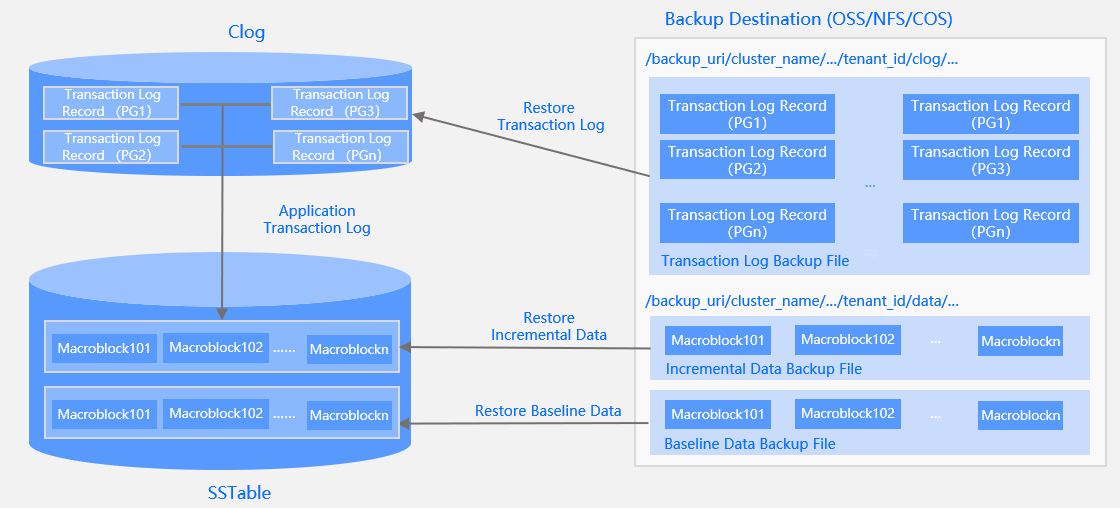 To start physical restoration, perform the following two steps:
In the target cluster, run the
CREATE RESOURCE POOLcommand to create a resource pool for tenant restoration.Run the
ALTER SYSTEM RESTORE TENANTcommand to schedule a tenant restoration task.The system executes the
RESTORE TENANTcommand in the following process:Creates a tenant for restoration.
Restores the system table data of the tenant.
Restores the system table logs of the tenant.
Modifies and restores the metadata of the tenant.
Restores the user table data of the tenant.
Restores the user table logs of the tenant.
Completes the restoration.
The restoration of a single PG is to copy the metadata and macroblock data of the PG to the specified OBServer to create a PG with only baseline data, and then copy the logs of the PG to the MemTable of the PG on the specified OBServer. In this process, minor compactions may be triggered if the number of logs is large.