







The syntax of SELECT is complex. This topic describes the syntax of common SELECT statements and aggregate SELECT statements.
SIMPLE SELECT
Description
You can use this statement to query data from a table.
Syntax
simple_select:
SELECT [/*+ hint statement */] [ALL | DISTINCT | UNIQUE | SQL_CALC_FOUND_ROWS]
 select_expr_list FROM from_list [WHERE condition]
  [GROUP BY group_expression_list [WITH ROLLUP] [HAVING condition]]
  [ORDER BY order_expression_list]
  [limit_clause]
  [FOR UPDATE]

select_expr:
 table_name.*
  | table_alias_name.*
  | expr [[AS] column_alias_name]

from_list:
    table_reference [, table_reference ...]

table_reference:
      simple_table
    | joined_table

simple_table:
    table_factor [partition_option] [[AS] table_alias_name]
    | (select_stmt) [AS] table_alias_name
    | (table_reference_list)

joined_table:
      table_reference [INNER] JOIN simple_table [join_condition]
    | table_reference outer_join_type JOIN simple_table join_condition

partition_option:
    PARTITION (partition_name_list)

partition_name_list:
    partition_name [, partition_name ...]

outer_join_type:
    {LEFT | RIGHT | FULL} [OUTER]

join_condition:
    ON expression

condition:
    expression

group_expression_list:
    group_expression [, group_expression ...]

group_expression:
    expression [ASC | DESC]

order_expression_list:
    order_expression [, order_expression ...]

order_expression:
    expression [ASC | DESC]

limit_clause:
  LIMIT {[offset,] row_count |row_count OFFSET offset}
Parameters
Parameter |
Description |
|---|---|
| ALL | DISTINCT | UNIQUE | SQL_CALC_FOUND_ROWS | A database table may contain duplicate values. * If DISTINCT is specified, only distinct rows are listed in the query result. * If ALL is specified, all rows are listed in the result. * If SQL_CALC_FOUND_ROWS is specified, no data is returned and only the number of data rows is returned. * The default value is ALL. |
| select_expr | Specifies the expressions or column names that you want to query. The names are separated with a comma (,). You can also use an asterisk (*) to represent all columns. |
| AS othername | Renames the output fields. |
| FROM table_references | Specifies the table or tables from which data is to be retrieved (multi-table query is supported). |
| WHERE where_conditions | Optional. Specifies a filter condition. Only the data that meets the condition is included in the query result. where_conditions is an expression. |
| GROUP BY group_by_list | Summarizes data by class. |
| HAVING search_conditions | The HAVING clause is similar to the WHERE clause, but the HAVING clause can use an accumulation function such as SUM or AVG. |
| ORDER BY order_list order_list: colname [ASC | DESC] [,colname [ASC | DESC]...] | Displays the query results in ascending (ASC) or descending (DESC) order. If you do not specify ASC or DESC, the default value ASC is used. |
| [LIMIT {[offset,] row_count |row_count OFFSET offset}] | Forces the SELECT statement to return the specified number of records. LIMIT supports one or two numeric parameters. The parameters must be an integer constant. * Given two parameters, the first parameter specifies the offset of the first record row to be returned, and the second parameter specifies the maximum number of record rows to be returned. The offset of the initial record row is 0 (rather than 1). * Given one parameter, the parameter specifies the maximum number of record rows to be returned, and the offset is 0. |
| FOR UPDATE | Imposes an exclusive lock on all the rows in the query results to prevent other concurrent transactions from changing or reading the rows in some transaction isolation levels. |
| PARTITION(partition_list) | Specifies the partition information of the table to be queried. For example, partition(p0,p1...). |
Examples
Take Table a as an example.
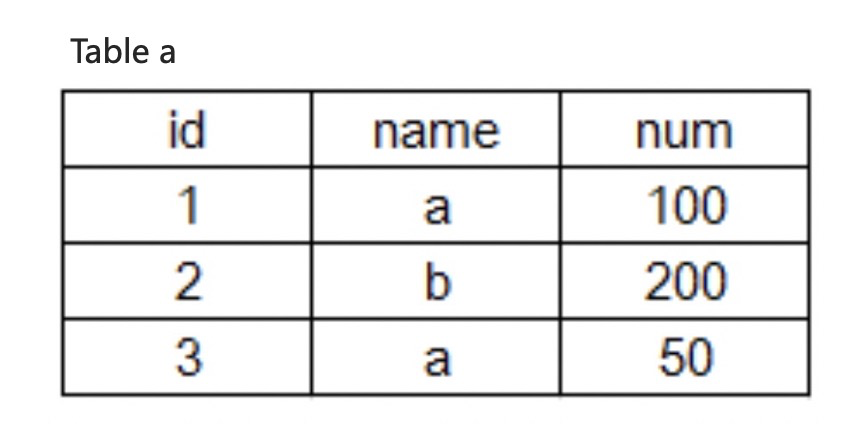
- Query the data in the name column from Table a.
obclient> SELECT name FROM a;
+------+
| name |
+------+
| a    |
| b    |
| a    |
+------+
3 rows in set (0.01 sec)
- Deduplicate the query results of the name field.
obclient> SELECT DISTINCT name FROM a;
+------+
| name |
+------+
| a    |
| b    |
+------+
2 rows in set (0.01 sec)
- Query the ID, name, and num columns in Table a, divide values in the num column by 2, and name the output column as avg.
obclient> SELECT id, name, num/2 AS avg FROM a;
+------+------+----------+
| id   | name | avg      |
+------+------+----------+
|    1 | a    |  50.0000 |
|    2 | b    | 100.0000 |
|    3 | a    |  25.0000 |
+------+------+----------+
3 rows in set (0.01 sec)
- Return the values of the corresponding ID, name, and num columns from Table a based on the filtering condition name = 'a'.
obclient> SELECT id, name, num FROM a WHERE name = 'a';
+------+------+------+
| id   | name | num  |
+------+------+------+
|    1 | a    |  100 |
|    3 | a    |   50 |
+------+------+------+
2 rows in set (0.01 sec)
- Retrieve the ID, name, and num values from Table a, calculate the sum of the num values by name, and return the calculation results.
obclient> SELECT id, name, SUM(num) FROM a GROUP BY name;
+------+------+----------+
| id   | name | SUM(num) |
+------+------+----------+
|    1 | a    |      150 |
|    2 | b    |      200 |
+------+------+----------+
2 rows in set (0.00 sec)
- Retrieve the ID, name, and num values from Table a, calculate the sum of the num values by name, and return the rows with a sum of less than 160.
obclient> SELECT id, name, SUM(num) as sum FROM a GROUP BY name HAVING SUM(num) < 160;
+------+------+------+
| id   | name | sum  |
+------+------+------+
|    1 | a    |  150 |
+------+------+------+
1 row in set (0.01 sec)
- Retrieve the ID, name, and num values from Table a, and sort the results by the num value in ascending order.
obclient> SELECT * FROM a ORDER BY num ASC;
+------+------+------+
| id   | name | num  |
+------+------+------+
|    3 | a    |   50 |
|    1 | a    |  100 |
|    2 | b    |  200 |
+------+------+------+
3 rows in set (0.00 sec)
- Retrieve the ID, name, and num values from Table a, and sort the results by the num value in descending order.
obclient> SELECT * FROM a ORDER BY num DESC;
+------+------+------+
| id   | name | num  |
+------+------+------+
|    2 | b    |  200 |
|    1 | a    |  100 |
|    3 | a    |   50 |
+------+------+------+
3 rows in set (0.00 sec)
- Retrieve the ID, name, and num values from Table a, and use LIMIT to forcibly return two result rows starting from the second row.
obclient> SELECT * FROM a LIMIT 1,2;
+------+------+------+
| id | name | num |
+------+------+------+
| 2 | b | 200 |
| 3 | a | 50 |
+------+------+------+
2 rows in set (0.00 sec)
Set-based SELECT
Description
You can use this statement to perform UNION, MINUS, and INTERSECT operations on the query results of multiple SELECT statements.
Syntax
select_clause_set:
    simple_select [ UNION | UNION ALL | EXCEPT | INTERSECT] select_clause_set_left
  [ORDER BY sort_list_columns] [limit_clause]
Select_claime_set_right:
    simple_select |
  select_caluse_set
Parameters
Parameter |
Description |
|---|---|
| UNION ALL | Combines the results of two queries. |
| UNION | Combines the results of two queries and removes the duplicates. |
| EXCEPT | Returns unique rows from the result set of the query on the left side of the operator that do not exist in the result set of the query on the right side. |
| INTERSECT | Returns unique rows that exist in the result sets of both the query on the left side and the one on the right side of the operator. |
Examples
Take the following two tables as an example:
create table t1 (c1 int, c2 int);
create table t2 (c1 int, c2 int);
insert into t1 values (1, -1), (2, -2);
insert into t2 values (1, 1), (2, -2), (3, 3);
- Retrieve all records from T1 and T2.
obclient> SELECT C1, C2 FROM T1 UNION ALL SELECT C1, C2 FROM T2;
+------+------+
| C1   | C2   |
+------+------+
|    1 |   -1 |
|    2 |   -2 |
|    1 |    1 |
|    2 |   -2 |
|    3 |    3 |
+------+------+
5 rows in set (0.01 sec)
- Retrieve all unique records from t1 and t2
obclient> SELECT C1, C2 FROM T1 UNION SELECT C1, C2 FROM T2;
+------+------+
| C1   | C2   |
+------+------+
|    1 |   -1 |
|    2 |   -2 |
|    1 |    1 |
|    3 |    3 |
+------+------+
4 rows in set (0.01 sec)
- Retrieve the records that exist in both t1 and t2
obclient> SELECT C1, C2 FROM T1 INTERSECT SELECT C1, C2 FROM T2;
+------+------+
| C1   | C2   |
+------+------+
|    2 |   -2 |
+------+------+
1 row in set (0.00 sec)
- Retrieve the records that exist in t1 but do not exist in t2
obclient> SELECT C1, C2 FROM T1 EXCEPT SELECT C1, C2 FROM T2;
+------+------+
| C1   | C2   |
+------+------+
|    1 |   -1 |
+------+------+
1 row in set (0.00 sec)
- Retrieve the first two rows with the largest values in C2 in the union set of T1 and T2
obclient> SELECT C1, C2 FROM T1 UNION SELECT C1, C2 FROM T2 ORDER BY C2 DESC LIMIT 2;
+------+------+
| C1   | C2   |
+------+------+
|    3 |    3 |
|    1 |    1 |
+------+------+
2 rows in set (0.00 sec)