







You can use the ALTER SYSTEM statement to send commands to OceanBase Database to perform a specified operation.
BOOTSTRAP
Description
You can use this statement to bootstrap OceanBase clusters.
Syntax
alter_system_bootstrap_stmt:
    ALTER SYSTEM BOOTSTRAP opt_cluster_type region_zone_server_list;

opt_cluster_type:
    [CLUSTER cluster_role]

cluster_role:
    PRIMARY | STANDBY

region_zone_server_list:
    region_zone_server [, region_zone_server ...]

region_zone_server:
    [region] zone server

region:
    REGION [=] region_name

zone:
    ZONE [=] zone_name

server:
    SERVER [=] ip_port

ip_port:
    'STR_VALUE:INT_VALUE'
Parameters
The information of RootServers that run the RootService must be specified during system bootstrap. Separate multiple RootServers with a comma (,).
Parameter |
Description |
|---|---|
| region_name | The region where the RootServer is located. The region is specified in multi-region multi-center deployment. |
| zone_name | The Zone to which the specified RootServer belongs. |
| ip_port | The IP address and port of the specified RootServer. |
| PRIMARY | STANDBY | The primary and standby clusters. The primary and standby clusters must be specified at system startup. Otherwise, the system boots from the primary cluster by default. |
Example
- Specify a RootServer:
ALTER SYSTEM BOOTSTRAP ZONE 'zone1' SERVER '10.218.248.178:55410';
- Separate multiple RootsServers with commas (,):
ALTER SYSTEM BOOTSTRAP ZONE 'zone1' SERVER '172.24.65.24:55410', ZONE 'zone2'
SERVER '172.24.65.114:55410';
- Boot the standby cluster:
ALTER SYSTEM BOOTSTRAP CLUSTER STANDBY ZONE 'zone1' SERVER '10.218.248.178:55410';
JOB
Description
You can use this statement to trigger background jobs specified for parameters.
Syntax
alter_system_job_stmt:
ALTER SYSTEM RUN JOB job_name
[zone | server];
Parameters
Parameter |
Description |
|---|---|
| JOB job_name | Specifies the job name. Single quotation marks (') are required for special characters, and optional in other cases. Supported jobs include: * check_partition_table: The OBServer runs the job to check and delete a partition table. * root_inspection: triggers a RootService inspection. |
| zone | server | Specifies the zone or server to execute the job. |
Example
- Trigger a RootService inspection job.
ALTER SYSTEM RUN JOB "root_inspection";
MERGE
Description
You can use this statement to start a major compaction in the storage layer.
Syntax
alter_system_merge_stmt:
    ALTER SYSTEM merge_action;

merge_action:
      MAJOR FREEZE
    | MINOR FREEZE
      [tenant_list | replica] [server_list] [zone]
    | START MERGE
      zone
    | {SUSPEND | RESUME} MERGE
      [zone]
    | CLEAN MERGE ERROR

tenant_list:
    TENANT [=] (tenant_name_list)

tenant_name_list:
    tenant_name [, tenant_name ...]

replica:
    PARTITION_ID [=] 'partition_id%partition_count@table_id'

server_list:
    SERVER [=] ip_port_list
Parameters
Parameter |
Description |
|---|---|
| MAJOR FREEZE | Initiates daily compaction. |
| MINOR FREEZE | Initiates minor compaction. |
| START MERGE | Starts daily compaction. |
| {SUSPEND | RESUME} MERGE | Suspends or resumes daily compaction. |
| CLEAN MERGE ERROR | Removes compaction error tags. |
| tenant_name | Specifies a tenant for minor compaction. |
| PARTITION_ID | Specifies a replica for minor compaction. |
| SERVER | Specifies a server for minor compaction. |
| zone | Specifies a zone for compaction. |
Example
- Initiate daily compaction.
OceanBase(root@oceanbase)>alter system major freeze;
Query OK, 0 rows affected (0.06 sec)
PARAMETER
Description
You can use this statement to modify configuration item information.
Syntax
alter_system_parameter_stmt:
    ALTER SYSTEM [SET]
    parameter_name = expression [SCOPE = {MEMORY | SPFILE | BOTH}] [COMMENT [=} 'text']
                                                            {SERVER [=] 'ip:port' | ZONE [=] 'zone'};
Parameters
Parameter |
Description |
|---|---|
| parameter_name | Specifies the name of the configuration item to be modified. |
| expression | Specifies the value of the configuration item after modification. |
| COMMENT 'text' | Adds a comment on the modification. This parameter is optional. We recommend that this parameter is specified. |
| SCOPE | Specifies the effective scope of the configuration item modification. Valid values: * MEMORY: indicates that only the configuration item in the MEMORY is modified, and the modification takes effect immediately. The modification becomes invalid after the server is restarted. However, no configuration item supports this modification. * SPFILE: indicates that only the configuration item value in the configuration table is modified. The modification takes effect after the server is restarted. * BOTH: indicates that the configuration item is modified in both the configuration table and the memory. The modification takes effect immediately and remains effective after the server is restarted. The default value is BOTH. If SCOPE is set to BOTH or MEMORY for configuration items of which the modifications do not take effect immediately, an error is returned. |
| SERVER | Indicates modifying a configuration item of the specified server instance. |
| ZONE | Indicates that the configuration item is modified for the specific server type of the specified cluster. If this parameter is not set, the configuration item is modified for the specific server type of all clusters. |
Note
Separate multiple system configuration items to be modified with a comma (,).
Format of system configuration items: SHOW PARAMETERS [LIKE 'pattern' | WHERE expr];
Example
- Modify the configuration item enable_sql_audit.
OceanBase(root@oceanbase)>show parameters like 'enable_sql_audit';
+------+----------+---------------+----------+------------------+-----------+-------+---------------------------------------------------------------------------------------------------------------+----------+---------+---------+-------------------+
| zone | svr_type | svr_ip        | svr_port | name             | data_type | value | info                                                                                                          | section  | scope   | source  | edit_level        |
+------+----------+---------------+----------+------------------+-----------+-------+---------------------------------------------------------------------------------------------------------------+----------+---------+---------+-------------------+
| z1   | observer | 11.11.111.111 |    19510 | enable_sql_audit | NULL      | True  | specifies whether SQL audit is turned on. The default value is TRUE. Value: TRUE: turned on FALSE: turned off | OBSERVER | CLUSTER | DEFAULT | DYNAMIC_EFFECTIVE |
+------+----------+---------------+----------+------------------+-----------+-------+---------------------------------------------------------------------------------------------------------------+----------+---------+---------+-------------------+
1 rows in set (0.02 sec)

OceanBase(root@oceanbase)>alter system set enable_sql_audit = false scope = BOTH;
Query OK, 0 rows affected (0.05 sec)

OceanBase(root@oceanbase)>show parameters like 'enable_sql_audit';
+------+----------+---------------+----------+------------------+-----------+-------+---------------------------------------------------------------------------------------------------------------+----------+---------+---------+-------------------+
| zone | svr_type | svr_ip        | svr_port | name             | data_type | value | info                                                                                                          | section  | scope   | source  | edit_level        |
+------+----------+---------------+----------+------------------+-----------+-------+---------------------------------------------------------------------------------------------------------------+----------+---------+---------+-------------------+
| z1   | observer | 11.11.111.111 |    19510 | enable_sql_audit | NULL      | False | specifies whether SQL audit is turned on. The default value is TRUE. Value: TRUE: turned on FALSE: turned off | OBSERVER | CLUSTER | DEFAULT | DYNAMIC_EFFECTIVE |
+------+----------+---------------+----------+------------------+-----------+-------+---------------------------------------------------------------------------------------------------------------+----------+---------+---------+-------------------+
1 rows in set (0.02 sec)
REFRESH
Description
You can use this statement series to trigger a refresh operation, including refreshing the schema, time zone information, and various caches.
Syntax
alter_system_refresh_stmt:
    ALTER SYSTEM refresh_action;

refresh_action:
      REFRESH SCHEMA
      [zone | server]
    | REFRESH TIME_ZONE_INFO
    | FLUSH cache_type CACHE
      [tenant_list] [GLOBAL]
    | FLUSH KVCACHE
      [tenant] [CACHE [=] cache_name]

cache_type:
      ALL
    | LOCATION
    | CLOG
    | ILOG
    | COLUMN_STAT
    | BLOCK_INDEX
    | BLOCK
    | ROW
    | BLOOM_FILTER
    | SCHEMA
    | PLAN

tenant:
    TENANT [=] tenant_name

cache_name:
Parameters
Parameter |
Description |
|---|---|
| REFRESH SCHEMA | Refreshes the schema. When the system performs DDL operations, RootService notifies all OBServers to refresh the schema. If some OBServers are abnormal and disconnected from the RootService network, the schema needs to be manually refreshed on these servers. Schema refreshing can be performed for both a server and a cluster. |
| REFRESH TIME_ZONE_INFO | Notifies all servers in the cluster to update the local time zone information. |
| FLUSH cache_type CACHE | Clears the specified cache. |
| FLUSH KVCACHE | Clears the KV cache. * If the tenant and cache_name parameters are specified, the specified KV cache of the specified tenant is cleared. * If only the tenant parameter is specified, all KV caches of the specified tenant are cleared. * If the tenant and cache_name parameters are specified, all KV caches of all tenants are cleared. |
Example
- Refreshing the schema of a single OBServer:
ALTER SYSTEM REFRESH SCHEMA SERVER='172.24.65.24:55410';
- Refresh the schemas of the entire zone:
ALTER SYSTEM REFRESH SCHEMA ZONE='zone1';
REPLICA
Description
You can use this statement to perform various operations, such as moving, copying, and deleting replicas, converting replica types, and switching the roles of replicas.
Syntax
alter_system_replica_stmt:
    ALTER SYSTEM replica_action;

replica_action:
      SWITCH REPLICA
      {LEADER | FOLLOWER}
      {replica server | server [tenant_name] | zone [tenant_name]}
    | DROP REPLICA partition_id_desc
      replica server [create_timestamp] [zone] [FORCE]
    | {MOVE | COPY} REPLICA
      replica source destination
    | REPORT REPLICA partition_id_desc
      {zone | server}
    | RECYCLE REPLICA partition_id_desc
      {zone | server}
    | {ALTER | CHANGE | MODIFY} REPLICA
      replica server [set] REPLICA_TYPE = replica_type

source:
    SOURCE [=] 'ip:port'

destination:
    DESTINATION [=] 'ip:port'

partition_id_desc
    PARTITION_ID partition_id%partition_count@table_id

partition_idx | partition_count | table_id | task_id:
    INT_VALUE

create_timestamp:
    CREATE_TIMESTAMP [=] INT_VALUE

tenant_name_list:
    tenant_name [, tenant_name ...]

replica_type:
      {FULL | F}
    | {READONLY | R}
    | {LOGONLY | L}
Parameters
Parameter |
Description |
|---|---|
| SWITCH REPLICA | Reelects a leader. |
| DROP REPLICA | Drops a replica. To drop a replica on a specified OBServer, you must specify the partition_id, create_timestamp, and the OBServer address. |
| {MOVE | COPY} REPLICA | Moves or copies a replica. You must specify the source OBServer, destination OBServer, and partition_id. |
| REPORT REPLICA | Forcibly makes an OBServer or all OBServers in a zone perform replica reporting. |
| RECYCLE REPLICA | Reclaims unused replicas. |
| {ALTER | CHANGE | MODIFY} REPLICA | Modifies replica attributes. You can modify the type of a specified replica. Supported replica types are FULL, READONLY, and LOGONLY.The value of replica_type can be the full name of the three replica types or their initial letter F, R, or L, which are case-insensitive. |
Example
- Moving a replica
ALTER SYSTEM MOVE REPLICA PARTITION_ID '0%4@1100611139403777'
SOURCE '172.24.65.24:55410'
DESTINATION '172.24.65.26:55410';
- Drop a replica
ALTER SYSTEM DROP REPLICA PARTITION_ID '0%4@1100611139403777'
SERVER '172.24.65.26:55410';
- Modify the type of a replica
ALTER SYSTEM CHANGE REPLICA PARTITION_ID '0%4@1100611139403777'
SERVER '172.24.65.26:55410';
CHANGE REPLICA_TYPE = 'L';
- Reelect a leader
ALTER SYSTEM SWITCH REPLICA LEADER PARTITION_ID '0%4@1100611139403777'
SERVER '172.24.65.26:55410';
ROOTSERVICE
Description
Switch the RootServer (RS) role.
Syntax
alter_system_rootservice_stmt:
ALTER SYSTEM SWITCH ROOTSERVICE {LEADER | FOLLOWER} {zone | server};
Parameters
Parameter |
Description |
|---|---|
| LEADER | FOLLOWER | Sets the RS role to Leader or Follower. |
| zone | server | Modifies the RS role of a specified zone or server. |
Example
- Changing the RS of z1 to the leader
ALTER SYSTEM SWITCH ROOTSERVICE LEADER ZONE 'z1';
SERVER
Description
You can use this statement to maintain the status of OBServers in the system and control the add, delete, start, and stop operations of the OBServers.
Syntax
alter_system_server_stmt:
    ALTER SYSTEM server_action SERVER ip_port_list [zone];

server_action:
      ADD
    | DELETE
    | CANCEL DELETE
    | START
    | STOP
    | FORCE STOP

ip_port_list:
    ip_port [, ip_port ...]
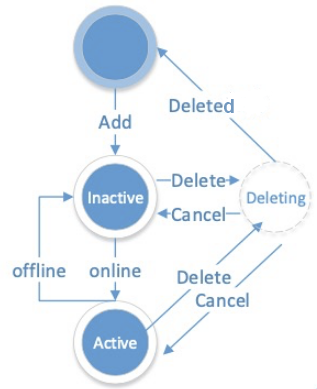
Parameters
The following figure shows the server status.
Parameter |
Description |
|---|---|
| ip_port | Specifies the IP address and port of an OBServer. |
| zone | If a zone is specified, zone verification is performed for the server to be maintained. |
| ADD | Adds a server. |
| DELETE | Deletes a server. |
| CANCEL DELETE | Cancels the deletion of a server. |
| START | Starts a server. |
| STOP | Stops a server. |
| FORCE STOP | Forcibly stops a server. |
Example
- Adding a server
ALTER SYSTEM ADD SERVER '172.24.65.113:55410' ZONE 'zone1';
Notice
Run the Add and Delete commands to add servers to the service list. Only servers in the list can provide services.
The Delete operation reelects a leader and copies replicas.
The Delete operation takes a long time and can be canceled by using the Cancel command.
THROTTLE
Description
You can use this statement to configure feature throttling.
Syntax
alter_system_throttle_stmt:
    ALTER SYSTEM throttle_action;

throttle_action:
      ENABLE SQL THROTTLE [priority_option] [using_metric_option_list]
    | DISABLE SQL

priority_option:
    FOR PRIORITY <= INT_VALUE

using_metric_option_list:
    USING metric_option_list

metric_option_list:
    metric_option [metric_option ...]

metric_option:
      RT = {INT_VALUE | DECIMAL_VALUE}
    | CPU = {INT_VALUE | DECIMAL_VALUE}
    | IO = INT_VALUE
    | NETWORK = {INT_VALUE | DECIMAL_VALUE}
    | QUEUE_TIME = {INT_VALUE | DECIMAL_VALUE}
    | LOGICAL_READS = {INT_VALUE | DECIMAL_VALUE}
Parameters
Parameter |
Description |
|---|---|
| ENABLE SQL | Enables throttling. This parameter is followed by throttling features and eigenvalues. |
| FOR PRIORITY | Specifies the priority for a throttling request to take effect only in specific sessions. |
| RT | Performs throttling based on the request execution time. |
| CPU | Performs throttling based on the CPU utilization, which is not supported. |
| IO | Performs throttling based on the I/O times, which is not supported. |
| NETWORK | Performs throttling based on the transmitted network traffic volume, which is not supported. |
| QUEUE_TIME | Performs throttling based on the queue waiting time. |
| LOGICAL_READS | Performs throttling based on the number of logical read times, which is not supported. |
| DISABLE SQL | Disables throttling. |
Example
- Perform throttling for requests of which the waiting time exceeds 0.1s in sessions with a priority <= 100.
alter system enable sql throttle for priority <= 100 using queue_time=0.1
UNIT
Description
You can use this statement to migrate UNIT resources.
Syntax
alter_system_unit_stmt:
    ALTER SYSTEM MIGRATE
    UNIT [=] unit_id DESTINATION [=] ip_port

unit_id:
    INT_VALUE
Parameters
Parameter |
Description |
|---|---|
| unit_id | The UNIT ID. |
| ip_port | The destination server address to which the UNIT is to be migrated. |
Example
- Migrating UNIT 1001 to 11.11.111.111:19510
OceanBase(root@oceanbase)>alter system migrate unit = 1001 destination = '11.11.111.111:19510';
Query OK, 0 rows affected (0.05 sec)
ZONE
Description
You can use this statement to maintain the status of zones in the system and control the add, delete, start, and stop operations of the zones.
Syntax
alter_system_zone_stmt:
      ADD ZONE zone_name
      [zone_option_list]
    | {ALTER | CHANGE | MODIFY} ZONE zone_name
      [SET] zone_option_list
    | {DELETE | START | STOP | FORCE STOP} ZONE zone_name

zone_option_list:
    zone_option [, zone_option ...]

zone_option:
      region
    | idc
    | ZONE_TYPE {READONLY | READWRITE}

idc:
    STR_VALUE
Parameters
Parameter |
Description |
|---|---|
| ADD ZONE | Adds a zone. |
| {ALTER | CHANGE | MODIFY} ZONE | Modifies the Region attribute of a zone. Note The functions of the ALTER, CHANGE, and MODIFY commands are the same. They all can be used to modify the Region attribute of a zone. |
| DELETE ZONE | Deletes a zone. Ensure that the zone to be deleted does not contain any server. |
| START | STOP | Starts or stops a zone. |
Example
- Deleting a zone
OceanBase(root@oceanbase)>alter system delete zone 'z1';
ERROR 4668 (HY000): The zone is not empty and cannot be deleted. You should delete the servers of the zone. There are 1 servers alive and 0 not alive.
CLUSTER
Description
You can use this statement for cluster management, including adding, deleting, or modifying cluster attributes.
Syntax
ALTER SYSTEM  cluster_action cluster_name CLUSTER_ID INTNUM;
cluster_action:
    ADD CLUSTER
    | REMOVE CLUSTER
    | ENABLE CLUSTER SYNCHRONIZATION
    | DISABLE CLUSTER SYNCHRONIZATION
    | MODIFY CLUSTER REDO_TRANSPORT_OPTIONS = 'SYNC|ASYNC'
Parameters
Parameter |
Description |
|---|---|
| ADD CLUSTER | Adds a standby cluster. |
| REMOVE CLUSTER | Deletes an existing standby cluster. |
| ENABLE CLUSTER SYNCHRONIZATION | Allows the synchronization of a standby cluster. |
| DISABLE CLUSTER SYNCHRONIZATION | Disables the synchronization of a standby cluster. |
| MODIFY CLUSTER REDO_TRANSPORT_OPTIONS | Modifies the log synchronization mode of a standby cluster in the primary cluster. * SYNC: strong synchronization * ASYNC: asynchronous synchronization The default synchronization mode is ASYCN. |
Example
- Adding a standby cluster
ALTER SYSTEM ADD CLUSTER 'ob1.test' cluster_id = 1;
SWITCHOVER
Description
You can use this statement for lossless and lossy switchover of clusters to switch over the roles between the primary cluster and a standby cluster.
Syntax
ALTER SYSTEM commit_switchover_clause;

commit_switchover_clause:
    COMMIT TO SWITCHOVER TO PRIMARY
    | COMMIT TO SWITCHOVER TO PHYSICAL STANDBY
    | ACTIVATE PHYSICAL STANDBY CLUSTER
    | CONVERT TO PHYSICAL STANDBY
Parameters
Parameter |
Description |
|---|---|
| COMMIT TO SWITCHOVER TO PRIMARY | Changes the role of a secondary cluster to the primary cluster. Execute this clause on a standby cluster after the original primary cluster becomes the primary cluster. Do not execute this command when another standby cluster is set as the primary cluster. |
| COMMIT TO SWITCHOVER TO PHYSICAL STANDBY | Changes the role of the primary cluster to a standby cluster without data loss. Execute this clause on the primary cluster after all data is synchronized to the standby cluster. |
| ACTIVATE PHYSICAL STANDBY CLUSTER | Changes a standby cluster to the primary cluster when the original primary cluster is down. |
| CONVERT TO PHYSICAL STANDBY | Changes the primary cluster to a standby cluster. |
Example
- Changing the primary cluster to a standby cluster
ALTER SYSTEM COMMIT TO SWITCHOVER TO PHYSICAL STANDBY;
- Change a standby cluster to the primary cluster
ALTER SYSTEM COMMIT TO SWITCHOVER TO PRIMARY;
- Change a standby cluster to the primary cluster when the original primary cluster is down
ALTER SYSTEM ACTIVATE PHYSICAL STANDBY CLUSTER;
- Restarte the original primary cluster and change it to a standby cluster
ALTER SYSTEM CONVERT TO PHYSICAL STANDBY;
BALANCE TASK
Description
You can use this statement to clear load balancing tasks that are not being scheduled.
Syntax
ALTER SYSTEM REMOVE BALANCE TASK opt_tenant_list opt_zone_list opt_balance_task_type;

opt_tenant_list
    TENANT [=] name,name_list

opt_zone_list
    ZONE [=] zone_name, zone_list

opt_balance_task_type
    ALL
    | MANUAL
    | AUTO
Parameters
Parameter |
Description |
|---|---|
| opt_tenant_list | The tenant list. If it is not specified, the tasks of all tenants are cleared. |
| opt_zone_list | Optional. The zone list. |
| opt_balance_task_type | The type of tasks to be cleared. * ALL: all tasks * AUTO: tasks automatically generated * MANUAL: tasks manually initiated by users |
Example
- Clearing all tasks of all tenants that are not being scheduled
ALTER SYSTEM REMOVE BALANCE TASK;
CANCEL MIGRATE UNIT
Description
You can use this statement to cancel UNIT migration.
Syntax
ALTER SYSTEM CANCEL MIGRATE UNIT unit_id;
Parameters
Parameter |
Description |
|---|---|
| unit_id | The ID of the migrated UNIT. |
Example
- Cancel the migration of UNIT 1001.
ALTER SYSTEM CANCEL MIGRATE UNIT 1001;
RESTORE
Description
You can use this statement to restore the data of tenants.
Syntax
ALTER SYSTEM RESTORE [table_name_list FOR] dest_tenant FROM source_tenant AT 'url' UNTIL 'timestamp' WITH 'restore_option';
Parameters
Parameter |
Description |
|---|---|
| table_name_list | Specifies the tables to be restored in a tenant. The table names in the list must contain the database (MySQL tenant) or user (Oracle tenant) to which the table belongs. |
| dest_tenant | The name of the destination tenant to which the data is to be restored. |
| source_tenant | The name of the source tenant of which the data is backed up. |
| url | The value of backup_dest specified during backup. |
| timestamp | The restoration timestamp, which must be later than or equal to START_TIME in the CDB_OB_BACKUP_SET_DETAILS view of the earliest data backup, and earlier than or equal to MAX_NEXT_TIME in the CDB_OB_BACKUP_ARCHIVELOG_SUMMARY view of the log backup. |
| restore_option | The restoration options. Valid values: * backup_cluster_name: Required. The name of the source cluster. * backup_cluster_id: Required. The ID of the source cluster. * pool_list: Required. The resource pool of users. * locality: Optional. The locality of the tenant. * kms_encrypt: Optional. The value true indicates specifying kms_encrypt_info during restoration. |
Example
- Restore the data of a tenant.
ALTER SYSTEM RESTORE restored_trade FROM trade
    AT 'oss://antsys-oceanbasebackup/backup_rd/20200323?host=cn-hangzhou-alipay-b.oss-cdn.aliyun-inc.com&access_id=xxx&access_key=xxx'
  UNTIL ' 2020-03-23 08:59:45'
  WITH 'backup_cluster_name=ob20daily.backup&backup_cluster_id=1&pool_list=restore_pool';

ALTER SYSTEM RESTORE restored_trade FROM trade
  AT 'file:///data/nfs/physical_backup_test/20200520'
  UNTIL '2020-05-21 09:39:54.071670'
  WITH 'backup_cluster_name=ob20daily.backup&backup_cluster_id=1&pool_list=restore_pool';
- Restore the data of specified tables in a tenant.
ALTER SYSTEM RESTORE `crm`.`sales`, `crm`.`products`, `hr`.`employees` FOR new_tenant1 FROM tenant1
AT 'oss://antsys-oceanbasebackup/backup_rd/?host=cn-hangzhou-alipay-b.oss-cdn.aliyun-inc.com&access_id=xxx&access_key=xxx'
UNTIL '2021-02-28 08:59:45'
WITH 'backup_cluster_name=ob20daily.backup&backup_cluster_id=1&pool_list=restore_pool';
CHANGE TENANT
Description
You can use this statement to switch tenants.
Syntax
ALTER SYSTEM CHANGE TENANT tenant_name;

ALTER SYSTEM CHANGE TENANT TENANT_ID [=] INTNUM;
Parameters
Parameter |
Description |
|---|---|
| tenant_name | The name of the target tenant. |
| TENANT_ID | The ID of the target tenant. |
Example
- Changing to the tenant with the ID of 1001
ALTER SYSTEM CHANGE TENANT TENANT_ID = 1001;
Note
The preceding command must be executed in a system tenant.
This command must be executed during direct connection with the OBServer and be executed again after disconnection.
This command cannot be executed during transaction execution.
DDL operations cannot be performed after you switch to a non-system tenant.
BACKUP
Description
You can use this statement to trigger a backup.
Syntax
//Set the backup media path
ALTER SYSTEM SET backup_dest = <backup_uri>;
//Enable log archiving
ALTER SYSTEM ARCHIVELOG;
//Disable log archiving
ALTER SYSTEM NOARCHIVELOG;
//Trigger a baseline backup (only cluster-level backup is supported)
ALTER SYSTEM BACKUP DATABASE;
//Cancel the current backup
ALTER SYSTEM CANCEL BACKUP;
//Set the backup media path for the secondary backup
ALTER SYSTEM SET backup_backup_dest = <backup_backup_uri>;
//Perform secondary backup on log backups
ALTER SYSTEM BACKUP BACKUPPIECE ALL NOT BACKED UP N TIMES [tenant_id = N] [tenant_name = name] [backup_backup_dest=uri];
ALTER SYSTEM BACKUP BACKUPPIECE [= N] [tenant_id = N] [tenant_name = name]  [backup_backup_dest=uri] [WITH ACTIVE BACKUPPIECE];
//Cancel the ongoing secondary backup on log backups
ALTER SYSTEM CANCEL BACKUP BACKUPPIECE;
//Perform secondary backup on data backups
ALTER SYSTEM BACKUP BACKUPSET ALL NOT BACKED UP N TIMES [tenant_id = N] [tenant_name = name] [backup_backup_dest=uri];
ALTER SYSTEM BACKUP BACKUPSET = N [tenant_id = N] [tenant_name = name]  [backup_backup_dest=uri];
//Cancel the ongoing secondary backup on data backups
ALTER SYSTEM CANCEL BACKUP BACKUPSET;
//Enable automatic secondary backup of log backups
ALTER SYSTEM START BACKUP ARCHIVELOG;
//Disable automatic secondary backup of log backups
ALTER SYSTEM STOP BACKUP ARCHIVELOG;
Parameters
Parameter |
Description |
|---|---|
| backup_dest | Specifies the path to store the backup data. You can set it to an Object Storage Service (OSS) bucket or a file. For more information about the syntax, see the following example. |
| backup_backup_dest | Specifies the path to store the secondary backup. You can set it to an OSS bucket or a file. |
| tenant_id | Specifies the ID of the tenant. |
| tenant_name | Specifies the name of the tenant. |
| BACKUPPIECE ALL NOT BACKED UP N TIMES | Performs secondary backup on log backups whose number of copies is less than N. |
| BACKUPPIECE [= N] | Performs secondary backup on log backups with the specified BACKUPPIECE ID. If you specify WITH ACTIVE BACKUPPIECE, the active log backup will also be backed up. |
| BACKUPSET ALL NOT BACKED UP N TIMES | Performs secondary backup on data backups whose number of copies is less than N. |
| BACKUPSET = N | Performs secondary backup on data backups with the specified BACKUPSET ID. |
Example
- Setting the path to store the backup data
alter system set backup_dest='oss://antsys-oceanbasebackup/backup_dir?host=xxx&access_id=xxx&access_key=xxx';
alter system set backup_dest='file:///data/nfs/physical_backup_dir';
- Performing secondary backup on log backups.
alter system backup backuppiece all not backed up 2 times backup_backup_dest= 'file:///ob_backup_backup/ob_cluster_1_backup_piece_20200125';
alter system backup backuppiece 1 tenant_name tenant_1 backup_backup_dest= 'file:///ob_backup_backup/ob_cluster_1_backup_piece_20200225';
Note
The preceding command must be executed in a system tenant.
MAXIMIZE
Description
You can use this statement to set the protection mode of the primary and standby clusters. You can execute this statement only in the primary cluster.
Syntax
ALTER SYSTEM SET STANDBY CLUSTER TO MAXIMIZE {AVAILABILITY | PERFORMANCE | PROTECTION};
Parameters
Parameter |
Description |
|---|---|
| AVAILABILITY | The mode that provides the maximum availability. |
| PERFORMANCE | The mode that provides the maximum performance. This is the default mode. |
| PROTECTION | The mode that provides the maximum protection. |
Example
- Setting the protection mode of the primary and standby clusters to AVAILABILITY.
ALTER SYSTEM SET STANDBY CLUSTER TO MAXIMIZE AVAILABILITY;
DELETE BACKUPSET
Description
You can use this statement to clear a backup.
Syntax
ALTER SYSTEM DELETE BACKUPSET backup_set_id
Parameters
Parameter |
Description |
|---|---|
| backup_set_id | The ID of the backup_set corresponding to the backup to be cleared. An ID is generated when a backup is initiated. The ID can be queried in the CDB_OB_BACKUP_SET_DETAILS view. |
Example
- Clear the backup data of which the backup_set_id is 1.
ALTER SYSTEM DELETE BACKUPSET 1;
DELETE OBSOLETE BACKUP
Description
You can use this statement to clear expired backup data. Note
Set the expiration time before you use this statement to clear expired backup data.
Syntax
ALTER SYSTEM SET backup_recovery_window = <expiration time>;
ALTER SYSTEM DELETE OBSOLETE BACKUP;
Parameters
Parameter |
Description |
|---|---|
| backup_recovery_window | The recovery time window for backup data. The default value is 0, indicating that the backup data is retained permanently. We recommend that you set this parameter to 7d, which indicates that the backup data is retained for one week and will be cleared afterward. |
Example
- Setting the expiration time of backup data to one week, after which the backup data will be cleared
ALTER SYSTEM SET backup_recovery_window = '7d';
ALTER SYSTEM DELETE OBSOLETE BACKUP;