







Background
You can skip DDL statements that cause errors in an incremental synchronization project by updating the component configuration. The procedure is as follows:
Locate the DDL statement that reports an error in the
error.logfile.Click the
msg/ddl _msg.logtab and copy the DDL statement that follows the colon after thereceive ddlkeyword.Add or update the corresponding parameters.
Note
lf you use OceanBase Migration Service (OMS) V3.2.2-BP or a later version earlier than V3.3.1, you need to add or update the
JDBCWriter.coordinatorFile.skipDdlparameter in therootsection.lf you use OMS V3.3.1 and later, you need to add or update the
skipDdlparameter in thecoordinatorsection.
OMS V3.2.2-BP or a later version earlier than V3.3.1
Find the DDL statement received by the source data source.
Log on to the OMS console.
In the left-side navigation pane, click Data Migration.
On the Data Migration page, click the name of the target data migration project to go to its details page.
Click View Component Monitoring in the upper-right corner.
In the View Component Monitoring dialog box, click View Logs in the Actions column of the component.
Click the
msg/ddl_msg.logtab and copy the DDL statement that follows the colon after thereceive ddlkeyword. This is the statement received by the source data source.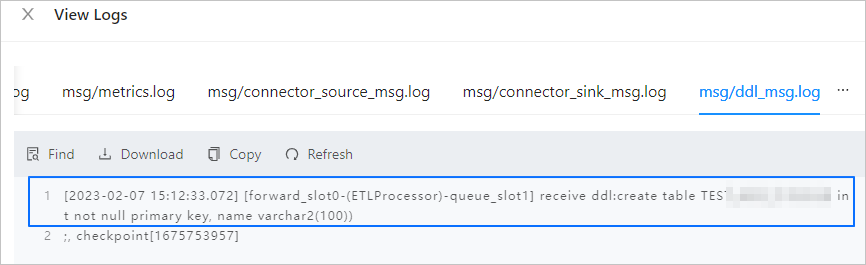
Update the configurations of the JDBCWriter component.
Go to the View Component Monitoring dialog box.
Click Update in the Actions column of the JDBCWriter component.
In the Update Configuration dialog box, move the pointer over the blank area next to the root parameter and click the plus sign.
Enter JDBCWriter.coordinatorFile.skipDdl for
Key Nameand click the check sign.In the Update Configuration dialog box, find the new key name. The default value is NULL.
Move the pointer over the new parameter, click the edit icon that appears, and change the value of the parameter to the DDL statement that you copied in the foregoing step. The target DDL statement follows the colon after the
receive ddlkeyword.OMS supports parameter values that contain line breaks and compares the value of
JDBCWriter.coordinatorFile.skipDdlwith the received DDL statements after removing spaces, line breaks, tabs, and semicolons in the statements.For example, assume that the received DDL statement is as follows:
CREATE TABLE my_table (
id INT,
name VARCHAR(50)
);
Set the
JDBCWriter.coordinatorFile.skipDdlparameter to"CREATE TABLE my_table(id INT,name VARCHAR(50))".To skip multiple DDL statements, separate them with ampersands (&), for example:
"CREATE TABLE my_table(id INT,name VARCHAR(50))&create table test(id int not null)".Modify the value in the field and then click the OK icon.
In the Update Configuration dialog box, click Update.
OMS V3.3.1 and later
Find the DDL statement received by the source data source.
Log on to the OMS console.
In the left-side navigation pane, click Data Migration.
On the Data Migration page, click the name of the target data migration project to go to its details page.
Click View Component Monitoring in the upper-right corner.
In theView Component Monitoring dialog box, click View Logs in the Actions column of the Incr-Sync component.
Click the
msg/ddl_msg.logtab and copy the DDL statement that follows the colon after thereceive ddlkeyword. This is the statement received by the source data source.
Update the configuration of the Incr-Sync component.
Notice
In OMS V4.0.1 and later, the JDBCWriter component is renamed to Incr-Sync. Operations of the component remain unchanged. The Incr-Sync component is taken as an example.
Go to the View Component Monitoring dialog box.
Click Update in the Actions column of the Incr-Sync component.
In the Update Configuration dialog box, move the pointer over the blank area next to the
coordinatorparameter and click the plus sign.Enter skipDdl for
Key Nameand click the check sign.In the Update Configuration dialog box, find the new key name. The default value is NULL.
Move the pointer over the new parameter, click the edit icon that appears, and change the value of the parameter to the DDL statement that you copied in the foregoing step. The target DDL statement follows the colon after the
receive ddlkeyword.OMS supports keyword comparison. The received DDL statements that contain the specified keyword are filtered. In addition, you must specify the DDL statement that you want to skip in JSON format.
For example, assume that the received DDL statement is as follows:
CREATE TABLE my_table (
id INT,
name VARCHAR(50)
);
Set the
skipDdlparameter to["CREATE TABLE my_table"].To skip multiple DDL statements, specify the DDL statements in JSON format and separate them with commas (,), such as
["CREATE TABLE my_table","create table test"].Notice
You must use escape characters to escape double quotation marks (") in DDL statements. Otherwise, a JSON parsing error will be reported.
For example, if you want to skip thecreate table "student" xxxstatement, set theskipDdlparameter to["create table \"student\" xxx"].The value of the `skipDdl` parameter is case-sensitive.
Modify the value in the field and then click the OK icon.
In the Update Configuration dialog box, click OK.