







This topic describes how to use OceanBase Migration Service (OMS) to migrate data from an Oracle database to an Oracle tenant of OceanBase Database, which can be a physical data source or an ApsaraDB for OceanBase data source.
Background
You can create a data migration project in the OMS console to seamlessly migrate the existing business data and incremental data from an Oracle database to an Oracle tenant of OceanBase Database through schema migration, full migration, and incremental data synchronization.
The Oracle database supports the following modes: primary database only, standby database only, and primary/standby databases. The following table describes the data migration operations supported for each mode.
Mode |
Supported operation |
|---|---|
| Primary database only | Schema migration, full migration, incremental synchronization, full verification, and reverse incremental migration |
| Standby database only | Schema migration, full migration, incremental synchronization, and full verification |
| Primary/Standby databases | Primary database: reverse incremental migration. Standby database: schema migration, full migration, incremental synchronization, and full verification |
Prerequisites
You have created a corresponding schema in the target Oracle tenant of OceanBase Database.
You have enabled archivelog for the source Oracle instance and switched the logfile before OMS starts incremental data replication.
You have installed LogMiner in the source Oracle instance, and LogMiner runs properly.
LogMiner enables you to obtain data from the archive logs of the Oracle instance.
You have created dedicated database users in the source Oracle database and the target Oracle tenant of OceanBase Database for data migration, and granted the required privileges to the users. For more information, see Create a database user.
You have made sure that the Oracle instance has enabled the database-level or table-level supplemental logging feature.
If you enable supplemental logging of the primary key and unique key at the database level, when a large number of unnecessary logs are generated by tables that do not need to be synchronized, the pressure on LogMiner Reader to fetch logs and on the Oracle database increases. Therefore, you can enable only the table-level supplemental_log of the primary key and unique key for Oracle databases in the OMS console. However, if you specify extract-transform-load (ETL) options to filter columns other than the primary key and unique key columns when you create a migration project, enable supplemental logging for the corresponding columns or all columns.
Clock synchronization (such as the NTP service) is required between an Oracle server and the OMS server to avoid data risks. For an Oracle RAC, clock synchronization is also required between Oracle instances.
Limitations
Limitations on the source database
Do not perform DDL operations that modify database or table schemas during schema migration or full data migration. Otherwise, the data migration project may be interrupted.
OMS supports Oracle Database 10g, 11g, 12c, 18c, and 19c. Oracle Database 12c and later provide container databases (CDBs) and pluggable databases (PDBs).
OMS supports the migration of only regular tables and views.
OMS supports the migration of only objects whose database name, table name, and column name are ASCII-encoded and do not contain special characters. The special characters are spaces, line breaks, and the following characters:
. | " ' ` ( ) = ; / & \.If the destination is a database, OMS does not support triggers in the destination database. If triggers exist in the destination database, the data migration may fail.
Data type limitations
Incremental data migration is not supported for a table whose data in all columns is of the following three large object (LOB) types: BLOB, CLOB, and NCLOB.
If a table does not have a primary key but contains data of a LOB type, the reverse incremental migration of the table can suffer poor data quality.
Data source identifiers and user accounts must be globally unique in OMS.
The data transmission service can parse up to 5 TB of incremental logs of Oracle databases per day.
You cannot create a database object whose name exceeds 30 bytes in length in an Oracle database of version 11g or earlier. Note that you cannot create a database object that exceeds this limit in an Oracle tenant of OceanBase Database during reverse incremental migration.
OMS does not support the migration of database objects, such as schemas, tables, and columns, whose name exceeds 30 bytes in length from an Oracle database of version 12c or later.
OMS does not support some
UPDATEstatements in the source Oracle database. For example, the followingUPDATEstatement is not supported:UPDATE TABLE_NAME SET KEY=KEY+1;In the preceding example,
TABLE_NAMEis the table name, andKEYis a primary key column of the NUMERIC type.
Considerations
When the Oracle database is in standby database only or primary/standby databases mode, if the number of instances that run on the primary Oracle database differs from that on the standby database, incremental logs of some instances may not be pulled. You need to manually set the parameters of the Store component to specify the instances for which incremental logs are to be pulled from the standby database. The procedure is as follows:
Stop the Store component as soon as it starts.
On the Update Configuration page of the Store component, add the
deliver2store.logminer.instance_threadsparameter and specify the instances for which logs are to be pulled.Separate multiple threads with vertical bars (|), for example, 1|2|3. For more information about how to update a store component, see Update a store component.
Restart the Store component.
Wait five minutes, and then run the
grep 'log entries from' connector/connector.logcommand to check the instances for which logs are pulled. Thethreadfield indicates the instances for which logs are pulled.
If you need to synchronize incremental data from an Oracle database, we recommend that you restrict the size of a single archive file in the Oracle database to within 2 GB. An excessively large archive file may incur the following risks:
The log pulling time increases not in proportion to the size of a single archive file, but much more sharply.
When the Oracle database is in standby database only or primary/standby databases mode, the incremental data is pulled from the standby database. In this case, only archive files can be pulled. An archive file is pulled after it is generated. A larger archive file means a longer delay before the archive file is processed, and a longer time for processing the archive file.
In addition, a larger size of a single archive file means larger memory required by the Store component under the same data pulling concurrency.
The archive files must be stored for more than two days in the Oracle database. Otherwise, in the case of a sharp increase in the number of archive files or an exception in the Store component, restoration may fail due to the lack of required archive files.
If a DML operation is performed to exchange primary keys in the source Oracle database, errors occur when OMS parses logs. This causes data loss when data is migrated to the destination database. Here is a sample DML statement that exchanges primary keys:
UPDATE test SET c1=(CASE WHEN c1=1 THEN 2 WHEN c1=2 THEN 1 END) WHERE c1 IN (1,2);OMS allows you to migrate data from an Oracle instance whose character set is AL32UTF8, AL16UTF16, ZHS16GBK, or GB18030. If the UTF-8 character set is used in the source, we recommend that you use a compatible character set, such as UTF-8 or UTF-16, in the destination to avoid garbled characters.
If you select a migration mode that supports incremental synchronization and reverse incremental migration, and an exception occurs when OMS pulls the incremental data from a standby Oracle database, you can run the
ALTER SYSTEM SWITCH LOGFILEcommand in the primary database to handle the exception.When you migrate a table without a primary key from an Oracle database to an Oracle tenant of OceanBase Database, do not perform any operations on any table that may change the ROWID, such as data import and export, Alter Table, FlashBack Table, and partition splitting or compaction.
If the clocks between nodes or between the client and the server are out of synchronization, the latency may be inaccurate during incremental synchronization or reverse incremental migration.
For example, if the clock is earlier than the standard time, the latency can be negative. If the clock is later than the standard time, the latency can be positive.
Due to the historical reasons that daylight saving time was once implemented in China, the start and end dates of daylight saving time from 1986 to 1991 are caused by incremental synchronization from Oracle database to OceanBase database Oracle tenants, and April 10, 1988 ~ April 17,
TIMESTAMP(6) WITH TIME ZONEtype, there may be a 1-hour time difference between the source and destination.In a project for reverse incremental migration from an Oracle database to an Oracle tenant of OceanBase Database of a version earlier than V3.2.x, if the source table is a multi-partition table with a global unique index and you update the values of the partitioning key of the table, data may be lost during migration.
When the Oracle tenant of the destination OceanBase database is earlier than V2.2.70, foreign keys, checks, and other objects added during the switchover may not be supported.
When DDL synchronization is disabled, if you change the unique index of the destination, you must restart the Incr-Sync component. Otherwise, the data may be inconsistent.
If forward switchover is disabled for a data migration project, drop the unique indexes and pseudocolumns from the destination. If you do not drop the unique indexes and pseudocolumns, data cannot be written, and pseudocolumns will be generated again when data is imported to the downstream system, causing conflicts with the pseudocolumns in the source.
If forward switchover is enabled for the data migration project, OMS will automatically drop hidden columns and unique indexes based on the type of the migration project. For more information, see Mechanisms for handling hidden columns.
If a new table without the primary key is added in the source Oracle database during the incremental synchronization, OMS does not automatically drop the hidden columns and the unique index added to the table in the destination Oracle tenant of OceanBase Database. You need to manually drop them before you start a reverse migration task.
To confirm the tables without the primary key that are added during the incremental synchronization, view the manual_table.log file in the
logs/msg/directory.If the source and target databases use different character sets, a field length extension policy will be provided during schema migration. For example, the field length is extended by 1.5 times, and the length unit is changed from BYTE to CHAR.
This ensures that data encoded by using different character sets can be migrated from the source database to the target database. However, after cutover, data may fail to be written back to the source database during reverse incremental data migration because of an extra long data length.
If the source contains data types with time zone information, such as TIMESTAMP WITH TIME ZONE, make sure that the target database supports the data types and has the corresponding time zone. Otherwise, data inconsistency occurs during data migration.
Take note of the following points if you want to perform data merge migration:
We recommend that you configure the mappings between the source and destination databases by specifying matching rules.
We recommend that you manually create schemas at the destination. If you use OMS to create schemas, skip failed objects in the schema migration step.
Check the objects in the recycle bin of the Oracle database. If the recycle bin contains more than 100 objects, internal table queries may time out. You must clear the objects in the recycle bin.
Query whether the recycle bin is enabled.
SELECT Value FROM V$ob_parameters WHERE Name = 'recyclebin';Query the number of objects in the recycle bin.
SELECT count(*) FROM USER_RECYCLEBIN;
If you select only Incremental Synchronization when you create a data migration project, OMS requires that the archive logs in the source database be retained for more than 48 hours.
If you select Full Data Migration and Incremental Synchronization when you create a data migration project, OMS requires that the archive logs in the source database be retained for at least 7 days. Otherwise, the data migration project will fail or the data in the source and destination databases will be inconsistent because OMS cannot obtain incremental logs.
Data type mappings
Notice
Data of the CLOB and BLOB types must be less than 48 MB in size.
Data of the ROWID, BFILE, XMLType, UROWID, UNDEFINED, and UDT types cannot be migrated.
Incremental synchronization is not supported for tables with data of the LONG or LONG RAW type.
Oracle database |
Oracle tenant of OceanBase Database |
|---|---|
| CHAR(n CHAR) | CHAR(n CHAR) |
| CHAR(n BYTE) | CHAR(n BYTE) |
| NCHAR(n) | NCHAR(n) |
| VARCHAR2(n) | VARCHAR2(n) |
| NVARCHAR2(n) | NVARCHAR2(n) |
| NUMBER(n) | NUMBER(n) |
| NUMBER (p, s) | NUMBER(p,s) |
| RAW | RAW |
| CLOB | CLOB |
| NCLOB |
|
| BLOB | BLOB |
| REAL | FLOAT |
| FLOAT(n) |
|
| BINARY_FLOAT | BINARY_FLOAT |
| BINARY_DOUBLE | BINARY_DOUBLE |
| DATE | DATE |
| TIMESTAMP | TIMESTAMP |
| TIMESTAMP WITH TIME ZONE | TIMESTAMP WITH TIME ZONE |
| TIMESTAMP WITH LOCAL TIME ZONE | TIMESTAMP WITH LOCAL TIME ZONE |
| INTERVAL YEAR(p) TO MONTH | INTERVAL YEAR(p) TO MONTH |
| INTERVAL DAY(p) TO SECOND | INTERVAL DAY(p) TO SECOND |
| LONG | CLOB Note: This data type is not supported for incremental synchronization. |
| LONG RAW | BLOB Note: This data type is not supported for incremental synchronization. |
Conversion of Oracle table partitions
When OMS is used to migrate data from an Oracle database, the system automatically converts your business SQL statements. However, the conversion performed in OceanBase Database V2.2.30 is different from that in OceanBase Database V2.2.50.
Note
The partition conversion rules described in this topic apply to all partitioning types.
Source table definition |
Table after conversion in OceanBase Database V2.2.30 |
Table after conversion in OceanBase Database V2.2.50 and later |
|---|---|---|
CREATE TABLE T_RANGE_0 (A INT, B INT, PRIMARY KEY (B) )PARTITION BY RANGE(A)(....); |
CREATE TABLE "T_RANGE_0" ("A" NUMBER, "B" NUMBER NOT NULL, PRIMARY KEY ("B", "A") )PARTITION BY RANGE ("A")(.... ); CREATE UNIQUE INDEX ON "T_RANGE_0"(B);
|
CREATE TABLE "T_RANGE_0" ("A" NUMBER, "B" NUMBER NOT NULL,CONSTRAINT "T_RANGE_10_UK" UNIQUE ("B") )PARTITION BY RANGE ("A")( .... ); |
CREATE TABLE T_RANGE_10 ("A" INT, "B" INT, "C" DATE, "D" NUMBER GENERATED ALWAYS AS (TO_NUMBER(TO_CHAR("C",'dd'))) VIRTUAL, CONSTRAINT "T_RANGE_10_PK" PRIMARY KEY (A) )PARTITION BY RANGE(D)( .... ); |
CREATE TABLE T_RANGE_10 ("A" INT NOT NULL,"B" INT,"C" DATE,"D" NUMBER GENERATED ALWAYS AS (TO_NUMBER(TO_CHAR("C",'dd'))) VIRTUAL,CONSTRAINT "T_RANGE_10_PK" PRIMARY KEY (A, C) )PARTITION BY RANGE(D)( .... ); |
CREATE TABLE T_RANGE_10 ("A" INT NOT NULL,"B" INT,"C" DATE,"D" NUMBER GENERATED ALWAYS AS (TO_NUMBER(TO_CHAR("C",'dd'))) VIRTUAL,CONSTRAINT "T_RANGE_10_PK" UNIQUE (A) )PARTITION BY RANGE(D)( .... ); |
CREATE TABLE T_RANGE_1 (A INT,B INT,UNIQUE (B) )PARTITION BY RANGE(A)( partition P_MAX values less than (10) ); |
-- [WARNING] Create global index on no primary key table is unsupported. Object: "GUYUE"."T_RANGE_1" | The source table definition is supported. |
CREATE TABLE T_RANGE_2 (A INT,B INT NOT NULL,UNIQUE (B) )PARTITION BY RANGE(A)( partition P_MAX values less than (10) ); |
CREATE TABLE "T_RANGE_2" ("A" NUMBER,"B" NUMBER NOT NULL,PRIMARY KEY ("B", "A") )PARTITION BY RANGE ("A")( .... ); |
The source table definition is supported. |
CREATE TABLE T_RANGE_3 (A INT,B INT,UNIQUE (A) )PARTITION BY RANGE(A)( .... ); |
-- [WARNING] Create global index on no primary key table is unsupported. Object: "GUYUE"."T_RANGE_2" | The source table definition is supported. |
CREATE TABLE T_RANGE_4 (A INT NOT NULL,B INT,UNIQUE (A) )PARTITION BY RANGE(A)( .... ); |
CREATE TABLE "T_RANGE_4" ("A" NUMBER NOT NULL,"B" NUMBER,PRIMARY KEY ("A") )PARTITION BY RANGE ("A")( .... ); |
CREATE TABLE "T_RANGE_4" ("A" NUMBER NOT NULL,"B" NUMBER,PRIMARY KEY ("A") )PARTITION BY RANGE ("A")( .... ); |
CREATE TABLE T_RANGE_5 (A INT,B INT,UNIQUE (A, B) )PARTITION BY RANGE(A)( partition P_MAX values less than (10) ); |
-- [WARNING] Create global index on no primary key table is unsupported. Object: "GUYUE"."T_RANGE_5" | The source table definition is supported. |
CREATE TABLE T_RANGE_6 (A INT NOT NULL,B INT,UNIQUE (A, B) )PARTITION BY RANGE(A)( partition P_MAX values less than (10) ); |
-- [WARNING] Create global index on no primary key table is unsupported. Object: "GUYUE"."T_RANGE_5" | The source table definition is supported. |
CREATE TABLE T_RANGE_7 (A INT NOT NULL,B INT NOT NULL,UNIQUE (A, B) )PARTITION BY RANGE(A)( partition P_MAX values less than (10) ); |
CREATE TABLE "T_RANGE_7" ("A" NUMBER NOT NULL,"B" NUMBER NOT NULL,PRIMARY KEY ("A", "B") )PARTITION BY RANGE ("A")( .... ); |
CREATE TABLE "T_RANGE_7" ("A" NUMBER NOT NULL,"B" NUMBER NOT NULL,PRIMARY KEY ("A", "B") )PARTITION BY RANGE ("A")( .... ); |
CREATE TABLE T_RANGE_8 ("A" INT,"B" INT,"C" INT NOT NULL,UNIQUE (A),UNIQUE (B),UNIQUE (C) )PARTITION BY RANGE(B)( partition P_MAX values less than (10) ); |
CREATE TABLE "T_RANGE_8" ("A" NUMBER,"B" NUMBER,"C" NUMBER NOT NULL,PRIMARY KEY ("C", "B"),UNIQUE ("A"),UNIQUE ("B"),UNIQUE ("C") )PARTITION BY RANGE ("B")( .... ); |
The source table definition is supported. |
CREATE TABLE T_RANGE_9 ("A" INT,"B" INT,"C" INT NOT NULL,UNIQUE(A),UNIQUE(B),UNIQUE (C) )PARTITION BY RANGE(C)( partition P_MAX values less than (10) ); |
CREATE TABLE "T_RANGE_9" ("A" NUMBER,"B" NUMBER,"C" NUMBER NOT NULL,PRIMARY KEY ("C"),UNIQUE ("A"),UNIQUE ("B") )PARTITION BY RANGE ("C")( .... ); |
CREATE TABLE "T_RANGE_9" ("A" NUMBER,"B" NUMBER,"C" NUMBER NOT NULL,PRIMARY KEY ("C"),UNIQUE ("A"),UNIQUE ("B") )PARTITION BY RANGE ("C")( .... ); |
Check and modify the system configurations of the Oracle instance
Perform the following operations:
Enable ARCHIVELOG for the source Oracle database.
Enable supplemental logging for the source Oracle database.
(Optional) Set the system parameters of the Oracle database.
Enable ARCHIVELOG for the source Oracle database
SELECT log_mode FROM v$database;
The value of the log_mode field must be archivelog. Otherwise, perform the following steps to change it:
Run the following commands to enable ARCHIVELOG:
SHUTDOWN IMMEDIATE;
STARTUP MOUNT;
ALTER DATABASE ARCHIVELOG;
ALTER DATABASE OPEN;
Run the following command to view the path and quota of archive logs.
View the path and quota of the
recovery file. We recommend that you set thedb_recovery_file_dest_sizeparameter to a relatively large value. After you enable ARCHIVELOG, you need to regularly clear the archive logs by using Recovery Manager (RMAN) or other methods.SHOW PARAMETER db_recovery_file_dest;Change the quota of archive logs as needed.
ALTER SYSTEM SET db_recovery_file_dest_size =50G SCOPE = BOTH;
Enable supplemental logging for the source Oracle database
LogMiner Reader allows you to enable only table-level supplemental logging for an Oracle database. If you create a table in the source Oracle database during the migration and the table needs to be migrated, you must enable supplemental logging for the primary key and unique key before you perform DML operations. Otherwise, OMS returns an exception indicating incomplete logs.
Notice
You need to enable supplemental logging in the primary Oracle database.
If the indexes are inconsistent between the source and target databases, the extract-transform-load (ETL) results are not as expected, or the migration performance of partitioned tables deteriorates, you need to perform the following operations:
Add the database-level or table-level
supplemental_log_data_pkandsupplemental_log_data_uiparameters.Enable supplemental logging for columns.
Add all columns involved by the primary keys or unique keys in the source and target databases to resolve the problem of index inconsistency between the source and target databases.
If an ETL exists, add the ETL column to resolve the problem that the ETL does not meet the expectation.
If the target table is a partitioned table, add a partitioning column to resolve the problem that the write performance deteriorates because partition pruning cannot be performed.
You can execute the following statement to check the addition result.
SELECT log_group_type FROM all_log_groups WHERE OWNER = '<schema_name>' AND table_name = '<table_name>';If the check result includes ALL COLUMN LOGGING, the check is passed. Otherwise, check whether the
ALL_LOG_GROUP_COLUMNStable contains all preceding columns.Here is a sample statement for enabling supplemental logging for columns:
ALTER TABLE <table_name> ADD SUPPLEMENTAL LOG GROUP <table_name_group> (c1, c2) ALWAYS;
The following table describes the possible risks and solutions when you perform DDL operations in a running data migration project.
Operation |
Risk |
Solution |
|---|---|---|
| CREATE TABLE (table to be synchronized) | If the table in the target database is a partitioned table, the table indexes in the source and target databases are inconsistent, or ETL is required, the data migration performance may be affected and ETL may not meet the expectation. | Database-level supplemental logging for primary keys and unique keys must be enabled. Manually enable supplemental logging for the involved columns. |
| Add, drop, or modify the primary key, unique key, or partitioning column, or modify the ETL column | This violates the rule that supplemental logging must be enabled upon startup and may result in data inconsistency or migration performance deterioration. | Enable supplemental logging based on the preceding rules. |
LogMiner Reader uses one of the following two methods to check whether supplemental logging is enabled. If not, LogMiner Reader exits.
Enable
supplemental_log_data_pkandsupplemental_log_data_uiat the database level.Run the following commands to check whether the supplemental logging feature is enabled. If the returned values are both
YES, supplemental logging is enabled.SELECT supplemental_log_data_pk, supplemental_log_data_ui FROM v$database;Otherwise, perform the following steps:
Execute the following statement to enable the supplemental logging feature.
ALTER DATABASE ADD supplemental log DATA(PRIMARY KEY, UNIQUE) columns;After you enable supplemental logging, perform a switchover to the ARCHIVELOG mode twice and wait at least 5 minutes before you start a project. For an Oracle RAC, perform a switchover for the instances alternately.
ALTER SYSTEM SWITCH LOGFILE;The reason for performing a switchover to the ARCHIVELOG mode twice is as follows:
When the Store component locates the start time for pulling log files, the database is rolled back by zero to two archive logs based on the specified timestamp. Therefore, after you enable the supplemental log feature, you need to perform a switchover to the ARCHIVELOG mode twice to prevent the Store component from pulling the logs that are generated before the specified timestamp. Otherwise, the Store component exits unexpectedly.
The reason for alternately performing the ARCHIVELOG switchover among multiple instances in a RAC system:
In an Oracle RAC system, if you perform the ARCHIVELOG switchover multiple times on one instance, when you perform the ARCHIVELOG switchover on the next instance, the latter instance may pull the logs that are generated before supplemental logging is enabled.
Enable
supplemental_log_data_pkandsupplemental_log_data_uiat the table level.Execute the following statement to confirm whether
supplemental_log_data_minis enabled at the database level:SELECT supplemental_log_data_min FROM v$database;If the returned value is
YESorIMPLICIT, supplemental logging is enabled.Execute the following statement to check whether the table-level supplemental logging is enabled for the tables to be synchronized.
SELECT log_group_type FROM all_log_groups WHERE OWNER = '<schema_name>' AND table_name = '<table_name>';Each type of supplemental logging returns one row. The results must contain
ALL COLUMN LOGGINGor bothPRIMARY KEY LOGGINGandUNIQUE KEY LOGGING.If the table-level supplemental logging is not enabled, execute the following statement.
ALTER TABLE table_name ADD SUPPLEMENTAL LOG DATA (PRIMARY KEY, UNIQUE) COLUMNS;After you enable supplemental logging, perform a switchover to the ARCHIVELOG mode twice and wait at least 5 minutes before you start a project. For an Oracle RAC, perform a switchover for the instances alternately.
ALTER SYSTEM SWITCH LOGFILE;
(Optional) Set the system parameters of the Oracle database
We recommend that you set the _log_parallelism_max parameter of the Oracle database to 1. The default value is 2.
Query the value of the
_log_parallelism_maxparameter by using either of the following methods:Method 1
SELECT NAM.KSPPINM,VAL.KSPPSTVL,NAM.KSPPDESC FROM SYS.X$KSPPI NAM,SYS.X$KSPPSV VAL WHERE NAM.INDX= VAL.INDX AND NAM.KSPPINM LIKE '_%' AND UPPER(NAM.KSPPINM) LIKE '%LOG_PARALLEL%';Method 2
SELECT VALUE FROM v$parameter WHERE name = '_log_parallelism_max';
Modify the value of
_log_parallelism_max. You can execute either of the following statements as needed:Oracle RAC
ALTER SYSTEM SET "_log_parallelism_max" = 1 SID = '*' SCOPE = spfile;Non-Oracle RAC
ALTER SYSTEM SET "_log_parallelism_max" = 1 SCOPE = spfile;
When you modify the value of
_log_parallelism_maxin Oracle 10g, if the error messagewrite to SPFILE requested but no SPFILE specified at startupis returned, execute the following statements:CREATE SPFILE FROM PFILE; SHUTDOWN IMMEDIATE; STARTUP; SHOW PARAMETER SPFILE;After you modify the value of
_log_parallelism_max, restart the instance, perform a switchover to the ARCHIVELOG mode twice, and wait more than five minutes before you start a project.
Procedure
Create a data migration project.

Log on to the OMS console.
In the left-side navigation pane, click Data Migration.
On the Data Migration page, click Create Migration Project in the upper-right corner.
On the Select Source and Destination page, configure the parameters.
ParameterDescriptionMigration Project Name We recommend that you set it to a combination of digits and letters. It must not contain any spaces and cannot exceed 64 characters in length. Tag (Optional) Click the field and select a target tag from the drop-down list. You can also click Manage Tags to create, modify, and delete tags. For more information, see Use tags to manage data migration projects. Source If you have created an Oracle data source, select it from the drop-down list. If not, click New Data Source in the drop-down list and create one in the dialog box that appears on the right. For more information about the parameters, see Create an Oracle data source. Destination If you have created a data source for the Oracle tenant of OceanBase Database, which can be a physical data source or an ApsaraDB for OceanBase data source, select it from the drop-down list. If not, click New Data Source in the drop-down list and create one in the dialog box that appears on the right. For more information about the parameters, see Create a physical OceanBase data source or Create a public cloud OceanBase data source. Click Next. On the Select Migration Type page, configure the following parameters.
Options for Migration Type are Schema Migration, Full Data Migration, Incremental Synchronization, Full Verification, and Reverse Increment.
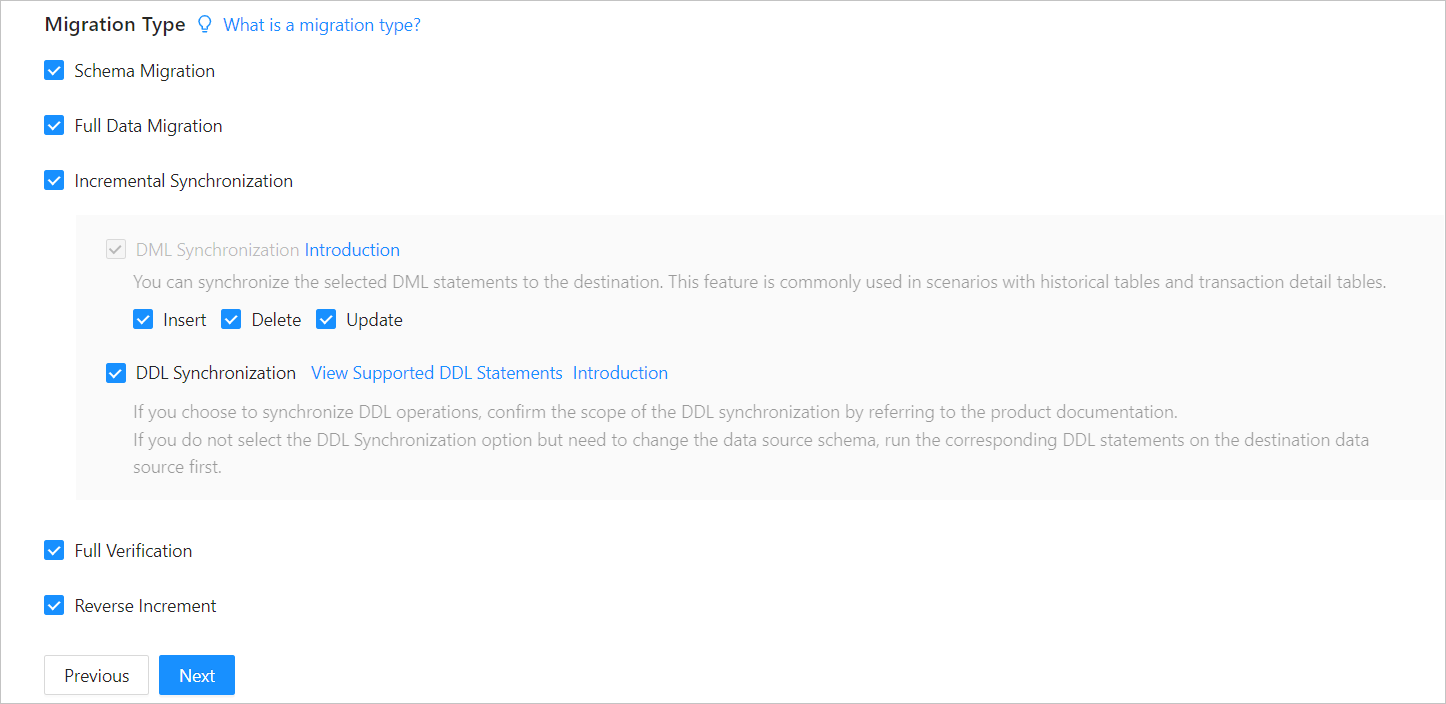 Migration typeDescription
Schema migration The definitions of data objects, such as tables, indexes, constraints, comments, and views, are migrated from the source database to the destination database. Temporary tables are automatically filtered out. Full migration If you select Full Migration, we recommend that you use the GATHER_SCHEMA_STATSorGATHER_TABLE_STATSstatement to collect the statistics of the Oracle database before data migration.Incremental synchronization Options for Incremental Synchronization are DML Synchronization and DDL Synchronization. You can select the operations as needed. For more information about DDL synchronization, see Synchronize DDL operations from an Oracle database to an Oracle tenant of OceanBase Database. Incremental Synchronization has the following limitations: - If you select DDL Synchronization, when you perform a DDL operation that cannot be synchronized by OMS in the source database, data migration may be interrupted.
- If the DDL operation is ADD COLUMN, we recommend that you set the column to a NULL column. If a new column contains default values, data migration may be interrupted.
You can add a new column and then specify the default values. - The source Oracle database does not support incremental synchronization of tables using the
empty_clob()function.
Full verification - If you select Full Verification, we recommend that you collect the statistics of the Oracle database and the Oracle tenant of OceanBase Database before full verification. For more information about how to collect statistics of an Oracle tenant of OceanBase Database, see Manually collect statistics.
- If you have selected Incremental Synchronization but did not select all DML statements in the DML Synchronization section, OMS does not support full verification.
Reverse incremental migration If a table to migrate has no primary key or unique index and a large amount of data in the table is changed, the reverse incremental migration will take a long time. In this case, you can add unique indexes in the source database.
You cannot select Reverse Increment in the following cases:- Data merge migration that involves multiple tables is enabled.
- Multiple source schemas map to the same destination schema.
(Optional) Click Next.
If you have selected Reverse Increment but the related parameters are not configured for the destination Oracle tenant of OceanBase Database, the More About Data Sources dialog box appears, prompting you to configure related parameters. For more information about the parameters, see Create a physical OceanBase data source or Create a public cloud OceanBase data source.
After you configure the parameters, click Test Connection. After the test succeeds, click OK.
Click Next. On the Select Migration Objects page, specify the migration objects and migration scope.
You can select Specify Objects or Match Rules to specify the migration objects.
Select Specify Objects. Then select the objects to be migrated on the left and click > to add them to the list on the right. You can select tables and views of one or more databases as the migration objects.
Notice
The names of tables to be migrated, as well as the names of columns in the tables, must not contain Chinese characters.
If the database or table name contains a double dollar sign ($$), you cannot create the migration project.
After you select migration objects by using the Specify Objects option, the DDL operations take effect only for selected objects, and table creation is not supported.
OMS automatically filters out unsupported tables.
OMS also allows you to import objects from text, rename objects, set row filters, view column information, and remove a single object or all objects to be migrated.
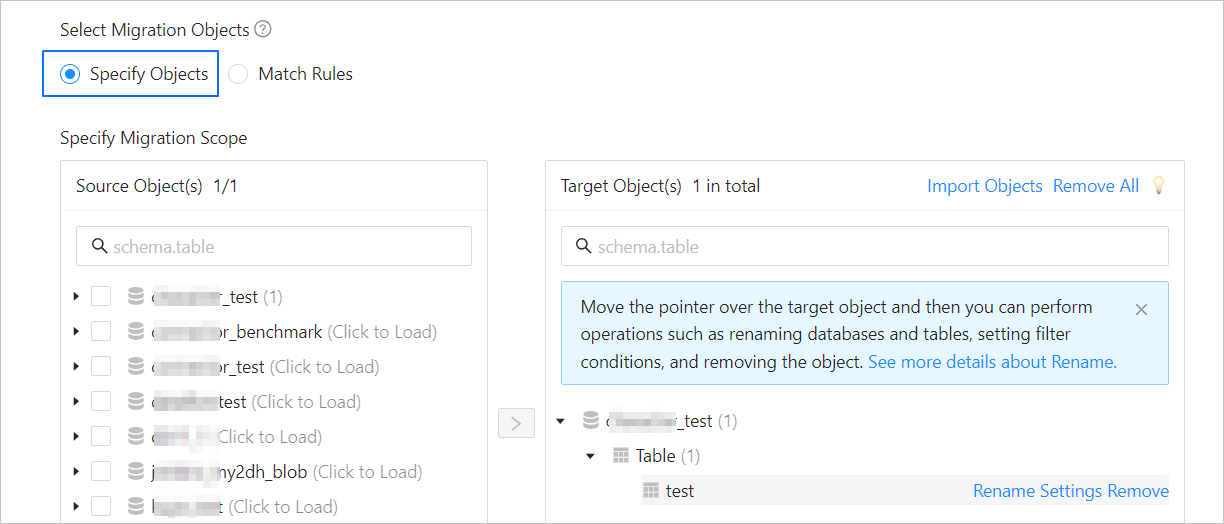 OperationDescription
Import objects - In the list on the right of the Specify Migration Scope section, click Import Objects in the upper-right corner.
- In the dialog box that appears, click OK.
Notice: This operation will overwrite previous selections. Proceed with caution. - In the Import Objects dialog box, import the objects to be migrated.
You can import CSV files to rename databases/tables and set row filtering conditions. For more information, see Download and import the settings of migration objects. - Click Validate.
- After the validation succeeds, click OK.
Rename objects OMS allows you to rename the migration objects. For more information, see Rename a migration or synchronization object. Configure settings OMS allows you to use the WHEREclause to filter rows. For more information, see Use SQL conditions to filter data.
You can also view column information of the migration object in the View Column section.Remove one or all objects During data mapping, OMS allows you to remove one or more selected objects to be migrated or synchronized to the destination. - To remove a single migration object:
In the list on the right of the Specify Migration Scope section, move the pointer over the target object, and click Remove. - To remove all migration objects:
In the list on the right of the Specify Migration Scope section, click Remove All in the upper-right corner. In the dialog box that appears, click OK.
When the source database is an Oracle database, if row filtering is enabled for columns other than the primary key and unique key columns, enable supplemental_log for the corresponding columns or all columns.
Execute the following statement to enable supplemental_log for the corresponding columns:
ALTER TABLE table_name ADD SUPPLEMENTAL LOG GROUP log_group_name (column1, column2, column3) ALWAYS;Execute the following statement to enable supplemental_log for all columns:
-- Enable database-level supplemental_log:
ALTER DATABASE ADD SUPPLEMENTAL LOG DATA (ALL) COLUMNS;
-- Enable table-level supplemental_log:
ALTER TABLE table_name ADD SUPPLEMENTAL LOG DATA (ALL) COLUMNS;
Select Match Rules. For more information, see Configure matching rules for migration objects.
Click Next. On the Migration Options page, configure the following parameters.
Full migration
The following parameters are displayed only if you have selected Full Data Migration on the Select Migration Type page.
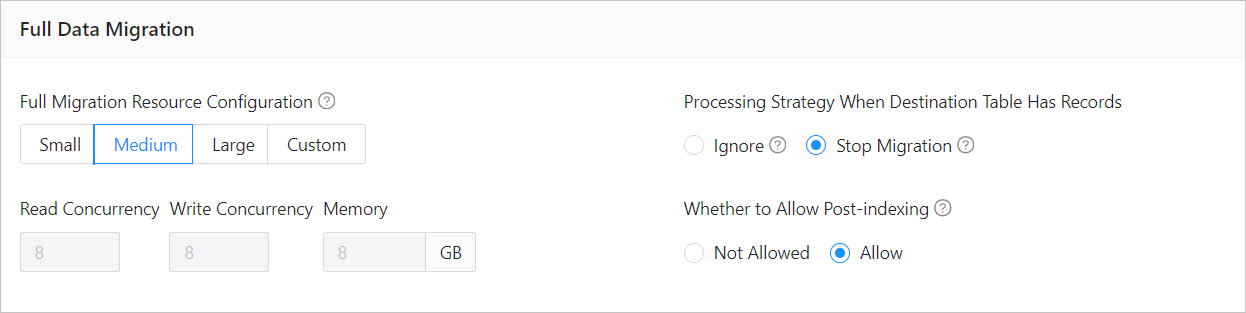 ParameterDescription
Full Migration Resource Configuration You can select Small, Medium, or Large to use the corresponding default values of Read Concurrency, Write Concurrency, and Memory. You can also customize the resource configurations for full migration. Through resource configuration for the Full-Import component, you can limit the resource consumption of a project in the full migration phase. Notice
In the case of custom configurations, the minimum value is 1, and only integers are supported.
Processing Strategy When Destination Table Has Records Valid values: Ignore and Stop Migration. - If you select Ignore, when the data to be written conflicts with the existing data of a destination table, OMS logs the conflicting data while retaining the existing data.
Notice
If you select Ignore, data is pulled in IN mode for full verification. In this case, the scenario where the destination contains more data than the source cannot be verified, and the verification efficiency will be decreased.
- If you select Stop Migration and a destination table contains records, an error is returned during full migration, indicating that the migration is not allowed. In this case, you must clear the data in the destination table before you can continue with the migration.
Notice
After an error is returned, if you click Resume in the dialog box, OMS ignores this error and continues to migrate data. Proceed with caution.
Whether to Allow Post-indexing Specifies whether to create indexes after the full migration is completed. Post-indexing can shorten the time required for full migration. For more information about the considerations on post-indexing, see the description below. Notice
This feature is supported only if you have selected both Schema Migration and Full Data Migration on the Select Migration Type page.
- Only non-unique key indexes can be created after the migration is completed.
- OceanBase Database V1.x does not support the post-indexing feature.
If post-indexing is allowed, we recommend that you adjust the parameters based on the hardware conditions of your OceanBase database and the current business traffic.
If you use OceanBase Database V4.x, adjust the following parameters of the
systenant and business tenants by using a CLI client.Adjust the parameters of the
systenant// parallel_servers_target specifies the queuing conditions for parallel queries on each server. // To maximize performance, we recommend that you set this parameter to a value greater than, for example, 1.5 times, the number of physical CPU cores. In addition, make sure that the value does not exceed 64, to prevent database kernels from contending for locks. set global parallel_servers_target = 64;Adjust the parameters of a business tenant
// Specify the limit on the file memory buffer size.
alter system set _temporary_file_io_area_size = '10' tenant = 'xxx';
// Disable throttling in V4.x.
alter system set sys_bkgd_net_percentage = 100;
If you use OceanBase Database V2.x or V3.x, adjust the following parameters of the
systenant by using a CLI client.// parallel_servers_target specifies the queuing conditions for parallel queries on each server. // To maximize performance, we recommend that you set this parameter to a value greater than, for example, 1.5 times, the number of physical CPU cores. In addition, make sure that the value does not exceed 64, to prevent database kernels from contending for locks. set global parallel_servers_target = 64; // data_copy_concurrency specifies the maximum number of concurrent data migration and replication tasks allowed in the system. alter system set data_copy_concurrency = 200;
- If you select Ignore, when the data to be written conflicts with the existing data of a destination table, OMS logs the conflicting data while retaining the existing data.
Incremental synchronization
The following parameters are displayed only if you have selected Incremental Synchronization on the Select Migration Type page.
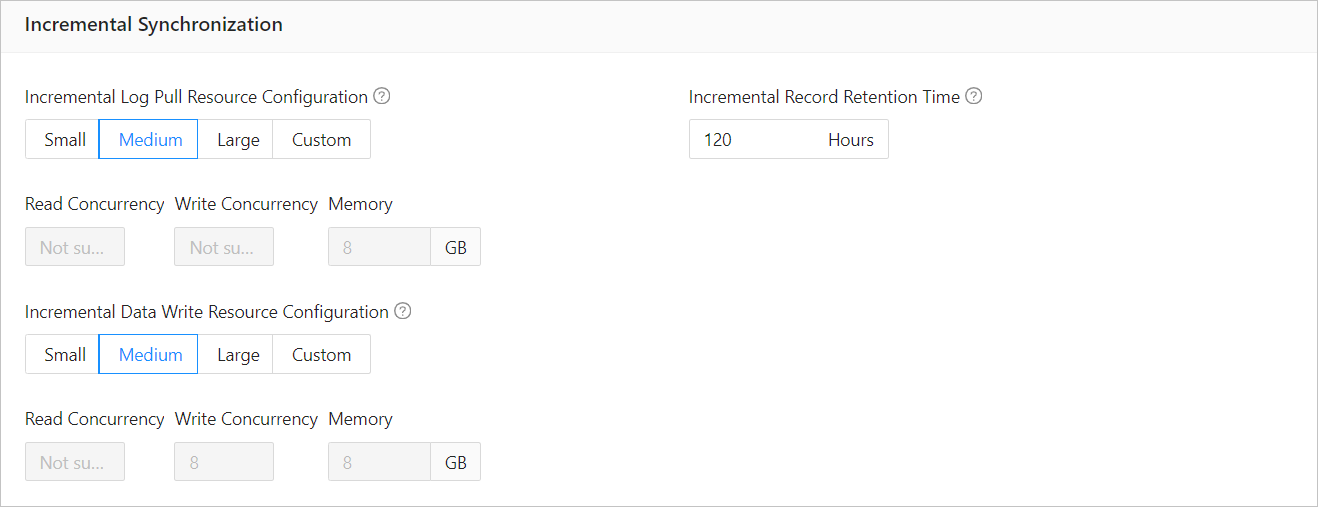 ParameterDescription
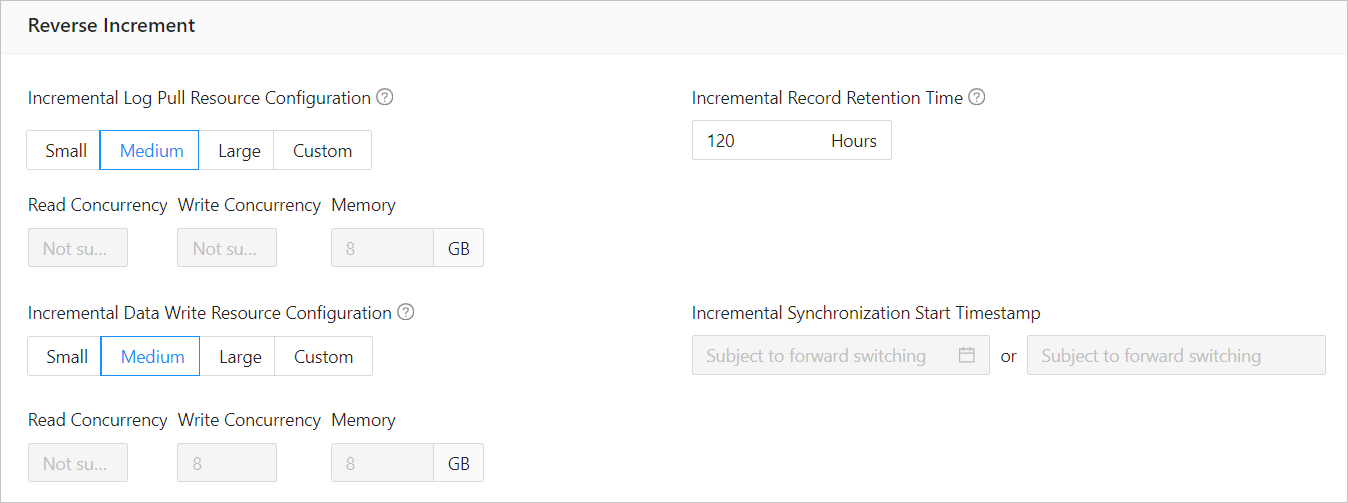
Incremental Log Pull Resource Configuration You can select Small, Medium, or Large to use the corresponding default value of Memory. You can also customize the resource configurations for incremental log pull. Through resource configuration for the Store component, you can limit the resource consumption of a project in log pull in the incremental synchronization phase. Notice
In the case of custom configurations, the minimum value is 1, and only integers are supported.
Incremental Data Write Resource Configuration You can select Small, Medium, or Large to use the corresponding default values of Write Concurrency and Memory. You can also customize the resource configurations for incremental data write. Through resource configuration for the Incr-Sync component, you can limit the resource consumption of a project in data writes in the incremental synchronization phase. Notice
In the case of custom configurations, the minimum value is 1, and only integers are supported.
Incremental Record Retention Time The duration that incremental parsed files are cached in OMS. A longer retention period results in more disk space occupied by the Store component. Incremental Synchronization Start Timestamp - If you have set the migration type to Full Data Migration, this parameter is not displayed.
- If you have selected Incremental Synchronization but not Full Data Migration, specify a point in time after which the data is to be synchronized. The default value is the current system time. For more information, see Set an incremental synchronization timestamp.
Reverse incremental migration
The following parameters are displayed only if you have selected Reverse Increment on the Select Migration Type page. The parameters for reverse incremental migration are consistent with those for incremental synchronization. You can select Reuse Incremental Synchronization Configuration in the upper-right corner.
Full verification
The following parameters are displayed only if you have selected Full Verification on the Select Migration Type page.
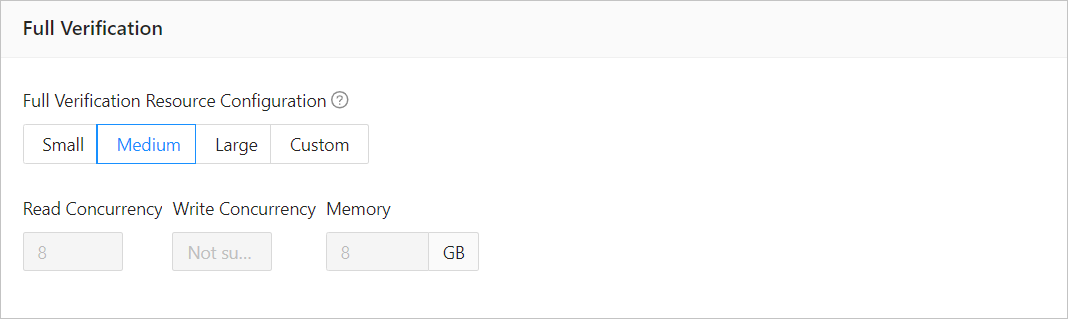 ParameterDescription
Full Verification Resource Configuration You can select Small, Medium, or Large to use the corresponding default values of Read Concurrency and Memory. You can also customize the resource configurations for full verification. Through resource configuration for the Full-Verification component, you can limit the resource consumption of a project in the full verification phase. Notice
In the case of custom configurations, the minimum value is 1, and only integers are supported.
Advanced options
Advanced migration parameters are displayed only if you have selected Schema Migration on the Select Migration Type page and the source and destination databases use different character sets.
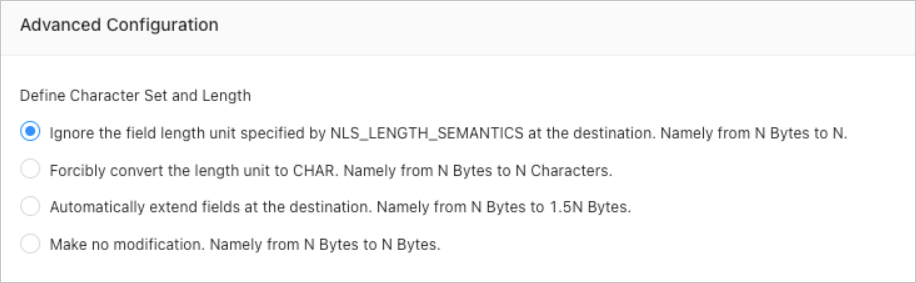
Note
If the character set of the source database is different from that of the destination database, for example, the character set of the source database is GBK while that of the destination database is UTF-8, fields may be truncated, which results in data inconsistency.
If you select Automatically Extend Fields at Destination, Namely from N Bytes to 1.5N Bytes, the data after conversion is truncated to the maximum length limit if it exceeds the limit.
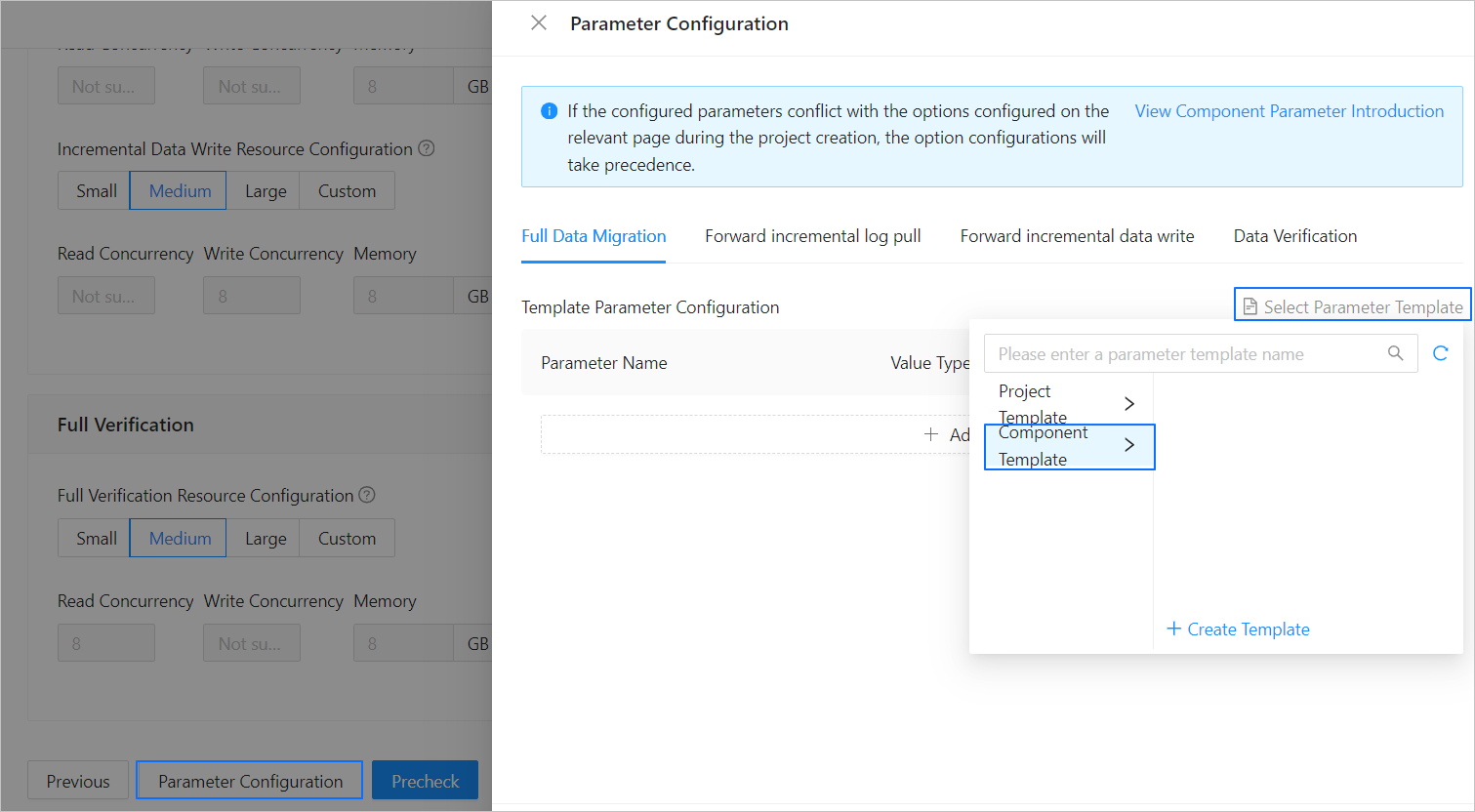
If the parameter settings on the page cannot meet your requirements, you can click Parameter Configuration in the lower part of the page to configure more specific settings. You can also reference an existing project or component template.
Click Precheck to start a precheck on the data migration project.
During the precheck, OMS checks the read and write privileges of the database users and the network connections of the databases. The data migration project can be started only after it passes all check items. You can perform one of the following operations if an error is returned during the precheck:
Identify and troubleshoot the problem and then perform the precheck again.
Click Skip in the Actions column of a failed precheck item. In the dialog box that appears, you can view the prompt for the consequences of the operation and click OK.
Click Start Project. If you do not need to start the project now, click Save to go to the details page of the data migration project. You can start the project later as needed.
OMS allows you to modify the migration objects when the data migration project is running. For more information, see View and modify migration objects. After a data migration project is started, the migration subtasks will be executed based on the selected migration types. For more information, see the "View migration details" section in the View details of a data migration project topic.