








After you log on to OceanBase Developer Center (ODC), the ODC homepage automatically appears.
The navigation bar on the top of the ODC homepage provides the link to Help Center and the options for you to switch the language and change the account password. The homepage provides the following four tabs:
Connection Management
Help
Related Tools
Related Resources

Switch the language
The display language of ODC is displayed in the upper-right corner of the ODC logon page. The default language is Simplified Chinese . You can click the language option to switch the display language. ODC supports English , Simplified Chinese , and Traditional Chinese .
Set an application password
You do not need to log on when you start the ODC client, because a default user is used. For security purposes, ODC client allows you to set an application password. After you set an application password, you must enter the password when you start the ODC client. If you enter the wrong password three times, the system will prompt you to reset the data. If you reset the data, connection information saved in ODC will be cleared.
Click Account in the upper-right corner of the navigation pane on the ODC homepage. In the list that appears, click Set Application Password . Specify a password in the dialog box. You can delete and change the password.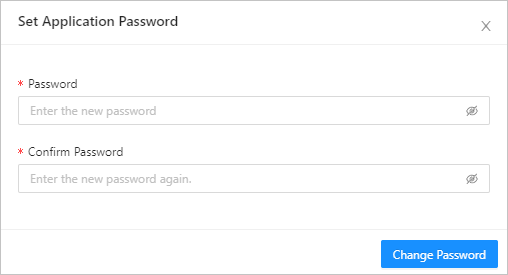
Connection management
The Connections tab displays all the connections you created, to help you view and manage connection information more efficiently. You can filter the connections by status by specifying Status above the list. The filtering conditions include All, Connected, Connection failed, and Connecting. You can also enter the search criteria in the search box to search for the target connection. The connection list displays the information about connections and allows you to perform some management actions on the connections. You can filter connections based on the information columns to conveniently view and search for connections. For more information about actions related to the connection list, see Manage connections.
Help
On the Help tab, you can view tutorial documents of some common actions in ODC, new features in the current version, and FAQ. Click the document you want to view on this tab. The introduction and link to the document are displayed in a pop-up dialog box. You can view the PDF file on the current page, or click the link to go to the official website and view the document.
Related tools
The Related Tools tab displays other OceanBase services. Click the desired tool on this tab. The introduction and link to the tool are displayed in a pop-up dialog box.
Related resources
The Related Resources tab displays resources that are operated by OceanBase or that contain OceanBase information. The tab provides links to resources such as OceanBase Official Website , OceanBase Community , OceanBase Cloud , and OceanBase College .