







You can create a role, grant privileges to the role, and manage privileges by role.
Create a role by using an SQL statement
You can use the CREATE ROLE statement to create a role. To create a role, you must have the CREATE ROLE privilege. For more information, see View user privileges. If you do not have the CREATE ROLE privilege, contact an administrator. For more information, see Modify user privileges.
The syntax for creating a role is as follows:
CREATE ROLE role_name
[ NOT IDENTIFIED
| IDENTIFIED BY password
] ;
Some notes about this:
NOT IDENTIFIED: If you specify this clause, a new role is not verified when it is enabled.IDENTIFIED BY password: This clause specifies the password to enable a role. If you specify this clause and assign the role to a user, the user must specify the password in theSET ROLEstatement to enable the role.If you do not specify the
NOT IDENTIFIEDorIDENTIFIED BY passwordclause, theNOT IDENTIFIEDclause is used for a new role by default.
Here are some examples:
Create a role named
role1:obclient> CREATE ROLE role1; Query OK, 0 rows affectedCreate a role named
role2and set its password to******.obclient> CREATE ROLE role2 IDENTIFIED BY ******; Query OK, 0 rows affectedFor more information about the
CREATE ROLEstatement, see CREATE ROLE.
Create a role in the OCP console
You can also create a database role in the OceanBase Cloud Platform (OCP) console.
Prerequisites
The tenant administrator role is assigned to you. Otherwise, request the OCP administrator to assign the role. For more information, see "Edit a user" in the OCP User Guide of the corresponding version.
Procedure
Log on to the OCP console.
In the left-side navigation pane, click Tenants to go to the Tenants page.
In the Tenants section, click the name of an Oracle tenant to go to the details page of the tenant.
In the left-side navigation pane, click User Management.
Click Create Role in the upper-right corner. In the dialog box that appears, specify role parameters.
The following table describes role parameters.
ParameterDescriptionRole Name The name of the role. The role name must start with a letter and end with a letter or a digit. The role name must be 2 to 32 characters in length and can contain letters, digits, and underscores ( _).Note
After you submit role settings, lowercase letters in the role name are converted to uppercase letters.System Permissions Optional. The parameter specifies the privileges that apply to all users. Roles Optional. You can assign your roles to the new role. 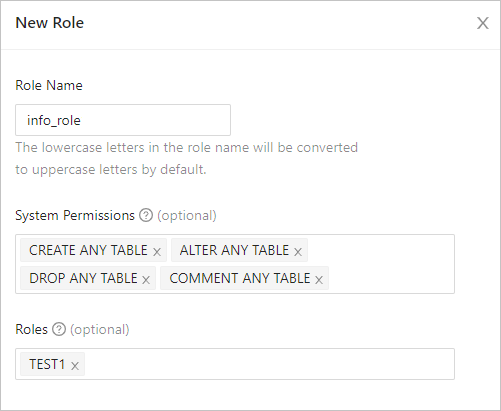
Click Submit.