A UNIQUE KEY constraint imposes a unique column value rule on a column or set of columns. This rule ensures that all values in the column or set of columns are unique and the values of the column or set of columns in any two rows of the table are not duplicated.
The following example shows the features of the syntax of a UNIQUE KEY constraint:
obclient> CREATE TABLE t1(c1 INT, c2 INT, CONSTRAINT t1_uk_c1_c2 UNIQUE(c1, c2));
Query OK, 0 rows affected

obclient> INSERT INTO t1 VALUES(1, 1);
Query OK, 1 row affected

obclient> INSERT INTO t1 VALUES(1, 1);
ORA-00001: unique constraint '1-1' for key 'T1_UK_C1_C2' violated

obclient> INSERT INTO t1 VALUES(null, 1);
Query OK, 1 row affected

obclient> INSERT INTO t1 VALUES(null, 1);
ORA-00001: unique constraint 'NULL-1' for key 'T1_UK_C1_C2' violated

obclient> INSERT INTO t1 VALUES(null, null);
Query OK, 1 row affected

obclient> INSERT INTO t1 VALUES(null, null);
Query OK, 1 row affected
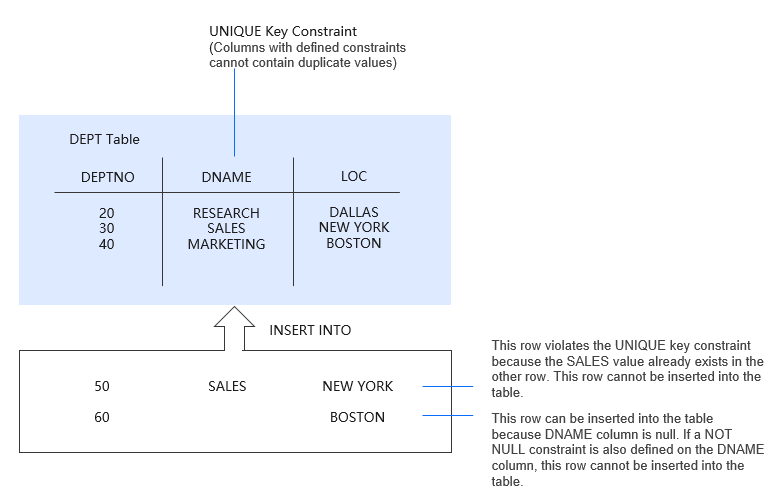
In the following figure, a UNIQUE KEY constraint is defined on the dname column of the dept table. In this case, duplicate department names are not allowed in this table, but you can insert null values into the dname column. If a NOT NULL constraint is also defined on the dname column, you cannot insert null values into the dname column.
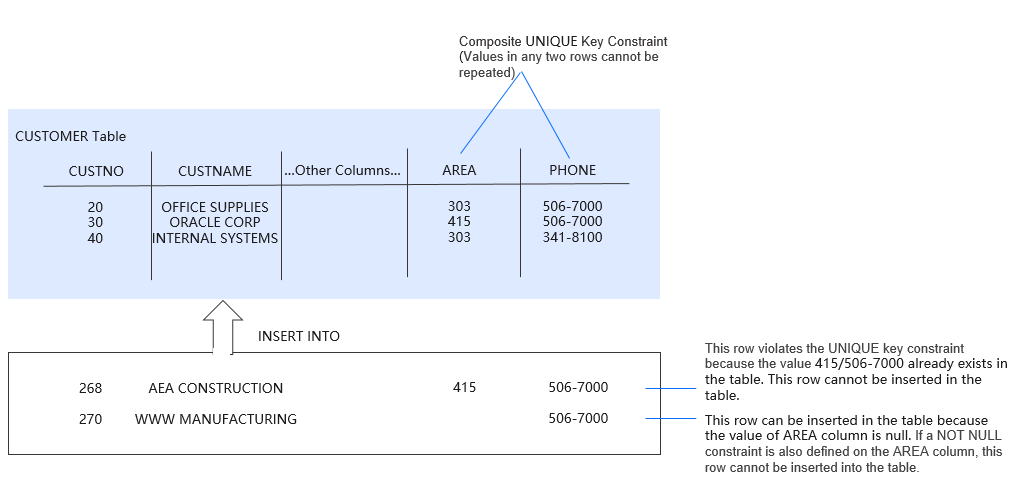
If a unique key consists of a set of columns, the set of columns is a composite unique key. In the following figure, the customer table has a UNIQUE KEY constraint. The key is a composite unique key that consists of the area and phone columns. In this case, the key values in any two rows cannot be duplicated, but you can insert null values into the columns. If a NOT NULL constraint is also defined on the columns, you cannot insert null values into the columns.
You can insert any number of rows into the customer table. However, the UNIQUE KEY constraint requires that the combination of the area code and telephone number in each row must be unique in the table. This prevents unintentional duplication of telephone numbers.