







After you initiate a major compaction, you can query internal tables to check the major compaction process.
You can view the compaction process by querying internal tables. Generally, the time required for a major compaction depends on the amount of data changed since the last major compaction. The time required by a major compaction increases when the amount of changed data increases after the last major compaction. The time required by a major compaction is also affected by the number of threads used for the compaction, the load of the cluster during the compaction, and whether rotating compaction is enabled.
View the major compaction process by querying internal tables
You can view the name column in the oceanbase.__all_zone table to check the major compaction process.
Log on to the
systenant as therootuser.Access the database named
oceanbase.obclient> USE oceanbase;Execute the following statement to view the major compaction progress:
obclient> SELECT * FROM __all_zone WHERE name LIKE '%merge%';You can view the
namecolumn in the returned result. The following table describes the parameters in thenamecolumn.ParameterDescriptionis_merge_error Indicates whether an error occurred during the major compaction. last_merged_version The last major compaction version of all zones in the cluster. merge_status The major compaction status. Valid values: IDLE: No major compaction is in progress.ERROR: An error occurred during the major compaction.TIMEOUT: The major compaction timed out but is not suspended. Only a TIMEOUT flag is attached.MERGING: The major compaction is in progress.
all_merged_version All major compaction versions of all zones in the cluster. is_merge_timeout Indicates whether the major compaction has timed out. last_merged_time The time of the last major compaction. last_merged_version The version of the last major compaction. merge_start_time The time when the major compaction of the zone started.
View the major compaction process in OCP
After you initiate a major compaction, you can view the major compaction process in OceanBase Cloud Platform (OCP).
Log on to the OCP console.
The Clusters page automatically appears.
In the Clusters list, find the target cluster and click its name.
In the left-side navigation pane of the page that appears, click Compaction Management.
On the Details of Major Compaction tab, view the details about the major compaction.
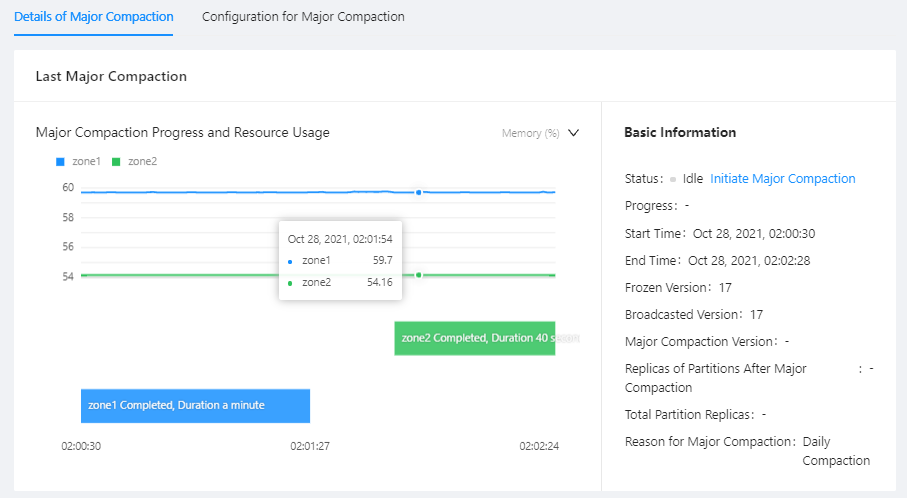
The Details of Major Compaction tab shows the information about the last major compaction in the cluster. If a major compaction is in progress, the information about the ongoing major compaction is displayed. If no major compaction is in progress, the last major compaction version is displayed with details.
Note
For a major compaction that is in progress, the estimated completion time is displayed after Start Time and End Time. The estimated completion time is estimated based on the average duration of the last three major compactions, which may differ greatly from the actual completion time.
Generally, in a stable environment, the estimated completion time is close to the actual completion time. However, for a newly deployed environment, the accuracy of the estimated completion time is relatively low due to the lack of historical data for estimation.
In addition, you can also check the compaction progresses of partitions based on information on the Total Partition Replicas and Replicas of Partitions After Major Compaction tabs, and then estimate the completion time.
Notice
The completion time estimated based on the number of compacted partition replicas is still inaccurate, because data in different partitions may vary greatly, resulting in largely varying compaction time for the partitions.