







Before you deploy OceanBase Migration Service (OMS), you must add an OMS configuration file.
Prerequisites
You have added the server where OMS is to be deployed.
If you want to use a custom OMS Docker image, make sure that the custom image file has been uploaded to the /data_dir/oms directory on the OceanBase Admin Toolkit (OAT) server.
Procedure
In the left-side navigation pane, choose Service Deployment > Config Files.
In the upper-right corner of the page, choose Add Config File > OMS. The Add OMS Config Files page appears.

Enter the configuration file information.
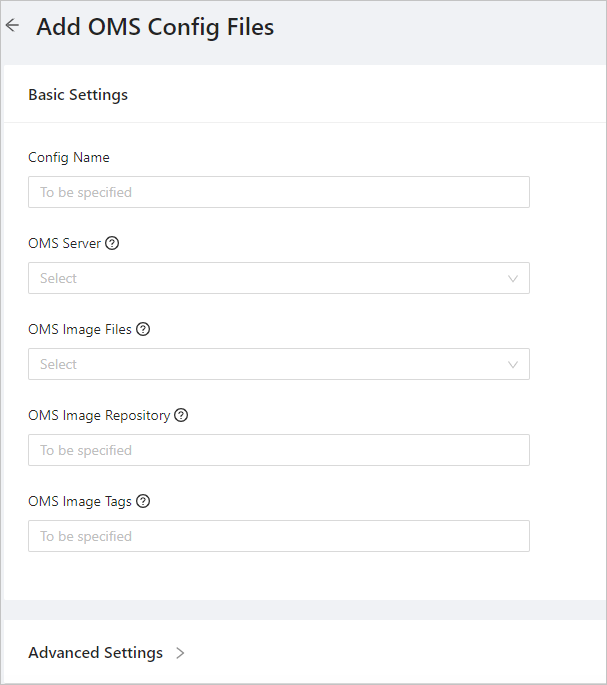
The following table describes the fields of OMS.
FieldDescriptionBasic Settings Config Name The name of the OMS configuration file. OMS Server The server where OMS is to be deployed. OMS Image File The TAR package of the OMS image.
You can either select the default TAR package or click Others to select the TAR package of a custom image.OMS Image Repository The address of the OMS image.
If you select the default TAR package, the system automatically fills in the field with the corresponding image address.OMS Image Tag The tag of the OMS image.
If you select the default TAR package, the system automatically fills in the field with the corresponding image tag.Advanced Settings OMS Service Port The port number of the OMS service. Default value: 8088. OMS Container CPU The number of CPU cores allocated to the OMS container. Default value: 12, indicating 12 cores. OMS Container Memory The memory allocated to the OMS container. Default value: 24G, indicating 24 GB. OMS Container Name The name of the OMS container. Default value: oms. OMS MetaDB Tenant The MetaDB tenant of OMS. Default value: oms_meta. It is created in the MetaDB cluster. Click OK.