







You can modify tenant-level parameters by using SQL statements or in the OceanBase Cloud Platform (OCP) console.
Modify tenant-level parameters by using SQL statements
You can set tenant-level parameters for the sys tenant or user tenants. Tenant-level parameters configured for the sys tenant apply to the sys tenant and other tenants. Tenant parameters configured for a user tenant apply only to this user tenant.
MySQL mode
In MySQL mode, use the following syntax to set tenant-level parameters:
ALTER SYSTEM [SET] parameter_name = expression [SCOPE = {MEMORY | SPFILE | BOTH}]
  [COMMENT [=] 'text']
     [SERVER [=] 'ip:port' | ZONE [=] 'zone']
         [TENANT=all|TENANT_NAME];
Some notes about this:
expression: specifies the value of the modified parameter.SCOPE: specifies the effective scope of the parameter. Default value:BOTH. Parameters:MEMORY: indicates that only parameters in the memory can be modified, and the modification takes effect immediately. The modification becomes invalid after the server is restarted. However, no parameter supports this modification.SPFILE: indicates that only parameters in the configuration table can be modified. The modification takes effect after the server is restarted.BOTH: indicates that parameters can be modified in both the configuration table and the memory. The modification takes effect immediately and remains effective after the server is restarted.
SERVER: the server to be modified in the specified tenant.ZONE: the zone to be modified in the specified tenant.ALTER SYSTEMallows you to specify either a zone or server, not both. You can specify only one zone or server at a time.If you do not specify a zone or server when you modify a tenant-level parameter, the modification takes effect for all zones and servers in the tenant.
The
TENANT=all | TENANT_NAMEclause is used only by thesystenant to modify the parameters of other tenants or all tenants.
Here are some examples:
Set a parameter of the
mytenanttenant from thesystenant.obclient> ALTER SYSTEM SET clog_max_unconfirmed_log_count=1600 TENANT='mytenant';Set a parameter of the
systenant from the system.obclient> ALTER SYSTEM SET clog_max_unconfirmed_log_count=1600;Set a parameter of a user tenant as the administrator of the user tenant.
obclient> ALTER SYSTEM SET clog_max_unconfirmed_log_count=1600 SCOPE=SPFILE;

obclient> ALTER SYSTEM SET clog_max_unconfirmed_log_count=1600;

obclient> ALTER SYSTEM SET clog_max_unconfirmed_log_count=1600 SERVER='192.168.100.1:2882';

obclient> ALTER SYSTEM SET clog_max_unconfirmed_log_count=1600 ZONE='z1';
Oracle mode
In Oracle mode, use the following syntax to set tenant-level parameters:
ALTER SYSTEM SET parameter_name = expression;
For example, set the parameter of a tenant after you log on as the administrator of the tenant.
obclient> ALTER SYSTEM SET clog_max_unconfirmed_log_count=1600;
Modify tenant-level parameters in the OCP console
You can also modify tenant-level parameters in the OCP console.
Prerequisites
You are granted the permissions to manage the tenant whose parameters you want to modify. If you do not have the required permissions, request the OCP administrator to assign the role. For more information, see "Edit a user" in the OCP User Guide of the corresponding version.
Procedure
Log on to the OCP console.
In the left-side navigation pane, click Tenants.
In the Tenants list, find the target tenant and click its name.
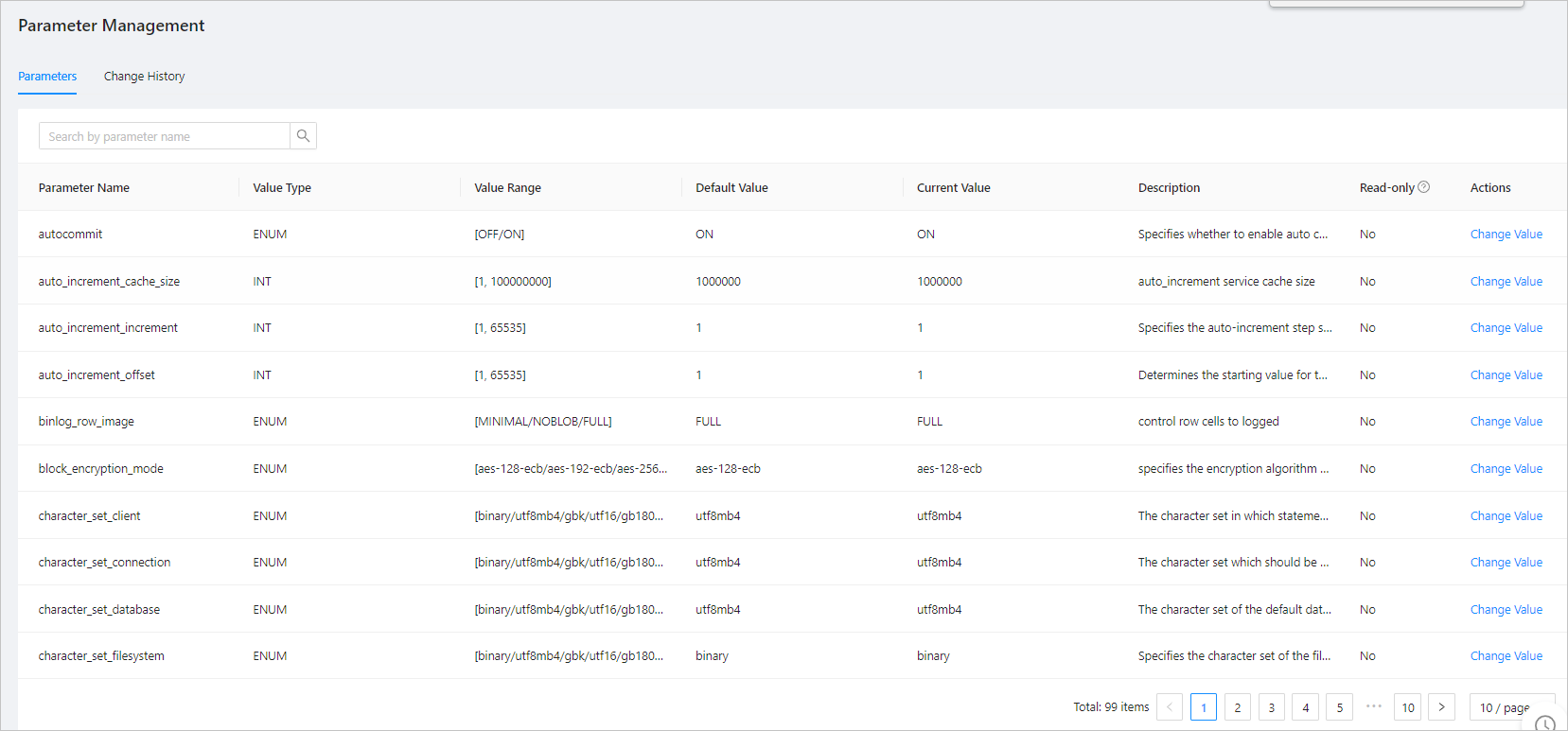
In the left-side navigation pane of the page that appears, click Parameter Management.
(Optional) In the search box of the Parameters page, enter a parameter name to do a fuzzy search.
Find the parameter to be modified and click Change Value.
In the dialog box that appears, modify the parameter value.
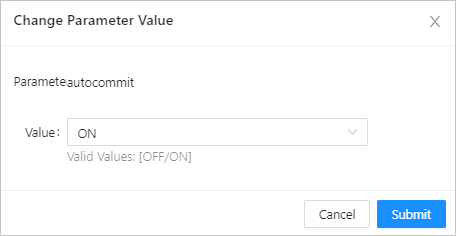
Click Submit.