







This topic describes how to physically restore data by using an SQL statement or in OceanBase Cloud Platform (OCP). OceanBase Database supports tenant-level point-in-time full restore.
OceanBase Database supports restore in the same cluster or to a different cluster.
Perform full restore by using an SQL statement
After you execute the restore statement, the system restores the required macroblock data from the corresponding full and incremental backups at the backup destination to the destination tenant and then pulls and replays the transaction logs.
Prerequisites
The preparations for restore are completed. For more information, see Preparations for restore.
Procedure
Log on to the
systenant as therootuser.Optional. Execute the following statement to set a restore password for the backup.
You need to set a restore password for the backup only if a password is added during data backup.
obclient> SET DECRYPTION IDENTIFIED BY 'password';In the statement,
passwordmust be replaced with the password added during data backup. If the password for full backup is different from the password for incremental backup, you must enter the password for full before the password for incremental backup and separate them with a comma.Example:
obclient> SET DECRYPTION IDENTIFIED BY '******';


obclient> SET DECRYPTION IDENTIFIED BY '******','******';
Execute the following statement to start a restore task:
obclient> ALTER SYSTEM RESTORE <dest_tenant_name> FROM <source_tenant_name> at 'uri' UNTIL 'timestamp' WITH 'restore_option';The following table describes the parameters.
ParameterDescriptiondest_tenant_name The name of the destination tenant to which the data is to be restored. source_tenant_name The name of the source tenant for which the data is backed up. uri The value of backup_destspecified during backup.timestamp The restore timestamp, which must be later than or equal to START_TIMEin theCDB_OB_BACKUP_SET_DETAILSview of the earliest data backup, and earlier than or equal toMAX_NEXT_TIMEin theCDB_OB_BACKUP_ARCHIVELOG_SUMMARYview of the log backup.restore_option The restore options, including backup_cluster_name,backup_cluster_id,pool_list,locality,primary_zone, andkms_encrypt.backup_cluster_name: required. The name of the source cluster.backup_cluster_id: required. Same as the value ofcluster_idof the source cluster.pool_list: required. The resource pool of the tenant. Multiple resource pools must be separated with commas (,).locality: optional. The locality of replicas of the new tenant, which must match the zone information ofpool_listof the cluster where the new tenant is located. By default, the locality of the source tenant is used. If the value specified for this parameter does not match the zone information ofpool_listof the cluster where the new tenant is located, the system resets the locality to the default value. That is, the system sets an F replica for each zone based onzone_listof resource_pool.
For example, the locality of the source tenant is"F@z1,F@z2,F@z3", and the zone distribution of the cluster where the new tenant is located is"z1,z2,z3,z4", the locality of the source tenant is used as the locality of the new tenant. If the locality of the source tenant is"F@z1,F@z2,F@z3,F@z4,F@z5", and the zone distribution of the cluster where the new tenant is located is"z1,z2,z3", the locality of the new tenant covers all zones of this cluster. That is, the locality of the new tenant is"F@z1,F@z2,F@z3".primary_zone: optional. The preferred position of the leader of the new tenant, which must matchpool_listandlocality. That is, it must match the zone information and meet the constraint thatprimary_regionmust have at least two Paxos members. By default, the primary zone of the source tenant is used. If the value specified for this parameter does not matchpool_listorlocalityof the cluster where the new tenant is located, the system resetsprimary_zoneto the default value. That is, leaders are randomly distributed to the zones based onzone_listoflocality.
For example, if the locality of the source tenant is"F@z1,F@z2,F@z3", the primary zone isz1, and the zone distribution of the cluster where the new tenant is located is"z1,z2,z3,z4", the primary zone of the new tenant is alsoz1. If the locality of the source tenant is"F@z1,F@z2,F@z3,F@z4,F@z5", the primary zone isz1, and the zone distribution of the cluster where the new tenant is located is "z1,z2,z3", the locality of the new tenant is"F@z1,F@z2,F@z3"and the primary zone is"z1,z2,z3".kms_encrypt: optional. Specifies whether encryption information is required. If the value istrue, the value ofkms_encrypt_infospecified in restore preparations is required for restore.
Examples:
NFS
obclient> ALTER SYSTEM RESTORE restored_trade FROM trade at 'file:///data/nfs/backup' until '2020-05-21 09:39:54.071670' with 'backup_cluster_name=xxx&backup_cluster_id=xxx&pool_list=xxx';OSS
obclient> ALTER SYSTEM RESTORE restored_trade FROM trade at 'oss://oceanbase-test-bucket/backup/?host=xxx.aliyun-inc.com&access_id=xxx&access_key=xxx' until '2020-03-23 08:59:45' with 'backup_cluster_name=ob20daily.backup&backup_cluster_id=1&pool_list=restore_pool';COS
obclient> ALTER SYSTEM RESTORE restored_trade from trade at 'cos://oceanbase-test-appid/backup?host=cos.ap-nanjing.myqcloud.com&access_id=xxx&access_key=xxx&appid=xxx' until ' 2020-03-23 08:59:45' with 'backup_cluster_name=ob20daily.backup&backup_cluster_id=1&pool_list=restore_pool';OBS
obclient> ALTER SYSTEM RESTORE restored_trade from trade at 'obs://oceanbase-test-appid/backup?host=obs.cn-east-2.myhuaweicloud.com&access_id=xxx&access_key=xxx&appid=xxx' until ' 2020-03-23 08:59:45' with 'backup_cluster_name=ob20daily.backup&backup_cluster_id=1&pool_list=restore_pool';
After you initiate a restore task, you can query the corresponding views to check the restore progress and results. For more information, see View the restore progress and results.
Perform full restore in OCP
You can also restore a cluster from a backup in OCP.
Log on to the OCP console.
Go to the Initiate Recovery page by using one of the following methods.
Method 1: Initiate a restore on the Recovery page.
In the left-side navigation pane, choose Backup & Recovery > Recovery.
On the Recovery page, click Initiate Recovery in the upper-right corner.
Method 2: Initiate a restore on the O&M page of a cluster.
In the left-side navigation pane, click Clusters to go to the Clusters page.
Click the target cluster in Clusters or Resource Usage to go to the Overview page of the cluster.
In the left-side navigation pane, click Backup & Recovery.
On the Backup & Recovery page of the cluster, click Initiate Recovery.
Note
You cannot restore the cluster by using Method 2 in the following circumstances:
The cluster is not in the running state.
The cluster does not have a backup strategy.
OCP of this version does not support the restore of clusters without backup strategies by using Method 2.
Optional. Specify the storage configuration fields if you use Method 1.
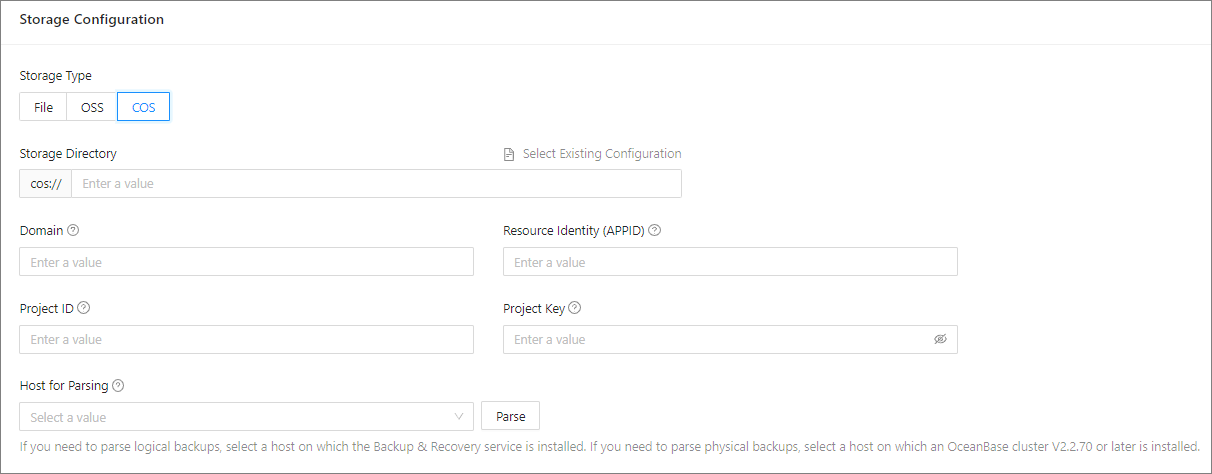 ParameterDescription
Storage Type You can select one of the following media: - File: Network File System (NFS) media.
- OSS: Alibaba Cloud Object Storage Service (OSS) is supported only in OceanBase Database V2.2.76 and later.
- COS: Tencent Cloud Object Storage (COS) is supported only in OceanBase Database V2.2.77 BP2 and later.
Storage Directory Select the directory in which the backup files are stored. - You can click Select Existing Configuration to automatically populate the following fields: Domain, User, AccessKey Pair, and Host for Parsing.
- You can also manually specify the fields.
Domain Enter the domain name of the cloud storage of backup files. - If you select OSS in the Storage Type field, enter the domain name to access the file stored at OSS of Alibaba Cloud.
- If you select COS in the Storage Type field, enter the domain name to access the file stored at COS of Tencent Cloud, for example, cos.ap-shanghai.myqcloud.com.
User This parameter is displayed only when Storage Type is set to OSS. It is the user used to access the cloud storage of backup files. AccessKey Pair This parameter is displayed only when Storage Type is set to OSS. It is the AccessKey pair used to access the cloud storage of backup files. Resource Identity (APPID) When Storage Type is COS, move the pointer over the question mark (?) and specify the value as prompted. Project ID When Storage Type is COS, move the pointer over the question mark (?) and specify the value as prompted. Project Key When Storage Type is COS, move the pointer over the question mark (?) and specify the value as prompted. Host for Parsing - When Storage Directory is set to Select Existing Configuration, the host for parsing is automatically populated. If you manually enter a value for Storage Directory, the host for parsing is not automatically populated. You can manually select a host as prompted.
- Click Parse to obtain the list of clusters that can be restored.
Specify the parameters in the Recovery Source and Time section by selecting the values from the corresponding drop-down lists.
ParameterDescriptionSource Cluster If you initiate a restore task from the O&M page of a cluster, the cluster is the source cluster by default, you do not need to specify this parameter. Source Tenant Select the tenant to restore. Recovery Date Select a date within the specified restorable time range. Restoration Point in Time Select a point in time within the specified time range. 
Select the destination tenant of the restore task. Select a cluster in the Running state from the drop-down list and enter the new tenant name.
The following types of clusters cannot be used as the restore destination:
Clusters in the primary/standby mode.
You cannot select a cluster in the primary/standby mode because physically restored data cannot be synchronized to the corresponding standby or primary database. For a primary or standby database, only clog data can be synchronized.
Clusters in the Unavailable state.
Specify the following parameters in the Zone Configuration section and set the priorities of the zones.
ParameterDescriptionReplica Type Valid values: - Full-featured Replica: A general-purpose replica that has a full set of data types and features including transaction logs, a MemTable, and an SSTable. A full-featured replica can switch to the leader role efficiently to provide services.
- Log Replica: A replica that contains only logs. It does not have a MemTable or an SSTable. It provides log services for external applications and participates in log voting. It can facilitate the restore of other replicas, but it cannot become the leader to provide database services.
- Read-only Replica: A replica that contains full logs, MemTables, and SSTables. You can select this type of replica for applications that does not require high consistency in data reading.
Unit Specification The specification of the resources that the replica occupies. - You can select an existing specification or
- create a specification as needed and select the new one.
Units The amount of resource units occupied by the replica. 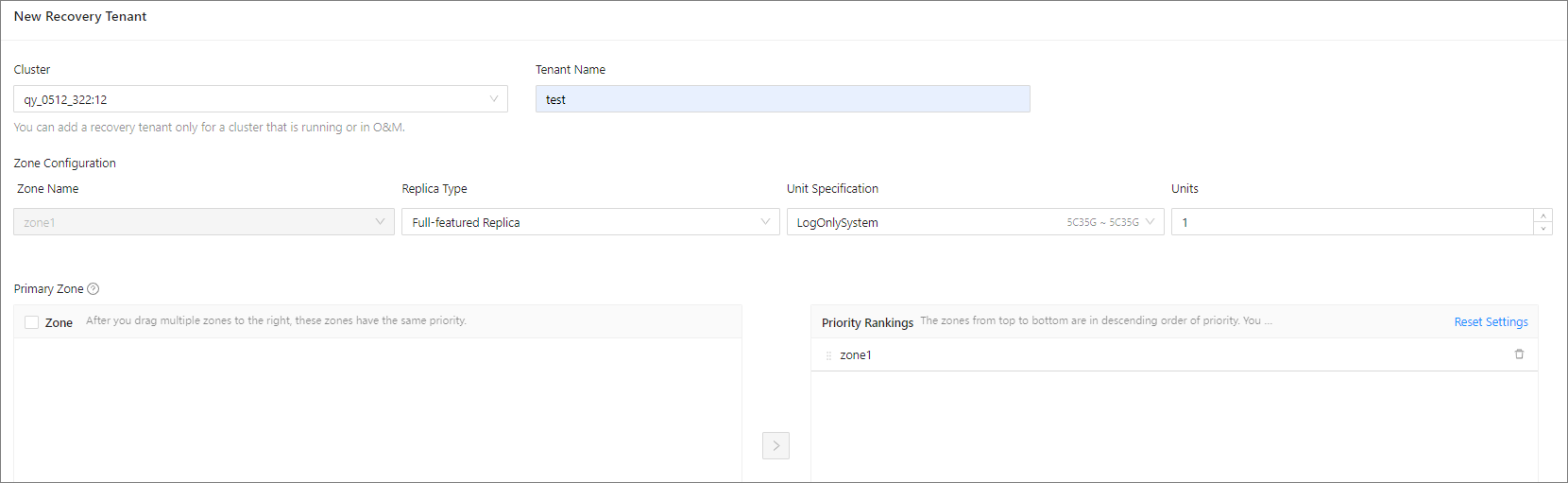
Click Initiate Recovery.