







This topic describes how to set backup_zone when three IDCs are deployed across two regions.
Sample scenario
When an OceanBase cluster is deployed across cities, some OBServer nodes in the cluster may fail to access the backup media. In this case, you must set backup_zone to specify the OBServer nodes whose data is to be backed up.
The following figure shows the architecture of three IDCs deployed across two regions.
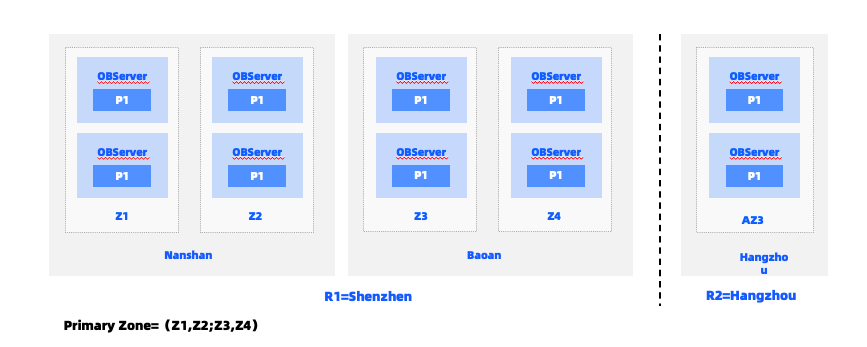
As shown in the preceding figure, five replicas of the primary cluster are distributed among three IDCs across two cities: two in Nanshan District, Shenzhen, two in Bao'an District, Shenzhen, and one in Hangzhou. Under normal circumstances, leaders are concentrated in the two zones in Nanshan District. Assume that a network file system (NFS) is deployed in the IDC in Nanshan District, Shenzhen as a backup medium, and the NFS is accessible across IDCs in Shenzhen but not across cities. In this case, OBServer nodes in the IDCs in Nanshan District and Bao'an District can access the NFS. Access from OBServer nodes in the IDC in Bao'an District incurs cross-IDC network traffic. OBServer nodes in the IDC in Hangzhou cannot access the NFS.
Procedure
Recommended backup zone configurations for the preceding sample scenario:
Specify
z1,z2,z3, andz4as backup sources.Specify that
z1andz2have the same priority,z3andz4have the same priority, andz1andz2have a higher priority thanz3andz4.
To set backup_zone, perform the following steps:
Log on to the database as the
rootuser of thesystenant.Execute the following statement to specify backup zones:
obclient> ALTER SYSTEM SET backup_zone = 'z1,z2;z3,z4';
Considerations
Take note of the following limitations when you set backup_zone:
All tenants including the
systenant of the primary zone must be included in the zones specified bybackup_zone.All leaders must be distributed among the zones specified by
backup_zone.To check whether all leaders of user tables, system tables, and RootService are distributed among the zones specified by
backup_zone, perform the following steps:Log on to the
systenant as therootuser.Access the database named
oceanbase.obclient> USE oceanbase;Query the zones where leaders of user tables, system tables, and RootService are located.
User tables
obclient> select zone, count(*) from __all_virtual_meta_table where role=1 group by zone;
+------+----------+
| zone | count(*) |
+------+----------+
| z1   |       21 |
+------+----------+
System tables
obclient> select zone, count(*) from __all_root_table where role=1 group by zone;
+------+----------+
| zone | count(*) |
+------+----------+
| z1   |     1476 |
+------+----------+
RootService
obclient> select zone, count(*) from __all_virtual_core_meta_table where role=1 group by zone;
+------+----------+
| zone | count(*) |
+------+----------+
| z1   |        1 |
+------+----------+