







You can deploy standby clusters in OceanBase Cloud Platform (OCP).
Prerequisites
Take note of the following rules when you deploy standby clusters:
During the deployment of a standby cluster, the system automatically synchronizes full data from the primary cluster. This process imposes specific bandwidth requirements. During normal synchronization, only REDO logs are synchronized. This synchronization process is equivalent to creating a follower.
The version of the standby cluster must be the same as that of the primary cluster. If you want to upgrade the version, OCP supports rolling upgrades of the primary and standby clusters. During an upgrade, both the primary and standby clusters are upgraded. Specifically, the standby cluster is upgraded before the primary cluster.
Background
The user interface of OCP may vary with the version. The following procedure describes how to check cluster parameters in OCP V3.1.0. For information about operations in OCP of another version, see User Guide of the corresponding OCP version.
Procedure
Log on to the OCP console.
The Clusters page automatically appears.
You can go to the Create Standby Cluster page in the following ways:
Click Create Cluster in the upper-right corner of the Cluster Overview page. On the Create Cluster page, choose Standby Cluster for Cluster Type, and select the corresponding primary cluster in the Primary Cluster drop-down list.
In the Clusters list on the Cluster Overview page, find the target primary cluster and click its name. In the upper-right corner on the Overview page, choose Create Standby Cluster.
On the Create Cluster page, configure the deployment mode of the standby cluster.
By default, three zones are added for a cluster. To deploy more than three zones for the cluster, click Add to add new zones.
To deploy less than three zones for the cluster, click the delete icon next to the zone to be deleted.
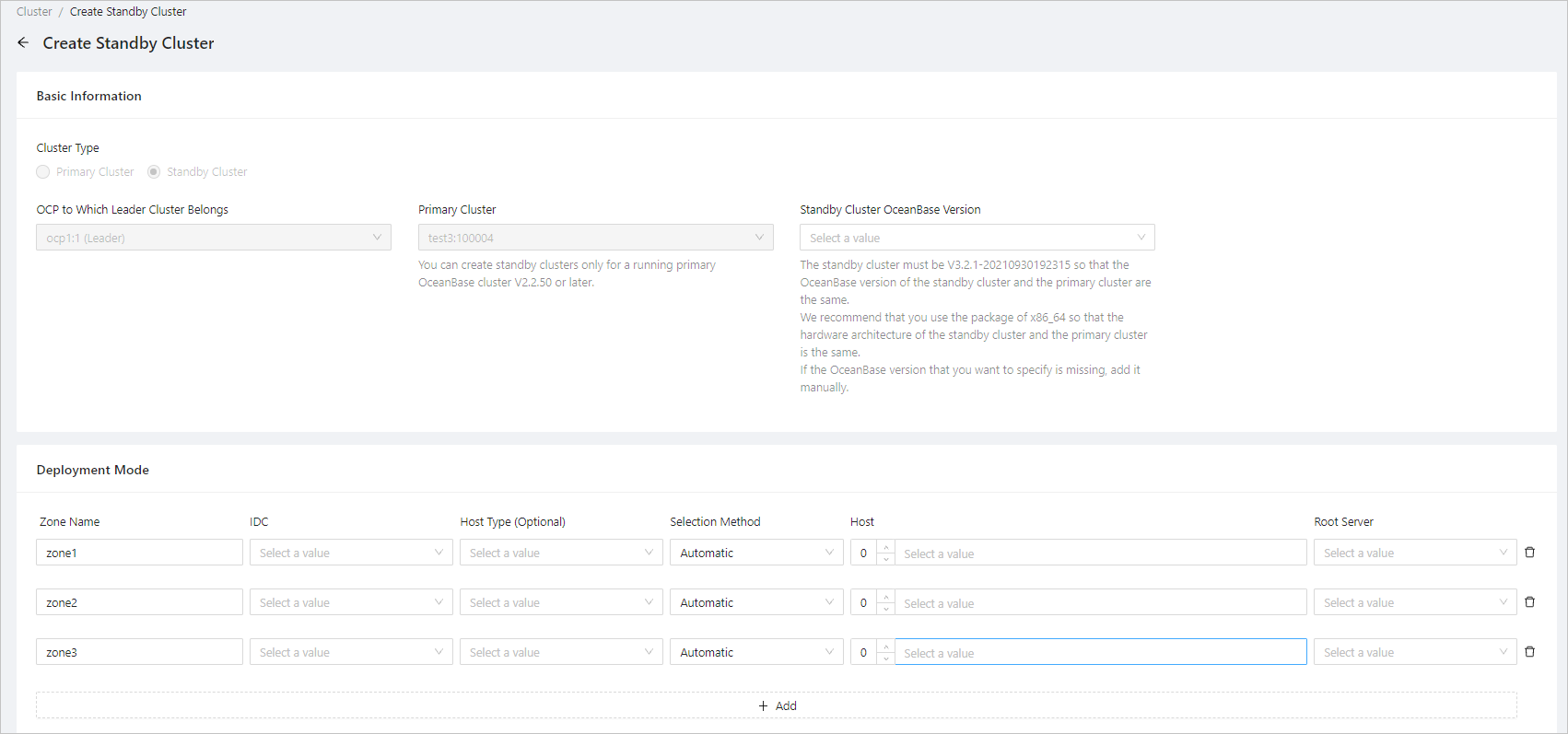
The following table describes the settings for each zone.
ParameterDescriptionZone Name Generally, a default name is provided. You can set a custom name as needed. IDC The IDC of the zone. Each zone can be deployed in only one IDC. Host Type Optional. If you select a host type, the host list displays only the hosts of the specified host type. Selection Method Choose Automatic or Manual. IP You can select multiple IP addresses.
If Selection Method is set to Automatic, you only need to enter the number of hosts, and OCP automatically selects the specified number of hosts from the available hosts. If Selection Method is set to Manual, you need to manually select the IP addresses from the list.Root Server Location You can select an IP address for the Root Server. Click Submit.
In the Confirm Information dialog box, confirm the information and then click OK.
After a standby cluster is deployed, the system selects the latest major version as a snapshot to create partition replicas for system tables and user tables under user tenants in the standby cluster, initializes log streams, and then selects partition leaders. The leader of each partition automatically copies full data of the specified version from the primary cluster, synchronizes the data to the majority of replicas, and then automatically synchronizes the REDO logs until the partition is synchronized with the primary cluster.