







OceanBase Developer Center (ODC) allows you to create a type on a GUI. This topic describes how to create a type in ODC.
Log on to OceanBase Developer Center (ODC) and click the name of the target connection to go to the corresponding connection management page. You can click Type in the left-side navigation pane to get a list of types To create a type, click + in the upper-right corner of the type list or click Create in the navigation bar on the top of the page.
Click Create. In the Create Type dialog box, specify the following information.
Name: specifies the name of the new object.
Type: specifies whether the new type object is Object Type, Array Type, or Table Type.
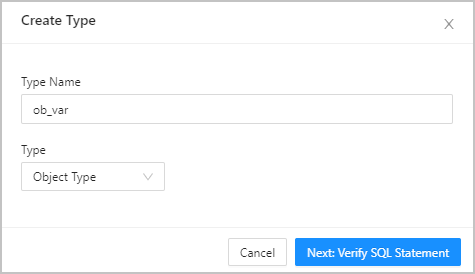
After you specify the preceding information, click Next Step to go to the statement compilation page. This page displays the corresponding type definition statements generated based on the information you specified in the Create Type dialog box. You must complete the statements based on your needs. After you complete the statements, click Create to complete the type creation.
In addition, the toolbar on the editing page provides the following buttons:
Description |
Description |
|---|---|
| Format | Click this button to apply formatting, such as indentation, line break, and keyword highlighting, to the selected SQL statements or all the SQL statements in the current SQL window. |
| Find and Replace | You can enter text in the search field to find the specific content and enter text in the replacement field to replace the content found. |
| Undo | Click this button to undo the last operation. |
| Redo | Click this button to reverse an Undo operation. |
| Case Sensitivity | The system supports three configurations: All Caps, All Lowercase, and Capitalize the first letter. Click this button to convert the selected statements in the script to the corresponding capitalization format. |
| Indent | You can add indents to or delete indents from the statements that you selected. |
| Remarks | You can click Add Comments to convert the statements that you select into comments or click Delete Comment to convert comments to SQL statements. |