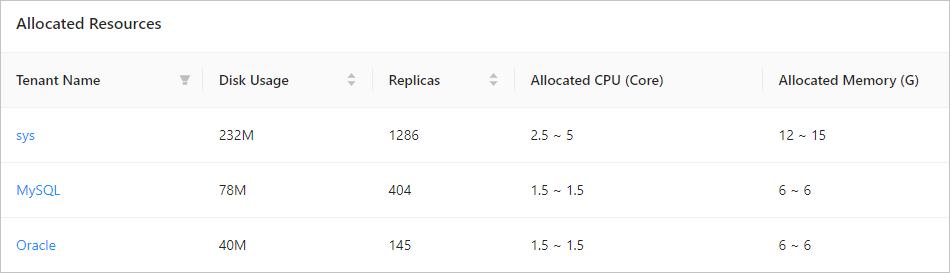
OceanBase Database allows you to query resource allocation of tenants in a view or in OceanBase Cloud Platform (OCP).
Query resource allocation in a view
Log on to the
systenant of OceanBase Database as therootuser.Execute the following statement to query the resource allocation of all tenants in the cluster:
obclient> SELECT * FROM oceanbase.gv$unit;
+---------+----------------+-----------------------------+------------------+------------------------+-------+-----------+-------------+----------------+----------+---------------------+-----------------------+---------+---------+-------------+-------------+----------+----------+---------------+---------------------+
| unit_id | unit_config_id | unit_config_name            | resource_pool_id | resource_pool_name     | zone  | tenant_id | tenant_name | svr_ip         | svr_port | migrate_from_svr_ip | migrate_from_svr_port | max_cpu | min_cpu | max_memory  | min_memory  | max_iops | min_iops | max_disk_size | max_session_num     |
+---------+----------------+-----------------------------+------------------+------------------------+-------+-----------+-------------+----------------+----------+---------------------+-----------------------+---------+---------+-------------+-------------+----------+----------+---------------+---------------------+
|       1 |              1 | sys_unit_config             |                1 | sys_pool               | zone1 |         1 | sys         | xx.xx.xx.217 |     2882 |                     |                     0 |       5 |     2.5 | 16106127360 | 12884901888 |    10000 |     5000 |  179593805824 | 9223372036854775807 |
|    1001 |           1001 | config_MySQL_zone1_S1_fpw   |             1001 | pool_MySQL_zone1_fpw   | zone1 |      1001 | MySQL       | xx.xx.xx.217 |     2882 |                     |                     0 |     1.5 |     1.5 |  6442450944 |  6442450944 |     1250 |     1250 |  536870912000 |                 375 |
|    1002 |           1002 | config_Oracle_zone1_S1_hpm  |             1002 | pool_Oracle_zone1_hpm  | zone1 |      1002 | Oracle      | xx.xx.xx.217 |     2882 |                     |                     0 |     1.5 |     1.5 |  6442450944 |  6442450944 |     1250 |     1250 |  536870912000 |                 375 |
|    1005 |           1005 | config_Oracle1_zone1_S1_oom |             1005 | pool_Oracle1_zone1_oom | zone1 |      1003 | Oracle2     | xx.xx.xx.217 |     2882 |                     |                     0 |     1.5 |     1.5 |  6442450944 |  6442450944 |     1250 |     1250 |  536870912000 |                 375 |
+---------+----------------+-----------------------------+------------------+------------------------+-------+-----------+-------------+----------------+----------+---------------------+-----------------------+---------+---------+-------------+-------------+----------+----------+---------------+---------------------+
4 rows in set
For more information about the
gv$unitview, see gv$unit.
Query resource allocation in OCP
Log on to the OCP console. In the Clusters list, find the target cluster and click its name.
The Overview page of the cluster appears.
In the left-side navigation pane, click Resource Management.
By default, the Unit Distribution tab on the Resource Management page is displayed.
Click the Resource Usage tab. In the Allocated Resources section, check the resource allocation of each tenant in the cluster.