







OceanBase Cloud Platform (OCP) provides the tenant topology feature. Based on the topology of a tenant, you can view the cluster, zone, and OBServer node where the tenant resides.
Log on to the console. In the left-side navigation pane, click Tenants and click the name of the target tenant in the Tenants list to go to the Overview page of the tenant. In the left-side navigation pane, click Topology to view details of the tenant topology.
The topology of a tenant consists of three layers:
The first layer indicates the cluster.
The second layer indicates zones.
The third layer indicates OBServer nodes.
Cluster
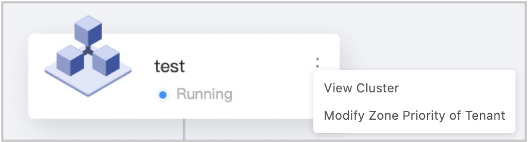
The cluster icon displays the name and status of the cluster to which the tenant belongs.
Click the More icon on the right of the cluster icon to view supported operations.
Click View Cluster to display the cluster topology on a new page.
Click Modify Zone Priority of Tenant to modify the zone priorities in the dialog box that appears.
Zone
A zone icon displays the name and status of the zone.
If a zone contains a tenant replica, the zone icon is displayed in purple with the initial of the replica type next to the tenant name. Otherwise, the zone icon is gray.
When you move the pointer over a zone icon, a tooltip appears and displays the type of the replica and the number of units in the zone.
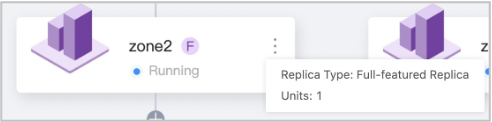
Click the More icon on the right of the zone icon to view supported operations.
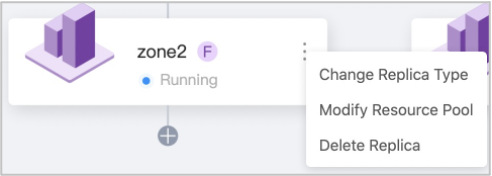
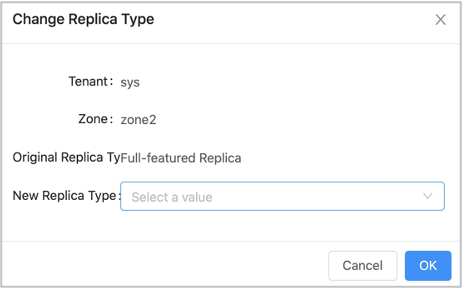
Click Change Replica Type and change the replica type in the dialog box that appears.
Click Modify Resource Pool and modify the resource pool of the zone in the dialog box that appears.
Click Delete Replica. In the dialog box that appears, click Delete to delete the replica.
OBServer node
The IP address and current status of an OBServer node are displayed next to the node icon.
If an OBServer node hosts a resource unit of the tenant, the node icon is displayed in green. Otherwise, the node icon is gray.
Click the More icon on the right of the node icon to view supported operations.
You can delete a unit. In the dialog box that appears, click Delete to delete the unit.
More information
You can check the basic information of the cluster from the
oceanbase.v$ob_clusterview.For more information about the
oceanbase.v$ob_clusterview, see v$ob_cluster.You can check the statuses and other basic information of all zones in the cluster from the
oceanbase.__all_zoneview.You can check the statuses and other basic information of all servers in the cluster from the
oceanbase.__all_serverview.