







Partition replica balancing
The process of changing the distribution of partition replicas in resource units, also known as units, of a tenant to minimize the load differences between the units is referred to as partition replica balancing. It is a tenant level operation and occurs in a single zone. RootService schedules partition replicas in a tenant to migrate data replicas within the zone and balance the load of all units in this zone.
Load balancing groups
Partition replica balancing is expected to evenly schedule all partition replicas in a single zone of a tenant to all resource units in the zone. Partitions in the zone are divided into several groups. A partition group is the basic unit of load balancing and is referred to as a load balancing group. A load balancing group is a group of partitions and is independent of other load balancing groups. When the load of partitions in each load balancing group is balanced, partitions in this zone are balanced. Load balancing groups are divided into three types:
Type 1 load balancing group: a group of partitions that belong to the same multi-partition table group.
Type 2 load balancing group: a group of partitions in a multi-partition table that does not belong to any table group.
Type 3 load balancing group: contains all partitions other than those in type 1 and type 2 load balancing groups. Each zone of a tenant can contain only one load balancing group of this type.
Rules for load balancing groups
Related parameters
balancer_tolerance_percentage specifies the load balancing sensitivity of disks. The value is a percentage in the range of [1, 100].
Rules for Type 1 load balancing groups
All partitions in a Type 1 load balancing group belong to the same table group. Partition groups in a load balancing group of this type are evenly scheduled to all units in a zone based on the number of the partition groups so that the difference of the partition group quantities in the units is no more than 1. If the number of partition groups meets the requirement, the partition groups are switched over among the units so that the difference of disk usages in the units is smaller than the value specified for the balancer_tolerance_percentage parameter. For more information about partition groups, see Set load balancing by table group.
Rules for Type 2 load balancing groups
All partitions in a Type 2 load balancing group belong to a multi-partition table. Partitions in a load balancing group of this type are evenly scheduled to all units in the zone based on the number of partitions so that the difference of the partition quantities in the units is no more than 1. If the number of partitions meets the requirement, the partitions are switched over among the units so that the difference of disk usages in the units is smaller than the value specified for the balancer_tolerance_percentage parameter.
Rules for Type 3 load balancing groups
Partitions in a Type 3 load balancing group are all other partitions except those in Type 1 and Type 2 load balancing groups. Partitions in a load balancing group of this type are scheduled to all units in the zone based on the number of the partitions so that the difference of the partition quantities in the units is no more than 1. If the number of partitions meets the requirement, the partitions are switched over among the units so that the difference of disk usages in the units is smaller than the value specified for the balancer_tolerance_percentage parameter.
Leader balancing
On the basis of partition replica balancing, OceanBase Database further balances leaders within a load balancing group. The basic unit of leader balancing is the load balancing group. This feature is designed to evenly schedule leaders of all partitions in a load balancing group to all OBServers in the primary zone so that the difference of the leader quantities on the OBServers in the primary zone is no more than 1. This enables the write load at the leader level in this load balancing group to be evenly distributed to all OBServers in the primary zone.
Examples
Assume that a cluster has three zones: Zone 1, Zone 2, and Zone 3. Each zone has two OBServers. A load balancing group contains 12 partitions, and the replicas of these partitions are evenly distributed across the zones. The following figures show leader balancing effects in different configurations of the primary zone.
In case of PrimaryZone='Zone1', leaders are evenly distributed to all OBServer nodes in Zone 1. The following figure shows the balancing results.
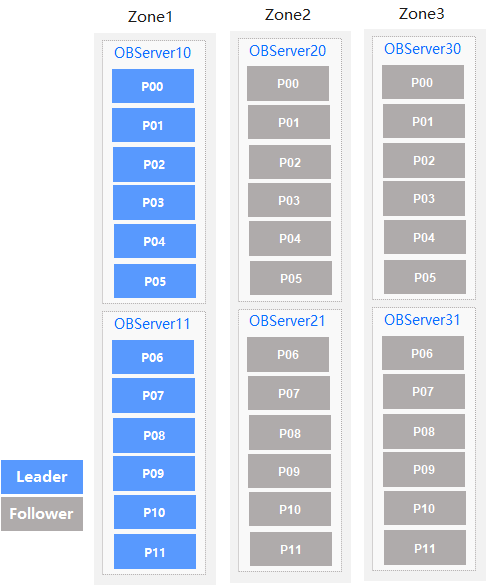
Leaders of all the 12 partitions are distributed to Zone 1, with six leaders on each OBServer node.
In case of PrimaryZone='Zone1, Zone2', leaders are evenly distributed to all OBServer nodes in Zone 1 and Zone 2. The following figure shows the balancing results.

Leaders of all the 12 partitions are evenly distributed to Zone 1 and Zone 2, with three leaders on each OBServer node.
In case of PrimaryZone='Zone1, Zone2, Zone3', leaders are evenly distributed to all OBServer nodes in Zone 1, Zone 2, and Zone 3. The following figure shows the balancing results.
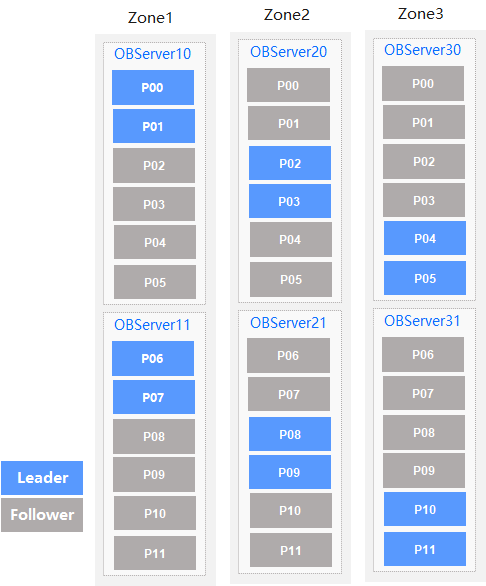
Leaders of all the 12 partitions in the load balancing group are evenly distributed in Zone 1, Zone 2, and Zone 3, with two leaders on each OBServer node.
Resource unit balancing
A unit is a container or virtual machine (VM) of user resources on an OBServer of the OceanBase Database system. A unit plays an important part in the multi-tenant distributed database architecture of OceanBase Database. RootService manages units and schedules the units among OBServers to improve the usage of the system resources. The following issues need to be resolved:
Unit allocation: When you create a unit, RootService selects an OBServer to allocate the unit to it.
Unit balancing: When OceanBase Database is running, RootService schedules the units based on various information such as the specifications of the units.
The strategies of unit allocation and unit balancing must resolve the following problems:
The allocation and scheduling of resources, mainly the CPUs and memory
The resource allocation among OBServers in a zone
CPU balancing
The unit allocation and resource balancing algorithm involves resource allocation and the balancing of CPU and memory resources. If different types of resources exist, issues may arise from resource assignment and balancing. To simplify the description of problems, CPU resources are taken as an example to explain the allocation and balancing of a single type of resources.
Scenario
Two OBServers OBS0 and OBS1 have 10 CPUs respectively. OBS0 has six units and each unit uses one CPU. OBS1 has four units and each unit uses one CPU.
Goal
Migrate resource units between the OBServers to make their CPU utilization as close as possible.
Procedure
Based on the preceding description of the scenario, the CPU utilization of OBS0 is 60% (6/10) and that of OBS1 is 40% (4/10). The difference of the CPU utilization of OBS0 and that of OBS1 is 20%. Migrate a unit from OBS0 to OBS1. Then, the CPU utilization of OBS0 and OBS1 is 50% (5/10). Compared with the CPU utilization before the migration, the CPU utilization of the two OBServers is balanced.
Calculate the usage of multiple types of resources
If you have different types of resources to be allocated and balanced in the system, it may be inaccurate to implement resource allocation and balancing based on the usage of one type of resources. This approach does not provide satisfactory resource allocation and balancing results. OceanBase Database uses the following method to implement allocation and balancing of different resources such as CPU and memory:
Assign a weight to each type of resources and use it as a percentage to calculate the usage of this type of resources in the total resources of the OBServer.
If the usage of a type of resources becomes higher, the weight allocated to this type of resources is higher.
For example, if a cluster has 50 CPUs in total and the units in this cluster occupy 20 CPUs, the total CPU utilization is 40%. If this cluster has 1,000 GB memory in total and the units occupy 100 GB, the memory usage is 10%. Assume that no other resource is used in the cluster, the CPU utilization and memory usage are assigned the weights of 80% and 20% respectively after normalization.
OBServers calculate the respective resource usages by using this method and then migrate units to reduce the difference of the resource usages among the OBServers.
Unit allocation
When you create a unit, you must select an OBServer for this unit. To select an appropriate OBServer, calculate the resource usages of the OBServers by using the preceding method and then select an OBServer with the minimum resource usage to host the unit.
Unit balancing
You can use the preceding resource usage calculation method to calculate the resource usage of each OBServer and migrate units among the OBServers to reduce and balance the resource usages of the OBServers.
Manage load balancing
OceanBase Database supports automatic load balancing based on configuration and manual load balancing.
For more information, see Automatically manage load balancing, Manually migrate and switch partitions, Set load balancing by table group, and Set load balancing by primary zone.