







This topic describes how to troubleshoot OBServer node restart failures.
Applicable versions
The solution provided in this topic is applicable to all versions of OceanBase Database.
Troubleshooting logic
If an OBServer node does not work properly after a restart, analyze the failure from the following perspectives:
Check the changes made before the OBServer node is restarted.
If parameter or environment changes were made before the restart, check whether the changes have caused the restart failure. If yes, roll back the changes when time consumption and rollback impact are acceptable. Then, reproduce the issue in the test environment and determine the root cause.
Check for other exceptions.
In currently known scenarios, common causes of OBServer node restart failures include Network Time Protocol (NTP) out-of-synchronization, network exceptions, schema refresh exceptions, and heartbeat exceptions. To determine the root cause, perform the following steps.
Troubleshooting procedure
In case of an OBServer node restart failure, check whether the observer.log file contains an error message. If yes, check the error message for troubleshooting. For more information, see "Error codes" in Reference Guide (MySQL Mode) and "Error codes" in Reference Guide (Oracle Mode). If no, check the basic environment of the OBServer node.
View the observer.log file
When an OBServer restart failure occurs, the observer.log file records the failure logs. You can run the grep ERROR observer.log command to check the cause of the failure.
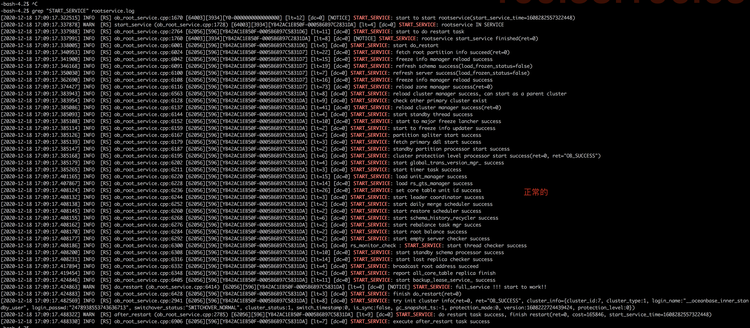
Generally, if an error message is generated during the restart, it indicates the direct cause of the restart failure. You can refer to the error message in the observer.log file and the scenarios described as follows for troubleshooting. The following figures show the logs generated when RootService is started properly.

Locate the failed node
Run the following command to locate the server where the leader of the __all_core_table table is located:
grep "1099511627777" election.log
In this example, the IP address and port number shown in the preceding figures are those of the failed node.
Check basic modules of the OBServer node
Check whether RootService is working properly.
Query the
__all_virtual_core_meta_tabletable. If an empty result set is returned, RootService is abnormal.obclient> SELECT * FROM __all_virtual_core_meta_table;Check whether RootService has entered the
START_SERVICEstate. Obtain a TRACE_ID value based on the ob_restart parameter. Show trace information in theobserver.logandrootservice.logfiles to find where the error is located.grep "START_SERVICE" rootservice.log
Check whether the heartbeat status of the OBServer node is normal.
Search for the
renew_leaseparameter in theobserver.logfile of the failed OBServer. If the parameter has a value, a heartbeat exception has occurred.[admin@hostname log]$ grep "renew_lease" observer.logCheck whether the schema refresh on the OBServer node is normal.
Search for the
REFRESH_SCHEMAparameter in theobserver.logfile of the failed OBServer node. If the parameter has a value, a schema refresh exception has occurred.[admin@hostname log]$ grep "REFRESH_SCHEMA" observer.logCheck whether clogs are replayed slowly.
Search for the
NOTICEparameter in theobserver.logfile of the failed OBServer node. If theclog is behind, service starting need to waitmessage exists, the restart failure is caused by slow replay of clogs.[admin@hostname log]$ grep "NOTICE" observer.log
Check the basic environment of the OBServer node
The OBServer election module requires a one-way network latency between nodes to be within 50 ms, or in the worst cases, within 100 ms. In addition, the clock synchronization latency between hosts in a cluster must be within 100 ms. This is because clock out-of-synchronization or network jitters lead to restart failures or other serious system availability issues. In case of an OBServer restart failure, you must first check whether the basic environment of the OBServer node meets the requirements by performing the following operations:
Run the
chronyc sources -vorntpq -pcommand to verify the clock.Check whether the current network facilities are normal. If no, remove the current host. For more information, see Replace an OBServer node.