







ODC allows you to connect to a MySQL tenant in OceanBase Database. This topic describes the prerequisites and connection procedure.
Prerequisites
You have obtained the web address of ODC or downloaded and installed an ODC client.
Procedure
On the logon page of ODC, enter your registered account and password and click Log On.
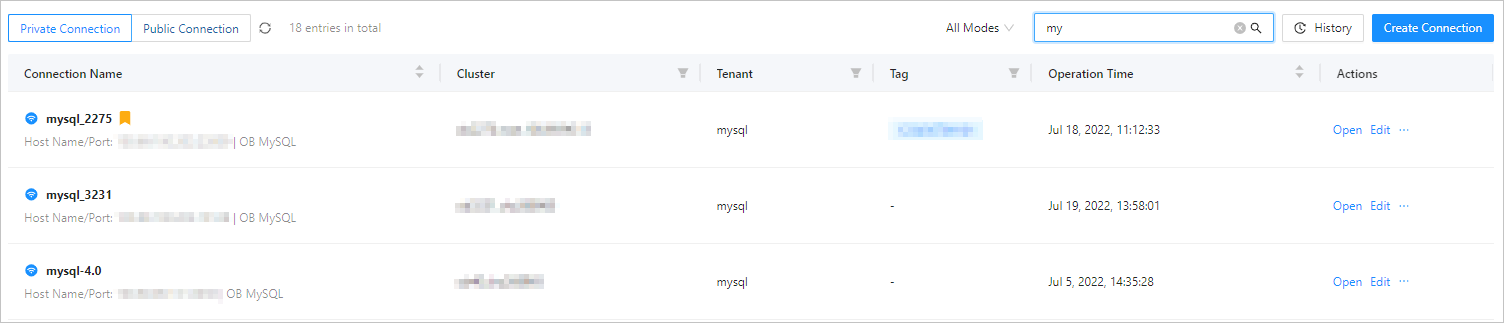
On the homepage of ODC, click Create Connection in the upper right corner of the Private Connection tab to create a private connection.
Note
It takes some time to load the data when you run ODC the first time.
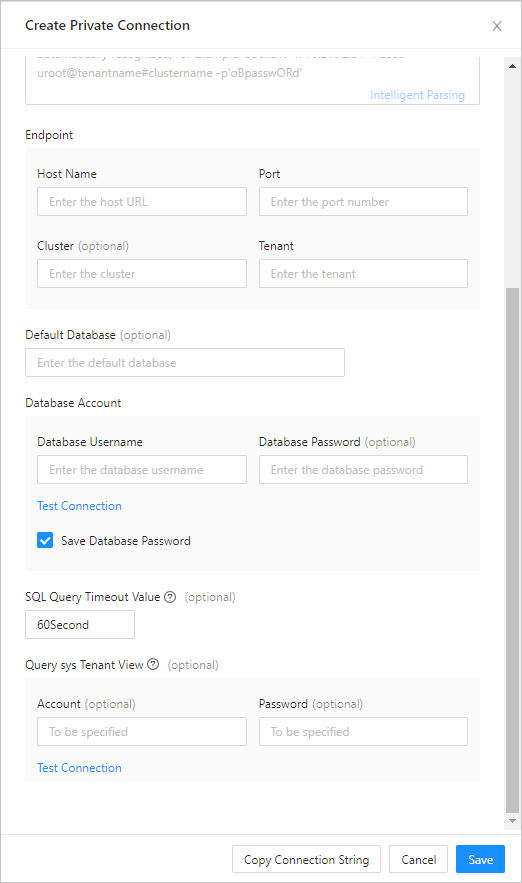
On the page displayed after you click Create Connection, specify Connection Mode to MySQL. Then, specify Connection Name, Host Name, Port, Cluster, Tenant, Database Username, and Database Password, and click Save.
If the settings are successfully saved, the connection to the database succeeds.
The created connection is displayed in the Private Connection list on the homepage of ODC. Click the connection name or Open below the action option to open the connection.

Note
The preceding page provides the following features:
Object management: A GUI is provided for you to create database objects. This makes the operations easier. In addition, you can edit the online table data that you are currently viewing.
Console: You can save and edit the content in a SQL window and reuse the scripts that you have saved. You can also format SQL scripts and display structured SQL statements. The SQL editor supports auto-complete when you write SQL statements to save your effort. You can edit and export the result set returned from SQL execution.
Toolkit: includes session management, recycle bin management, and import and export tools. Session management: The session management tool enables you to edit database sessions and global properties and terminate specified database sessions. Recycle bin management: The recycle bin management tool allows you to empty and restore database objects in the recycle bin. Import and export: The import and export tools enable you to import or export data of various formats in one or more tables.
SQL diagnostics: This feature allows you to diagnose SQL execution plans and view resource consumption during SQL execution. It can help you locate problems in SQL scripts.