







This topic describes how to change the password of a user in OceanBase Developer Center (ODC) or OceanBase Cloud Platform (OCP), or by using SQL statements.
Change the password of a user in ODC
Prerequisites
ODC has connected to the database.
Procedure
Log on to the ODC console.
On the Connections page, select the connected database and click Edit.
The Edit Connection page appears.
Click Change Password to change the database password.
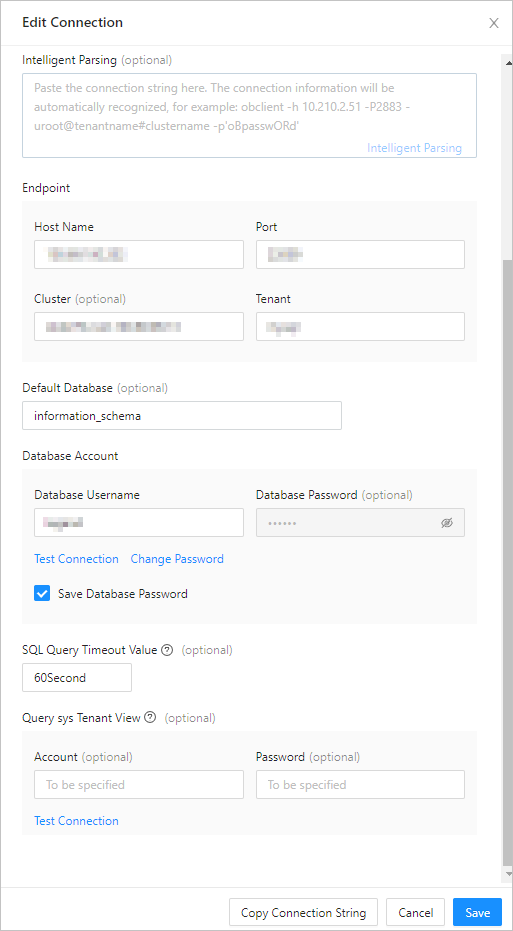
Change the password of a user in OCP
Before you change the password of a tenant user, ensure that you have the permission to modify the tenant.
Prerequisites
The current OCP user has the permissions of the TENANT_MANAGER role. Otherwise, request the OCP administrator to grant you the permissions. For more information, see Edit a user in the OCP User Guide of the corresponding version.
Procedure
Log on to the OCP console.
In the left-side navigation pane, click Tenants.
In the tenant list, find the target tenant to which the user belongs and click the tenant name. The Overview page appears.
In the left-side navigation pane, click User Management.
In the user list, find the user whose password is to be changed. In the Actions column, click Change Password.

In the dialog box that appears, enter the new password and confirm it, and then click OK.
Change the password of a user by using SQL statements
Change the password of a user by using the ALTER USER statement
You can execute the ALTER USER statement to change the passwords of other users. To execute this statement, you must have the UPDATE USER privilege.
Syntax:
obclient>ALTER USER username IDENTIFIED BY password;
Example for changing the password of sqluser01 to ***1**:
obclient> ALTER USER sqluser01 IDENTIFIED BY ***1**;
Change the password of a user by using the SET PASSWORD statement
You can execute the SET PASSWORD statement to change your own password or the passwords of other users.
Syntax:
obclient> SET PASSWORD [FOR user] = PASSWORD('password');
Notes:
If the
FOR userclause is absent, this statement changes the password of the current user. Any logged-on user can change its password.If the
FOR userclause is present, this statement changes the password of the specified user. To change the password of a specified user, you must have the CREATE USER privilege.
Example for changing the password of sqluser01 to ***1**:
obclient> SET PASSWORD FOR sqluser01 = password('***1**');
Query OK, 0 rows affected