







This topic describes how to skip specified DDL statements in the JDBCWriter component.
Applicable versions
OceanBase Migration Service (OMS) V3.2.2 and later
Procedure
Find the DDL statements received on the source end.
Log on to the OMS console.
In the left-side navigation pane, click Data Migration.
On the Data Migration page, click the name of the target data migration task to go to its details page.
Click View Component Monitoring in the upper-right corner.
In the View Component Monitoring dialog box, click the More icon after JDBCWriter and choose View Logs from the context menu.
Click the
msg/ddl_msg.logtab and copy the DDL statement that follows the colon after thereceive ddlkeyword. The statement is received from the source.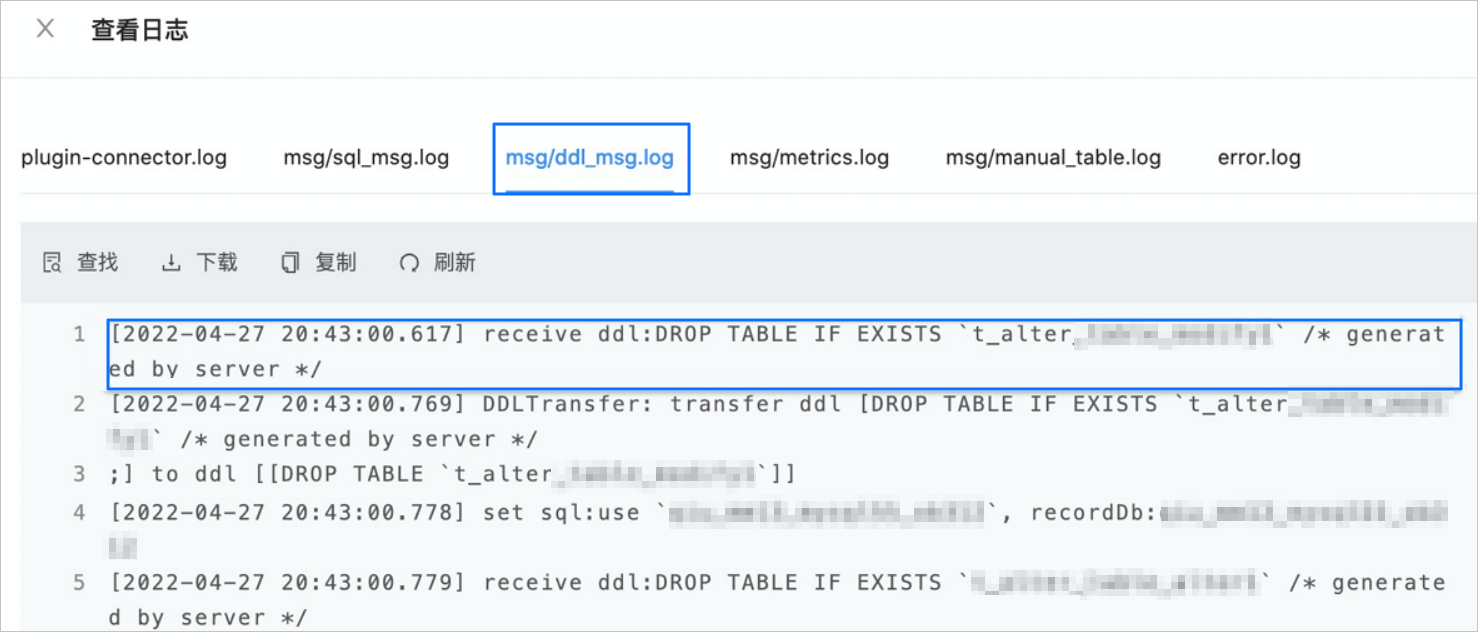
Update the configurations of the JDBCWriter component.
Return to the View Component Monitoring dialog box.
Click Update in the Actions column of the JDBCWriter component.
In the Update Configurations dialog box, hover the pointer over the blank area next to the root parameter and click the add icon that appears.
Enter JDBCWriter.coordinatorFile.skipDdl for
Key Nameand click the check icon.In the Update Configurations dialog box, find the new key name. The default value is NULL.
Hover the pointer over the new parameter, click the edit icon that appears, and change the value of the parameter to the DDL statement that follows the colon after the
receive ddlkeyword and that you copied in the foregoing step.DROP TABLE IF EXISTS `t_alter****` /* generated by server */If you want to skip multiple DDL statements, separate them with a dollar sign (&), for example:
DROP TABLE IF EXISTS `t_alter****` /* generated by server */&DROP TABLE IF EXISTS `t1_alter****`
Restart the JDBCWriter component.