







This topic describes how to use OceanBase Migration Service (OMS) Community Edition to migrate data from a TiDB database to OceanBase Database Community Edition.
Background information
You can create a data migration task in the OMS Community Edition to migrate the business data and incremental data from a TiDB database to an OceanBase database. You can migrate data to the OceanBase database through schema migration, full migration, and incremental synchronization.
TiDB is an integrated distributed database that supports hybrid transactional and analytical processing (HTAP). When you use TiDB V4.x or later, you need to deploy a TiCDC cluster and a Kafka cluster to synchronize incremental data from TiDB to OceanBase Database.
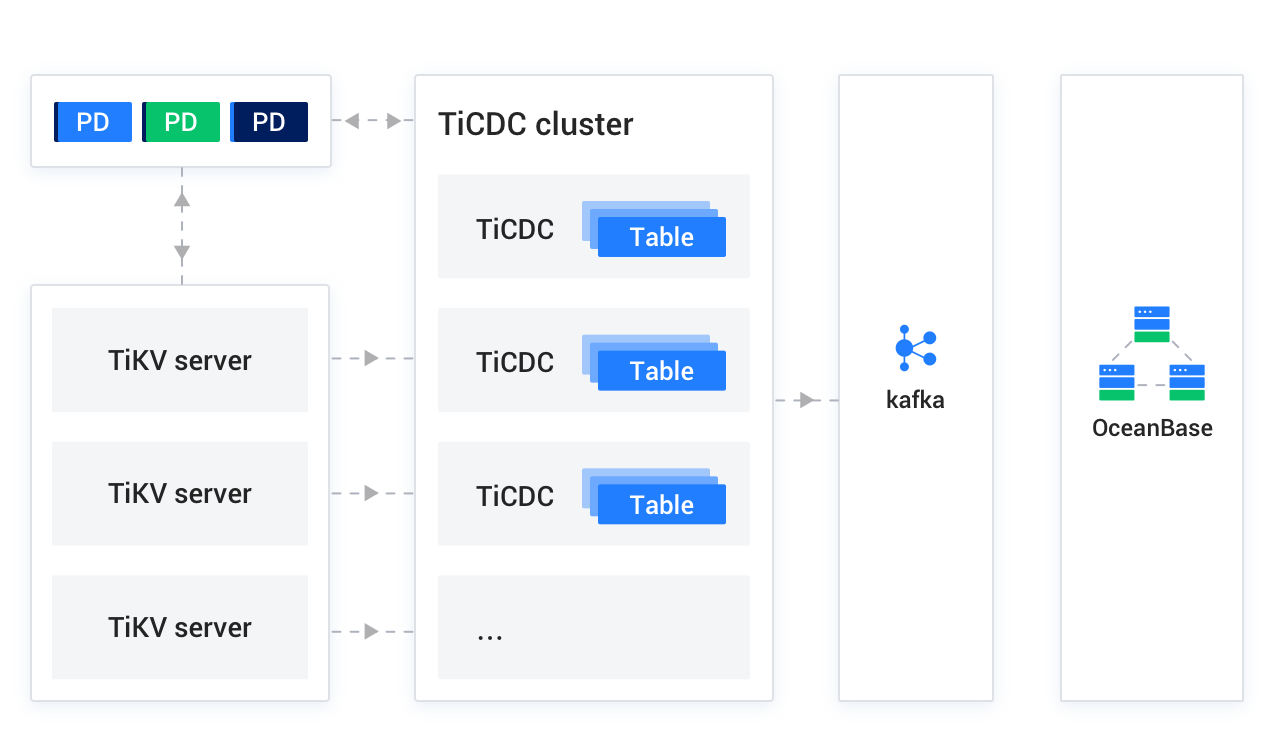
TiCDC is an incremental data synchronization tool for TiDB and provides high availability by using a placement driver (PD) cluster, which is the scheduling module of the TiDB cluster and usually consists of three PD nodes. TiKV Server is a TiKV node in the TiDB cluster. It sends data changes in change logs to the TiCDC cluster. TiCDC runs multiple TiCDC processes to obtain and process data from TiKV nodes, and then synchronizes the data to the Kafka cluster. The Kafka cluster saves the incremental logs of the TiDB database that are converted by TiCDC. During incremental data synchronization, OMS Community Edition obtains the corresponding data from the Kafka cluster and migrates the data to OceanBase Database in real time. If you create a TiDB data source without binding it to a Kafka data source, you cannot perform incremental synchronization.
Prerequisites
You have created dedicated database users in the source TiDB database and the target OceanBase database for data migration and granted the corresponding privileges to the users. For more information, see Create a database user.
Limitations
At present, TiDB V2.x, V3.x, V4.x, V5.x, V6.x, and V7.x are supported.
Notice
TiDB V2.x and V3.x support only TiDB Binlog.
If the target is a database, OMS Community Edition does not support triggers in the target database. If triggers exist in the target database, the data migration may fail.
DDL synchronization is not supported when you migrate data from a TiDB database to OceanBase Database.
OMS Community Edition does not support the migration of tables without primary keys from a TiDB database, or data that contains spaces to OceanBase Database.
Data source identifiers and user accounts must be globally unique in OMS.
OMS supports the migration of only objects whose database name, table name, and column name are ASCII-encoded and do not contain special characters. The special characters are spaces and | " ' ` ( ) = ; / & \n
OMS Community Edition supports only the TiCDC Open Protocol. If you use an unsupported protocol, a JDBC connector exception will occur and an error will be returned that a null pointer is accessed.
Please make sure that the TiCDC sync to Kafka configuration includes the enable-old-value = true parameter. Otherwise, it may cause abnormal data sync message format. For more information, see Description of the synchronization task configuration file.
Considerations
We recommend that you migrate no more than 1,000 tables at a time to avoid affecting the performance of the data migration task.
If the source database contains foreign keys with the same name, an error occurs during schema migration. In this case, you can rename the foreign keys to resume the task.
If the UTF-8 character set is used in the source database, we recommend that you use a compatible character set, such as UTF-8 or UTF-16, in the target database to avoid garbled characters.
In a task for reverse incremental migration from a TiDB database to OceanBase Database Community Edition, if your OceanBase Database Community Edition version is earlier than V3.2.x, if the source table is a multi-partition table with a global unique index and you update the values of the partitioning key of the table, data may be lost during migration.
Do not write data to the topic synchronously used by TiCDC. Otherwise, a JDBC connector exception may occur and an error may be returned, indicating that a null pointer was accessed.
Check whether the migration precision of OMS Community Edition for fields of data types such as DECIMAL, FLOAT, and DOUBLE is as expected. If the precision of the target field type is lower than the precision of the source field type, the value with a higher precision may be truncated. This may result in data inconsistency between the source and target fields.
If you change the unique index of the target, you must restart the Incr-Sync component. Otherwise, the data may be inconsistent.
If the clocks between nodes or between the client and the server are out of synchronization, the latency may be inaccurate during incremental synchronization or reverse incremental migration.
For example, if the clock is earlier than the standard time, the latency can be negative. If the clock is later than the standard time, the latency can be positive.
Take note of the following points if you want to perform data aggregation migration:
We recommend that you configure the mappings between the source and target databases by specifying the import objects or the matching rules.
We recommend that you manually create schemas at the target. If you use OMS to create schemas, skip failed objects in the schema migration step.
A difference between the source and target table schemas may result in data consistency. Some known scenarios are described as follows:
When you manually create a table schema at the target, if the data types of any columns are not supported by OMS Community Edition, implicit data type conversion may occur at the target, which causes inconsistent column types between the source and target.
If the length of a column at the target is shorter than that at the source, the data of this column may be automatically truncated, which causes data inconsistency between the source and target.
Note the following limitations when you use TiDB Database V2.x or V3.x for incremental migration. For more information about TiDB Binlog, see TiDB Binlog introduction.
TiDB Binlog does not support heartbeats. Therefore, the position of the incremental data does not get updated when there is no update in the source database.
An error
data not existedoccurs if the source database has no updates before you start incremental synchronization.For a table without a primary key, the incremental logs of this table do not contain information about other unique keys. In this case, the program treats all fields as the primary key. When an update operation is performed on the source table, it appears as a delete operation followed by an insert operation at the target table.
If you select only Incremental Synchronization when you create a data migration task, the local incremental logs in the source database must be retained for more than 48 hours.
If you select Full Data Migration and Incremental Synchronization when you create a data migration task, the local incremental logs in the source database must be retained for at least 7 days. Otherwise, the data migration task will fail or the data in the source and target databases will be inconsistent because the program cannot obtain incremental logs.
Data type mappings
TiDB database |
OceanBase Database Community Edition |
|---|---|
| INTEGER | INTEGER |
| TINYINT | TINYINT |
| MEDIUMINT | MEDIUMINT |
| BIGINT | BIGINT |
| SMALLINT | SMALLINT |
| DECIMAL | DECIMAL |
| NUMERIC | NUMERIC |
| FLOAT | FLOAT |
| REAL | REAL |
| DOUBLE PRECISION | DOUBLE PRECISION |
| BIT | BIT |
| CHAR | CHAR |
| VARCHAR | VARCHAR |
| BINARY | BINARY |
| VARBINARY | VARBINARY |
| BLOB | BLOB |
| TEXT | TEXT |
| ENUM | ENUM |
| SET | SET |
| DATE | DATE |
| DATETIME | DATETIME |
| TIMESTAMP | TIMESTAMP |
| TIME | TIME |
| YEAR | YEAR |
Procedure
Create a data migration task.
Log in to the OMS Community Edition console.
In the left-side navigation pane, click Data Migration.
On the Data Migration page, click the New Task button in the upper-right corner.
On the Select Source and Target page, configure the parameters.
ParameterDescriptionMigration task name We recommend that you use a name that contains Chinese characters, numbers, and letters. The name cannot contain spaces and must be 64 characters or less in length. Tag (optional) Click the tag box to open the tag selection dialog box. You can select a tag from the dialog box. You can also click Manage Tags to create, modify, and delete tags. For more information, see Manage data migration projects by tag. Source If you have created a TiDB data source, you can select it from the drop-down list. If you have not created a data source, click New Data Source in the drop-down list to create a TiDB data source. For more information, see Create a TiDB data source.
Notice:- If the TiDB data source in the source database is not bound with a valid Kafka data source or a topic, incremental synchronization is not supported.
- If consumer authentication and authorization are configured in the Kafka service, add the
properties={"group.id":"User environment consumer (the default value for OMS Community Edition is oms_jdbc_connector_null)"}parameter to thesourcesection of the incremental synchronization task.
Destination If you have created an OceanBase Community Edition data source, you can select it from the drop-down list. If you have not created a data source, click New Data Source in the drop-down list to create an OceanBase data source. For more information, see Create an OceanBase-CE data source. Click Next.
Click the Noted button in the pop-up dialog box.
Note that full migration and verification are supported for tables without primary keys or tables with non-null unique indexes in TiDB databases, but not for incremental synchronization.
On the Select Migration Type page, configure the parameters.
Migration Type includes Schema Migration, Full Migration, Incremental Synchronization, Full Verification, and Reverse Increment.
Migration TypeDescriptionSchema Migration After you start a schema migration task, OMS Community Edition will migrate the data object definitions (tables, indexes, constraints, comments, and views) from the source database to the target database. OMS Community Edition will automatically filter out temporary tables. Full Data Migration After you start a full data migration task, OMS Community Edition will migrate the existing data of tables in the source database to the corresponding tables in the target database. If you choose Full Migration, we recommend that you use the ANALYZEstatement to collect statistics on the TiDB database before you migrate the data.Incremental Synchronization After you start an incremental synchronization task, OMS Community Edition will synchronize the changed data (added, modified, or deleted) in the source database to the corresponding table in the target database.
Incremental Synchronization's DML Synchronization field specifies the DML operations (Insert,Delete, andUpdate) to be synchronized. You can select the required DML operations based on your needs. For more information, see DML filtering.
If you use TiDB database version earlier than V4.x and you have not bound a Kafka data source when you create a TiDB data source, you cannot select Incremental Synchronization.Full Verification After full migration is completed and incremental data is synchronized to the target database and is on par with the source data, OMS Community Edition will automatically initiate a full data verification task for the specified source and target tables. - If you choose Full Verification, we recommend that you collect statistics on the TiDB database and OMS Community Edition before you start the full verification.
- If you choose Incremental Synchronization and not all DML operations are selected in the DML Synchronization field, OMS Community Edition does not support full data verification in this scenario.
Reverse Increment After you start a reverse incremental task, OMS Community Edition can real-time send the change data generated in the target database after business switchover to the source database. In the following scenarios, you cannot select Reverse Increment: - Data aggregation from multiple tables.
- Schema mappings from many to one.
(Optional) Click Next. If you selected Reverse Increment and the target OceanBase Community Edition data source does not have the ConfigUrl, DRC username, or DRC password configured, a More about Data Sources dialog box will pop up, prompting you to configure the parameters. For more information, see Create an OceanBase-CE data source.
After you configure the parameters, click Test connectivity. If the test connection is successful, click Save.
Click Next. On the Select Migration Objects page, select the objects and the migration range.
You can select objects by using the Specify Objects and Match Rules sections.
Select Specify Objects. In the left-side pane, select the objects to migrate and click > to add the selected objects to the right-side pane. You can select tables and views from one or more databases as migration objects.
Notice
Table names and column names in the source database cannot contain Chinese characters.
If the database name or table name in the source database contains the "$$" character, a data migration task cannot be created.
OMS Community Edition allows you to import objects, rename objects, and remove one or all migration objects.
OperationProcedureImport objects - In the Specify Migration Scope section on the right, click the Import Objects button in the upper-right corner.
- In the dialog box, click OK.
**Notice: **
Import will overwrite previous selections. Proceed with caution. - In the Import Migration Objects dialog box, select the objects to import.
You can rename a database or table by importing a CSV file. For more information, see Download and import migration object configurations. - Click Validate.
- If the check is successful, click OK.
Rename objects OMS Community Edition allows you to rename migration objects. For more information, see Rename database and table. Remove objects OMS Community Edition allows you to remove one or all migration objects during data mapping. - Remove a migration object
In the Specify Migration Scope section on the right, hover the pointer over the target object and click the Remove button displayed next to the object. - Remove all migration objects
In the Specify Migration Scope section on the right, click the Remove All button in the upper-right corner. In the dialog box, click OK to remove all migration objects.
For more information about how to use the Match Rules section, see Configure matching rules.
Click Next. On the Migration Type page, configure the parameters.
If you want to view or modify the parameters of the full migration or incremental synchronization component, click Full Migration or Incremental Synchronization in the upper-right corner of the component and configure the parameters in the dialog box that appears. For more information, see Component parameters.
Full Migration
On the Select Migration Type page, select Full Migration. The following parameters will then be displayed.
ParameterDescriptionConcurrency It includes Stable, Normal, Fast, and Custom. The performance of a full migration task varies, and therefore, the resources required for the task vary. When you select Custom, you can set Read Concurrency, Write Concurrency, and JVM Memory according to your needs. Handling strategy when the destination object already contains records The handling strategies are Ignore and Stop Migration: - If you select Ignore, when data already exists in the destination table, OMS Community Edition adopts a strategy of writing conflicting data to the log file and retaining the original data, to write data.
Notice
If you select Ignore, full verification will use the IN mode to pull data, and cannot verify whether the destination contains data that does not exist in the source. The verification performance will be degraded to some extent.
- If you select Stop Migration, when data already exists in the destination table, the full migration task will return an error. In this case, cleanse the destination data and then continue the migration.
Notice
If an error occurs, clicking Resume will ignore this configuration and continue to migrate table data. Proceed with caution.
Write Method It includes SQL (data is written to a table by using the INSERTorREPLACEstatement) and Direct Load (data is written to a table through direct load). For more information about Direct Load, see Overview.Allow index postmigration You can set whether to create indexes after a full data migration is completed. Index postmigration can shorten the full migration duration. For more information, see the considerations below. Notice
On the Select Migration Type page, make sure that both Schema Migration and Full Data Migration are selected to enable this option.
If you select Allow index postmigration, we recommend that you adjust the parameters based on the hardware conditions of OceanBase Community Edition and the current business traffic.
If you use OceanBase Community Edition V4.x, you can use a screen-blackening client tool to adjust the following sys tenant parameters and business tenant parameters.
Adjust the sys tenant parameters
// parallel_servers_target sets the condition for queuing parallel queries on each server.
// If you prioritize performance, we recommend that you set this parameter to a value greater than the number of physical CPU cores, for example, 1.5 times the number of CPU cores. The value you set cannot exceed 64 to avoid kernel locking issues in OceanBase Community Edition.
set global parallel_servers_target = 64;
Adjust the business tenant parameters
// file memory buffer size
alter system set _temporary_file_io_area_size = '10' tenant = 'xxx';
// 4.x disable flow control
alter system set sys_bkgd_net_percentage = 100;
If you use OceanBase Community Edition V3.x, you can use a screen-blackening client tool to adjust the following sys tenant parameters.
// parallel_servers_target specifies the queuing conditions for parallel queries on each server.
// To maximize performance, we recommend that you set this parameter to a value greater than, for example, 1.5 times, the number of physical CPU cores. In addition, make sure that the value does not exceed 64, to avoid kernel lock contentions in OceanBase Community Edition.
set global parallel_servers_target = 64;
// `data_copy_concurrency` specifies the maximum number of concurrent data migration and replication tasks allowed in the system.
alter system set data_copy_concurrency = 200;
- If you select Ignore, when data already exists in the destination table, OMS Community Edition adopts a strategy of writing conflicting data to the log file and retaining the original data, to write data.
Incremental synchronization
The following parameters are displayed only if you have selected Incremental Synchronization on the Select Migration Type page.
ParameterDescriptionConcurrency Speed Valid values: Stable, Normal, Fast, and Custom. The amount of resources to be consumed by an incremental synchronization task varies based on the synchronization performance. If you select Custom, you can set Read Concurrency, Write Concurrency, and JVM Memory as needed. Kafka Consumer group.id (Optional) group.idis the unique identifier of a consumer group in the Kafka cluster.
Click Precheck to start a precheck on the data migration task.
During the precheck, OMS Community Edition checks the read and write privileges of the database users and the network connectivity of the databases. A data migration task can be started only after it passes all check items. If an error is returned during the precheck, you can perform the following operations:
Identify and troubleshoot the problem and then perform the precheck again.
Click Skip in the Actions column of the failed precheck item. In the dialog box that prompts the consequences of the operation, click OK.
Click Start Task. If you do not need to start the task now, click Save to go to the details page of the data migration task. You can start the task later as needed.
OMS Community Edition allows you to modify the migration objects when the data migration task is running. For more information, see View and modify migration objects. After the data migration task is started, it is executed based on the selected migration types. For more information, see the View migration details section in the View details of a data migration task topic.