






OceanBase Developer Center (ODC) provides two product forms: Web ODC and Client ODC.
Client ODC: an efficient and easy-to-use SQL development tool that applies to personal development scenarios. It supports Windows and MacOS.
Web ODC: an integrated database development, management, and collaboration platform that applies to collaborative development scenarios. It provides all-round features such as collaborative development, risk control, and data security. It supports multiple installation media such as an RPM package and a Docker image, and supports the x86 and advanced RISC machine (ARM) architectures. Web ODC includes all SQL development features of Client ODC.
This topic describes the deployment process of Web ODC. Client ODC can be directly installed on your desktop without deployment. For more information, see Install Client ODC.
Deployment types of Web ODC
Single-node deployment: ODC is deployed on a single node. All user requests are processed by this node. This deployment type is simple and consumes a few resources.
High-availability deployment: ODC is deployed on multiple nodes and the Nginx proxy is deployed on one of the nodes to route user requests. In single-node deployment, user requests are directly sent to ODC. In high-availability deployment, user requests are first sent to the node where the Nginx proxy is deployed and then routed to other nodes.
The benefits of high-availability deployment are as follows: When one node fails, Nginx will automatically route user requests to other nodes to ensure service continuity. In addition, ODC deployed in high-availability mode can accommodate more concurrent users and more requests than ODC deployed in single-node mode.
Deployment process
Single-node deployment process
To deploy ODC on a single node, load and run the ODC image on the node.
When you log on to Web ODC in a browser over HTTP for the first time, you will receive a message indicating that the connection is not secure. To ensure access security, you can configure an SSL certificate and deploy the Nginx image on the node by referring to the high-availability deployment process.
Note
- The initial username of the Web ODC administrator is
admin. When you deploy Web ODC, you can set the initial password of this administrator account by using the environment variableODC_ADMIN_INITIAL_PASSWORD. For more information, see Load and run an ODC image. - For information about how to log on to Web ODC, see Log on to Web ODC.
High-availability deployment process
To deploy ODC in high-availability mode, load and run the ODC image on multiple nodes and then deploy the Nginx image on one of these nodes to distribute user requests among them.
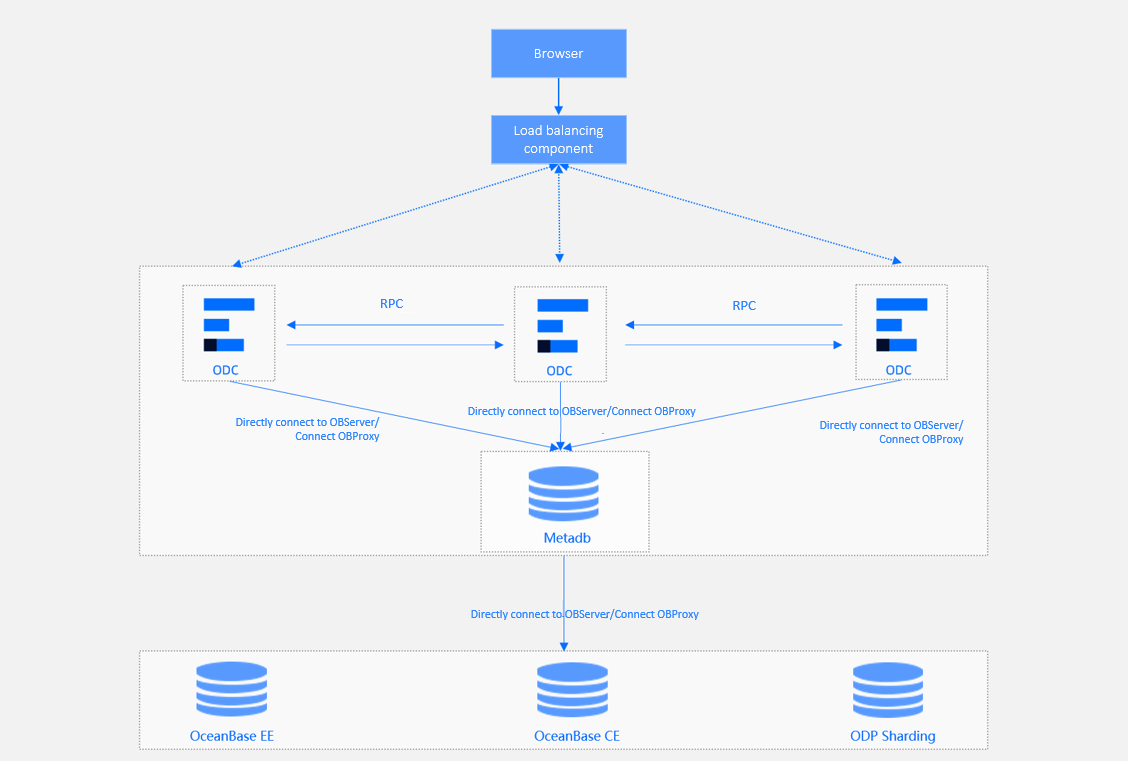
To deploy Web ODC in high-availability mode, perform the following four steps:
Load and run the ODC image: Run the ODC image separately on multiple nodes to install ODC.
Deploy the SSL certificate: When you log on to Web ODC in a browser over HTTP for the first time, you will receive a message indicating that the connection is not secure. To ensure access security, you can deploy an SSL certificate to access ODC over HTTPS. If you do not want to access ODC over HTTPS, you can skip this step and directly deploy the Nginx proxy.
Deploy the Nginx proxy: Pull and run the Nginx image on one of the nodes to implement high-availability deployment.
Configure certificate trust: Some browsers do not trust a self-signed certificate. You need to manually configure certificate trust in the browser.
Note
The initial username of the administrator account of Web ODC is
admin. When you deploy Web ODC, you can set the initial password of the administrator account by using the environment variableODC_ADMIN_INITIAL_PASSWORD. For more information, see Load and run an ODC image.