






While functioning as a tool platform, Web OceanBase Developer Center (ODC) also provides management and collaboration capabilities and focuses on the security, compliance, and efficiency of database changes. This topic describes how to get started with Web ODC.
The following figure shows the quick start process.
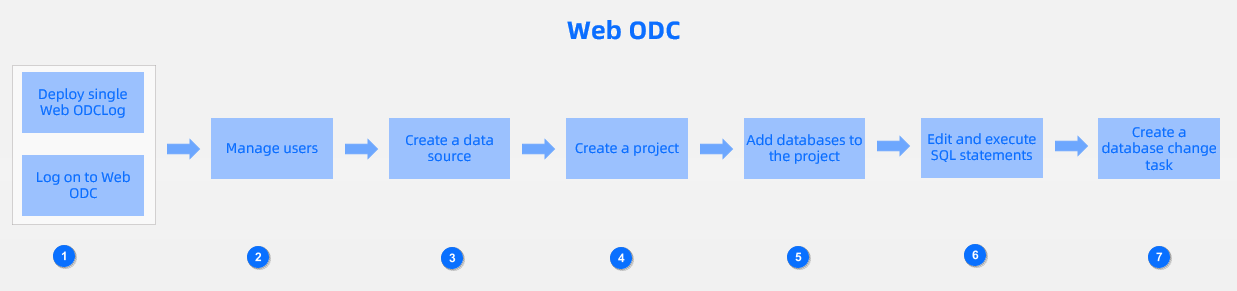
No. |
Operation |
Description |
|---|---|---|
| 1 | Deploy ODC on a single node | Deploy ODC on a single node. All user requests are processed by this node. |
| 1 | Log on to Web ODC | Log on to Web ODC. Subsequent operations, such as configuring data sources for databases and saving SQL scripts in the workspace, are performed based on the logon user. |
| 2 | Manage users | Add users and grant data source permissions based on user roles. |
| 3 | Create a data source | Establish a connection between ODC and OceanBase Database to edit and manage database objects and resources. |
| 4 | Create a project | Create a project for teamwork and security management. A project consists of project members, databases, and tickets. A project member operates a database on which the member has the access permission in the SQL window or by submitting a ticket. The submitted ticket is reviewed by specified project members or does not need to be reviewed based on the management strategy of the database. |
| 5 | Add a database to the project | Select a database from the data sources created in ODC and add it to the project. |
| 6 | Write and execute an SQL statement | Write and execute an SQL statement in the SQL window of ODC. |
| 7 | Create a database change task | Create a database change task to change data in the database. |
After you finish the preceding steps, you can develop and manage your OceanBase database in Web ODC.