






This topic describes how to view the path of Client OceanBase Developer Center (ODC) logs.
Collect and package logs on the Feedback page
Client ODC provides the built-in information collection feature. You can choose Help > Feedback > Generate information package on the ODC home page to obtain logs.
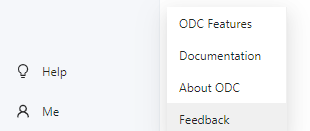
Click Generate information package in the Feedback window. ODC then generates a compressed file containing logs. Select a path to save the file.

Paths of local client ODC logs
ODC V3.3.0 and later
Windows system: the
serverandclientfolders under%USERPROFILE%\AppData\Roaming\odc\logs.%USERPROFILE%in the path is usuallyC:\Users\{username}\.macOS: the
serverandclientfolders under~/Library/Application Support/odc/logs.~in the path is usually/Users/{username}.
ODC V2.3.0 to ODC V3.2.x
Windows system: the
logsandjavaLogfolders under%USERPROFILE%\AppData\Roaming\odc.%USERPROFILE %in the path is usuallyC:\Users\{username}\.macOS: the
logsandjavaLogfolders under~/Library/Application Support/odc.~in the path is usually/Users/{username}.
ODC V2.2.x and earlier
Windows system:
%USERPROFILE%\AppData\Roaming\odc-sql-console\logs.%USERPROFILE%in the path is usuallyC:\Users\{username}.macOS: the
logsandjavaLogfolders under/Users/{user}/Library/Application Support/odc-sql-console/logs.