







ODC freezes during PL debugging
Symptom
The debugging page stalls when a PL debugging request is initiated in ODC. All buttons on the debugging page cannot be clicked.
Possible causes
A PL debugging request initiated in ODC lacks debugging precondition check and life cycle management, and therefore is stalled.
Affected versions
ODC V3.2.1 and earlier
Solutions
Upgrade ODC to V3.2.2 or later, in which the PL debugging logic is reconstructed. We recommend that you upgrade ODC to the latest version for a better experience in PL debugging.
Upgrade OceanBase Database to the latest PATCH versions of V2.2.77, V3.1.x, and V3.2.x, which are optimized for debugging and support object extension.
Error 4007 is returned during PL debugging
Symptom
The OBServer node reports a 4007 error for the PL debugging request initiated in ODC.
Possible causes
OceanBase Database needs to execute the PS protocol on the server side for PL debugging. However, in versions earlier than V2.2.x, the PS protocol on the server is disabled by default (_ob_enable_prepared_statement=0).
Affected versions
All versions of client ODC and web ODC
Solutions
Log on to the sys tenant of the target cluster. Go to OceanBase Database, and execute the following command:
obclient> select * from __all_virtual_sys_parameter_stat where name='_ob_enable_prepared_statement' \G
obclient> alter system set _ob_enable_prepared_statement=1;
Query OK, 0 rows affected (0.03 sec)
Error 4153 is returned during PL debugging
Symptom
The OBServer node reports the following error message for the PL debugging request initiated in ODC.
do not have enough resource to hold new debugger
Possible causes
The OBServer node has no more threads to allocate to the debugging process. The debugging process exits with an error.
Affected versions
All versions of client ODC and web ODC
Solutions
Solution 1
Increase the threads available for debugging. Formula for calculating the number of threads allocated by the OBServer node to the debugging process: unit_cpu * cpu_quota_concurrency / 2
unit_cpu is the tenant specification, and cpu_quota_concurrency is a parameter. You can increase the tenant specification or the parameter value to increase the threads available for debugging
Solution 2
If the development environment is not affected by a restart of the OBServer node, you can restart the OBServer node to release some thread resources.
Invalid PL objects for debugging
Symptom
An error is returned during the debugging of an invalid PL object, indicating that the debugging of invalid PL objects is not supported.
A PL name marked with a yellow exclamation icon is an invalid PL object.
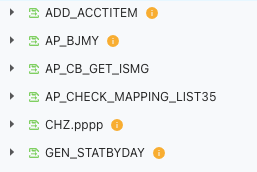
Possible causes
Unpredictable errors may occur during the debugging of an invalid PL object. Therefore, you must turn an invalid PL object into a valid one before debugging it.
Affected versions
All versions of client ODC and web ODC
Solutions
Solution 1
Move the pointer over the Alert icon to check why the current PL object is invalid.

Turn the PL object into valid as prompted. For example, you can recompile a PL object after creating the database objects that the PL object depends on.
Solution 2
If the PL object remains invalid, drop the PL object and create a new one.