







ODC is an enterprise-level database development platform tailored for OceanBase Database. ODC adopts the mature browser/server architecture and is accessible through either the Web or client version.
This topic shows you how to deploy the web version of ODC. The client version does not need deployment and you can use it directly after installation. For more information about installing the client, see Install ODC.
Deployment types
Single-node deployment: In single-node deployment, only one ODC node is deployed. This node handles all user requests. This deployment is simple and consumes fewer resources.
High-availability deployment: In high-availability deployment, the ODC application is deployed on several server nodes. NGINX is installed on one of the servers as a reverse proxy to handle user requests. Therefore, in single-node deployment, user requests are sent directly to the ODC application, while in high-availability deployment, user requests are first sent to the server where NGINX is deployed, and are then directed to the ODC application on different servers.
One benefit of high-availability deployment is service continuity. If one node is down, NGINX automatically forwards the traffic to other nodes. In addition, high-availability deployment supports more concurrent users and handles more requests than single-node deployment.
Deployment process
Single-node deployment process
To deploy OceanBase Developer Center (ODC) on a single server, load and run the ODC image on the server to install ODC.
When you log on to Web ODC in a browser over HTTP for the first time, you will receive a message indicating that the connection is not secure. To ensure access security, you can configure an SSL certificate and deploy the NGINX image on the single-node ODC server by referring to the procedure for the high-availability deployment mode.
Note
- The initial username of the Web ODC administrator is admin. When you deploy Web ODC, you can set the initial password of the ODC administrator account through the environment variable
ODC_ADMIN_INITIAL_PASSWORD. Please refer to Load and run an ODC Image for specific configuration. - For information about how to log on to Web ODC, see Log on to Web ODC.
High-availability deployment process
To deploy OceanBase Developer Center (ODC) in high-availability deployment mode, you can load and run the ODC image on multiple servers. Then, you can deploy the NGINX image on one of these servers to distribute user requests among them.
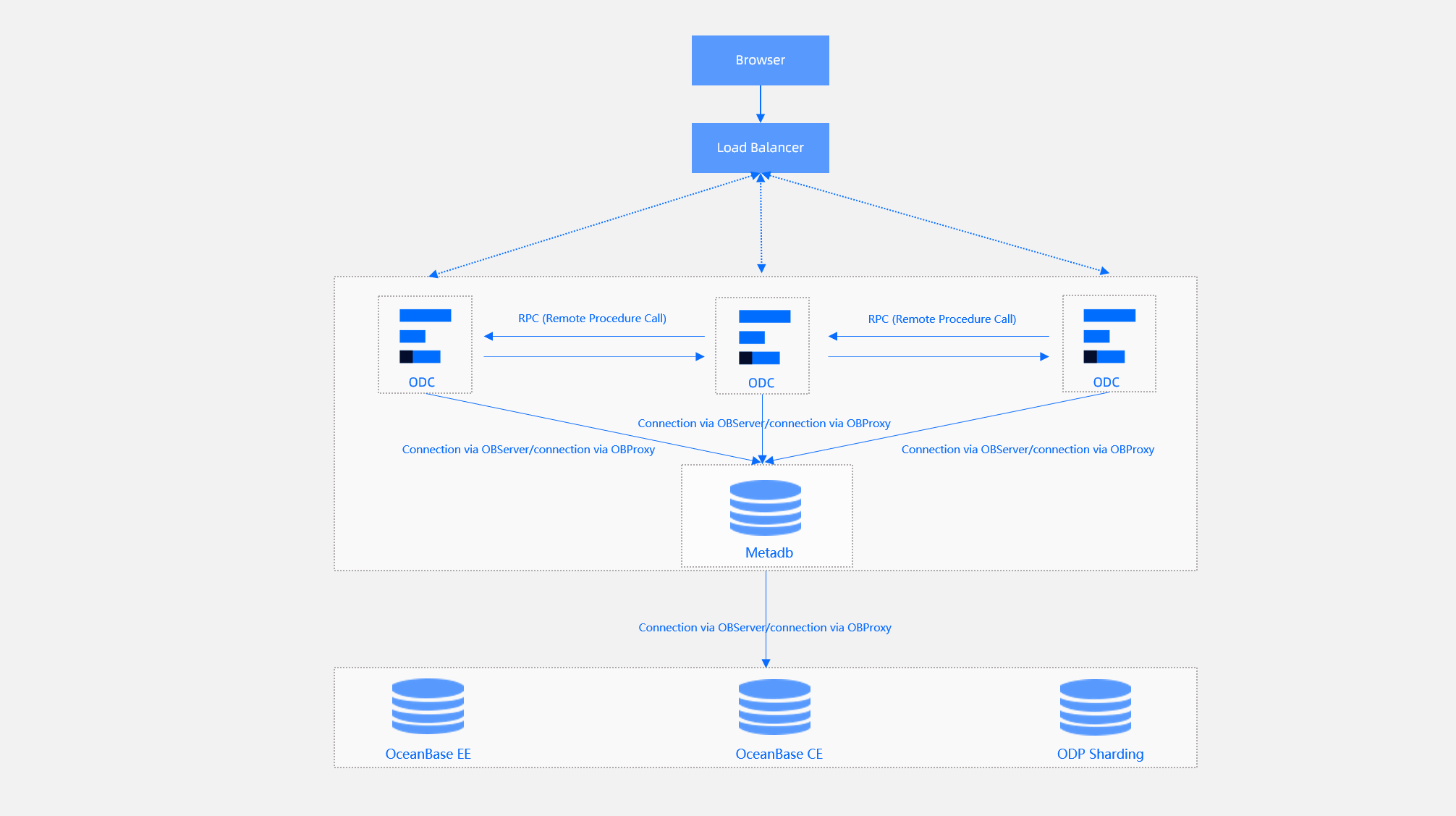
The high-availability deployment of ODC requires four steps:
Load and run an ODC image: Run the ODC image separately on multiple nodes to install ODC.
Deploy SSL certificate: When you log on to Web ODC in a browser over HTTP for the first time, you will receive a message indicating that the connection is not secure. To ensure access security, you can deploy an SSL certificate to access ODC over HTTPS. If you do not want to access ODC over HTTPS, you can skip this step and directly deploy NGINX.
Deploy the NGINX proxy: Pull and run the NGINX image on one of the nodes to implement high-availability deployment.
Configure certificate trust: Some browsers do not trust a self-signed certificate. You need to manually configure certificate trust in the browser.
Note
- The initial username of the Web ODC administrator is admin. When you deploy Web ODC, you can set the initial password of the ODC administrator account through the environment variable
ODC_ADMIN_INITIAL_PASSWORD. Please refer to Load and run an ODC Image for specific configuration. - For information about how to log on to Web ODC, see Log on to Web ODC.
- The initial username of the Web ODC administrator is admin. When you deploy Web ODC, you can set the initial password of the ODC administrator account through the environment variable