







This topic describes how to test the performance of OBKV-HBase by using the Yahoo! Cloud Serving Benchmark (YCSB) tool.
Prepare the environment
Purchase an ApsaraDB for OceanBase instance from Alibaba Cloud. Select Standard Edition (Key-Value) for Series, Single-IDC for Deployment Method, 8 Cores, 32 GB for Node Specification, and 2 for Full-featured Replica.
Notice
At present, the Standard Edition (Key-Value) series is available only for customers on the allowlist. To purchase this series, contact ApsaraDB for OceanBase Technical Support.
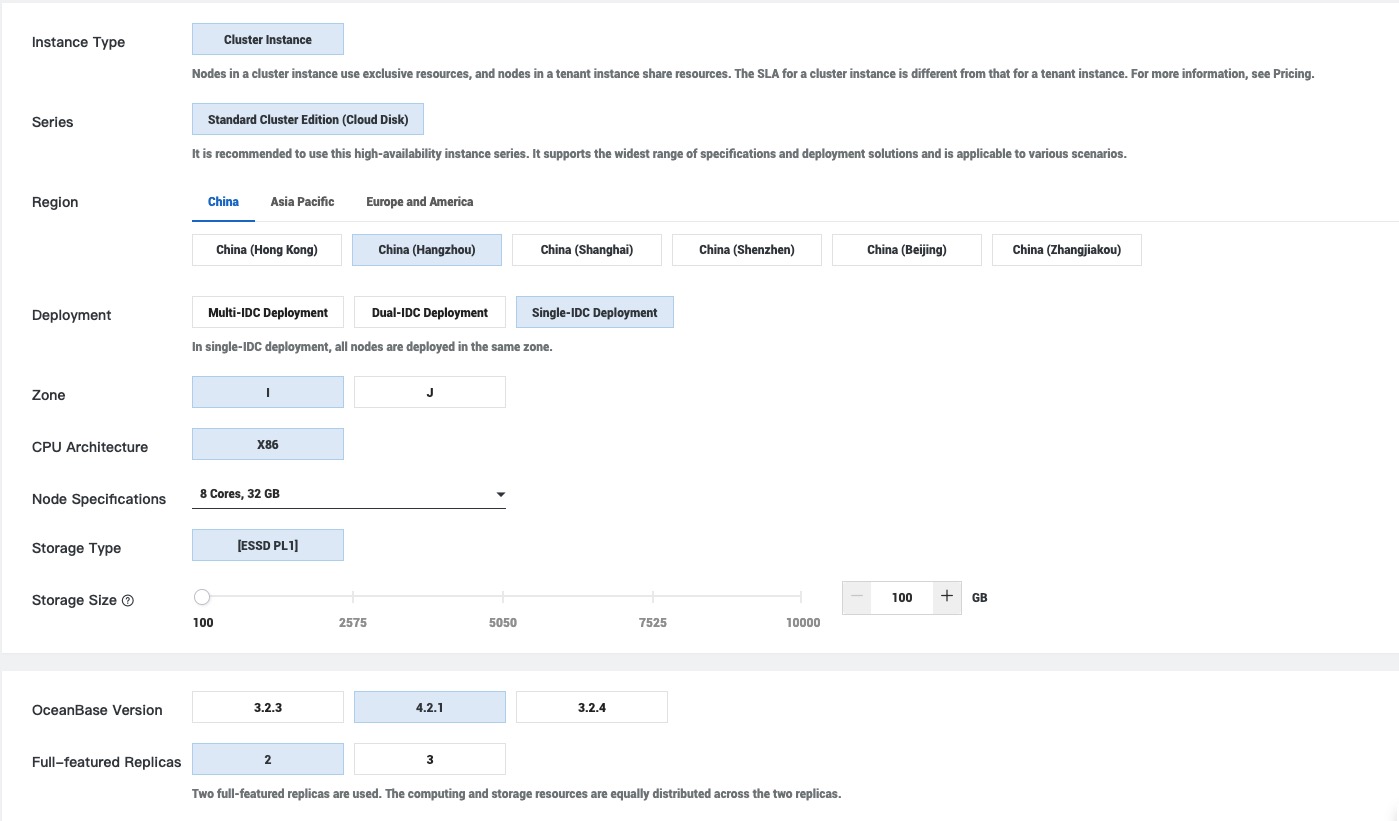
In the instance list, click the name of the purchased instance to go to the instance management page. In the left-side navigation pane, select Tenant Management and then click Create Tenant to create a tenant for the performance test. Specify 8 CPU cores and 32 GB of memory for the tenant.
On the tenant management page, select the created tenant to go to the tenant workspace. Then, click Create Account to create a test account.
Create a table
On the tenant workspace page, click Log in to Database and log in to the created OceanBase database instance by using the created test account. Then, execute the following statement to create a table:
CREATE TABLE test$family (
    K varbinary(1024) NOT NULL,
    Q varbinary(256) NOT NULL,
    T bigint(20) NOT NULL,
    V varbinary(1024) DEFAULT NULL,
    PRIMARY KEY (K, Q, T))
block_size=8192 partition by key(K) partitions 100;
Prepare the OBKV YCSB client
After you prepare the test environment on the server, you need to purchase an ECS instance with 8 CPU cores and 16 GB of memory as the performance test client. The client and server must be in the same virtual private cloud (VPC). Then, you need to add the IP address of the client to the allowlist in Security Settings on the instance management page of the database. Subsequent operations in this topic are all performed on the performance test client.
Make sure that you can run the following commands in the test environment:
- git: sudo yum install git
- mvn: sudo yum install maven
- java: sudo yum install java
Compile the
core-0.12.0.jarpackage.Download the YCSB source code and switch to the 0.12.0 branch:
[wieck@localhost ~] $ git clone https://github.com/brianfrankcooper/YCSB.git
[wieck@localhost ~] $ cd YCSB
[wieck@localhost YCSB] $ git checkout 0.12.0
Run the following command to compile and obtain the JAR package. After the command is executed, the required
core-0.12.0.jarpackage is placed in theYCSB/core/target/directory.[wieck@localhost YCSB] $ mvn -pl com.yahoo.ycsb:core -am clean package -Dmaven.test.skip=trueAdd the YCSB core dependency.
Download the obkv-hbase-client-java source code, place the
core-0.12.0.jarpackage in the root directory of the obkv-hbase-client-java project, and modify the pom.xml file to add the com.yahoo.ycsb dependency.[wieck@localhost ~] $ git clone https://github.com/oceanbase/obkv-hbase-client-java.git [wieck@localhost ~] $ cp xx/YCSB/core/target/core-0.12.0.jar xx/obkv-hbase-client-java[wieck@localhost ~] $ cd obkv-hbase-client-java [wieck@localhost obkv-hbase-client-java] $ vim pom.xml // ... <dependency> <groupId>org.powermock</groupId> <artifactId>powermock-module-junit4</artifactId> <version>${powermock.version}</version> <scope>test</scope> </dependency> <dependency> <groupId>com.yahoo.ycsb</groupId> <artifactId>core</artifactId> <version>0.12.0</version> <scope>system</scope> <systemPath>${project.basedir}/core-0.12.0.jar</systemPath> </dependency> </dependencies>Write the OBKV YCSB client.
Various methods of YCSB need to be implemented in this step. YcsbBench.java is a sample client, which is placed in the
src/main/java/com/alipay/oceanbase/hbase/util/directory of the obkv-hbase-client-java project.[wieck@localhost ~] $ cd /obkv-hbase-client-java/src/main/java/com/alipay/oceanbase/hbase/util/ [wieck@localhost util] $ vim YcsbBench.javaPackage the OBKV YCSB client into a JAR file.
Run the packaging command in the root directory of the OBKV YCSB client. After the command is executed, the required JAR package named
obkv-hbase-client-0.1.x-SNAPSHOT-jar-with-dependencies.jarappears in the target directory, which will be used for the YCSB test. In the package name, 0.1.x will be replaced with the actual version number.[wieck@localhost obkv-hbase-client-java] $ mvn assembly:assembly -Dmaven.test.skip=true
Modify the YCSB test script
After you download the YCSB source code and switch to the 0.12.0 branch, you need to modify the YCSB source code so that YCSB can identify the OBKV-HBase client.
Modify the YCSB script.
Modify the ycsb file to add the path of the OBKV-HBase client.
[wieck@localhost YCSB] $ cd bin/
[wieck@localhost YCSB] $ vim ycsb
// ...
    "tarantool"    : "com.yahoo.ycsb.db.TarantoolClient",
    "voldemort"    : "com.yahoo.ycsb.db.VoldemortClient",
    "ob-hbase"     : "com.alipay.oceanbase.hbase.util.YcsbBench",
}
Configure YCSB dependencies.
In the root directory, create a folder named
ob-binding/lib/and place the client package in the folder.[wieck@localhost YCSB] $ mkdir -p ob-binding/lib/ [wieck@localhost YCSB] $ cd ob-binding/lib/ [wieck@localhost lib] $ cp obkv-hbase-client-java/target/obkv-hbase-client-0.1.5-SNAPSHOT-jar-with-dependencies.jar ./Return to the root directory of YCSB and rename the
pom.xmlfile aspom.xml.backupin the root directory.[wieck@localhost YCSB] $ mv pom.xml pom.xml.backupCreate a folder named
libin the root directory of YCSB. Upload thecore-0.12.0.jarpackage to thelibfolder in the root directory and runwgetcommands in thelibfolder to download related packages.[wieck@localhost YCSB] $ mkdir lib [wieck@localhost YCSB] $ cd lib/ [wieck@localhost lib] $ cp /xx/YCSB/core/target/core-0.12.0.jar ./ [wieck@localhost lib] $ wget https://repo1.maven.org/maven2/org/apache/htrace/htrace-core4/4.1.0-incubating/htrace-core4-4.1.0-incubating.jar [wieck@localhost lib] $ wget https://repo1.maven.org/maven2/org/hdrhistogram/HdrHistogram/2.1.4/HdrHistogram-2.1.4.jarThe file structure in the
YCSB/libdirectory is as follows:[wieck@localhost lib] $ ls YCSB/lib/core-0.12.0.jar YCSB/lib/htrace-core4-4.1.0-incubating.jar YCSB/lib/HdrHistogram-2.1.4.jar
Parameters
OBKV-HBase parameters
Before the test, you need to learn about the parameters of the OBKV-HBase client.
// The following parameters are required for direct connection:
"hbase.oceanbase.paramURL"     -> config URL
"hbase.oceanbase.fullUserName" -> full user name like userName@tenantName#clusterName
"hbase.oceanbase.password"     -> password of user
"hbase.oceanbase.sysUserName"  -> SYS Tenant user name
"hbase.oceanbase.sysPassword"  -> password of sys user

// The following parameters are required for connection through OceanBase Database Proxy (ODP):
"hbase.oceanbase.odpMode"      -> whether to use ODP
"hbase.oceanbase.odpAddr"      -> ip addr of ODP
"hbase.oceanbase.odpPort"      -> port of ODP
"hbase.oceanbase.fullUserName" -> full user name like userName@tenantName#clusterName
"hbase.oceanbase.password"     -> password of user
"hbase.oceanbase.database"     -> database name
For more parameters, see com.alipay.oceanbase.hbase.constants. The parameters can be used to connect to the corresponding OBServer node and control the performance of the client.
YCSB workload parameters
The workload configurations are inherent in YCSB. For more information about workloads, see Core Workloads. You can use the official workload configurations provided by YCSB or customize the workload configurations. Alternatively, you can use the
-poption to pass in parameters through a command, to flexibly specify the operation to perform and the amount of data involved.Among the workload parameters, the
requestdistributionparameter will affect the resource utilization on the server. We recommend that you set the parameter touniformso that the test data can be evenly distributed.
Run the YCSB test
The test script is located in the YCSB/bin directory of YCSB. After you configure the test parameter model, you can run commands to start a test. For more information about the test script, see Running a Workload.
Notice
For a cluster deployed in a public cloud, after you select the target instance, you can click Database Proxy in the left-side navigation pane to view the corresponding ODP node. You only need to enter the username when setting hbase.oceanbase.fullUserName. The tenant name and cluster name are not required.
Test the put performance: One put operation inserts 10 records into a table. After all put operations are completed, the table will contain 300 million records.
The test command is as follows:
./bin/ycsb run ob-hbase -P workloads/workloada -s -threads $thread_num -p hbase.oceanbase.odpMode=true -p hbase.oceanbase.odpAddr="$odp_address" -p hbase.oceanbase.odpPort=$odp_port \
    -p hbase.oceanbase.fullUserName="$userName" -p hbase.oceanbase.password="$password" \
    -p hbase.oceanbase.database="$database" -p hbase.oceanbase.table="test" -p hbase.oceanbase.columnFamily="family" \
    -p insertproportion=1 -p readproportion=0 -p updateproportion=0 -p requestdistribution=uniform \
    -p recordcount=30000000 -p operationcount=30000000 -p server.connection.pool.size=$pool_size
Test the read performance:
In a regular read performance test in YCSB, data is loaded first before the read operation. To avoid loading data repeatedly, you can specify the
insertcountandinsertstartparameters to reuse the data inserted in the put phase. After data is loaded, you need to execute theALTER SYSTEM major freeze tenant=<your tenant name>statement to perform a major compaction before you start the read performance test.The test command is as follows:
./bin/ycsb run ob-hbase -P workloads/workloadc -s -threads $thread_num -p hbase.oceanbase.odpMode=true -p hbase.oceanbase.odpAddr="$odp_address" -p hbase.oceanbase.odpPort=$odp_port \
    -p hbase.oceanbase.fullUserName="$userName" -p hbase.oceanbase.password="$password" \
    -p hbase.oceanbase.database="$database" -p hbase.oceanbase.table="test" -p hbase.oceanbase.columnFamily="family" \
    -p recordcount=60000000 -p operationcount=30000000 -p insertcount=30000000 -p insertstart=30000000 \
    -p requestdistribution=uniform -p server.connection.pool.size=$pool_size