







HBase model
The HBase model differs greatly from the relational model. The following figure shows the HBase model in the form of a table for your easy understanding.
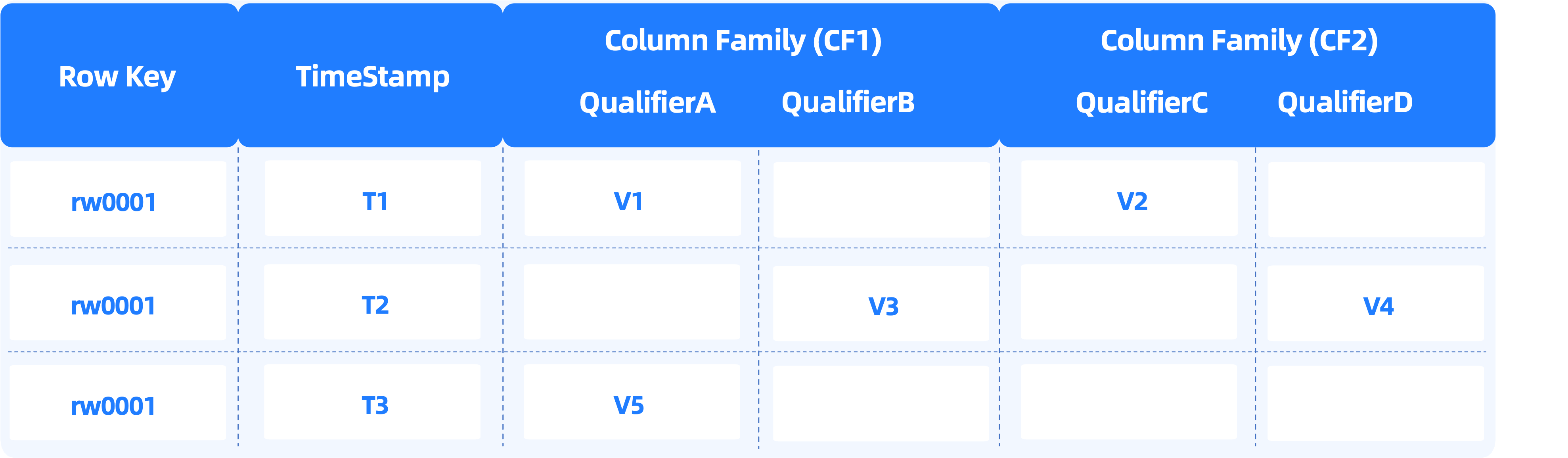
Table
Tables in HBase are similar to those in relational databases.
Row
Rows in HBase are similar to those in relational databases, but the two still have the following differences in terms of the data model:
- In relational databases, a rowkey corresponds to a row of physical data, and all rows share the same schema. HBase is a schemaless database where the schemas of rows can be independent of each other.
- HBase supports multiple data versions. You can specify the data version of a row when you query data. In the following example, the K column stores the primary key of an HBase table. A row whose primary key is
defaultKey1in the HBase model is stored as five rows in OBKV. The row has four columns and data in thedefaultColumn3column has two versions.
+--------------+----------------+----------------+--------------+
| K            | Q              | T              | V            |
+--------------+----------------+----------------+--------------+
| defaultKey1  | defaultColumn3 | -1715698988310 | defaultValue |
| defaultKey1  | defaultColumn6 | -1715698988310 | defaultValue |
| defaultKey1  | defaultColumn9 | -1715698988310 | defaultValue |
| defaultKey1  | defaultColumn1 | -1715698965577 | defaultValue |
| defaultKey1  | defaultColumn3 | -1715698965577 | defaultValue |
+--------------+----------------+----------------+--------------+
Column family
The concept of column family does not exist in relational databases. It is similar to the concept of vertical partition in some relational databases. A column family is a collection of columns whose values are physically stored together.
The HBase model supports an infinitely wide table and stores frequently accessed values in a column family to significantly improve the performance.
Column qualifier
A relational database has a fixed schema, which means that all rows have the same number of columns and the columns in the same position of rows are of the same data type. HBase is a schemaless database where each row can have a different number of columns and different column types.
In the following example, two HBase rows are inserted into OBKV. The defaultKey1 row has three columns and the defaultKey11 row has two columns.
+--------------+----------------+----------------+--------------+
| K            | Q              | T              | V            |
+--------------+----------------+----------------+--------------+
| defaultKey1  | defaultColumn3 | -1715698988310 | defaultValue |
| defaultKey1  | defaultColumn6 | -1715698988310 | defaultValue |
| defaultKey1  | defaultColumn9 | -1715698988310 | defaultValue |
| defaultKey11 | defaultColumn1 | -1715698965577 | defaultValue |
| defaultKey11 | defaultColumn2 | -1715698965577 | defaultValue |
+--------------+----------------+----------------+--------------+
Timestamp
Each value stored in HBase has a version number, which is identified by a timestamp. You can explicitly specify a timestamp when you write data. If you do not specify a timestamp, the timestamp when data is inserted into the storage engine is used by default.
In the following example, the T column indicates the timestamp. Considering that newly inserted data must be displayed at the top, the model layer of OBKV-HBase stores the negative value of each timestamp.
+-------------+----------------+----------------+--------------+
| K           | Q              | T              | V            |
+-------------+----------------+----------------+--------------+
| defaultKey1 | defaultColumn1 | -1715672642104 | defaultValue |
Cell
In HBase, a value of a specific version corresponds to a cell. A cell can be uniquely identified by a tuple of table, row, column family, column qualifier, and timestamp.
As shown in the preceding example, each row stored in OBKV is a cell in HBase.
OBKV-HBase data model
Database object types
An OBKV cluster is actually an OceanBase cluster for a MySQL tenant.
Database objects in OceanBase Database's MySQL mode include tables, views, indexes, and partitions.
In MySQL mode, a user can connect to a database and access and manage database objects after being granted the required privileges. A database is a collection of database objects used for privilege management and namespace-based resource isolation.
The following table briefly describes the database objects in OceanBase Database's MySQL mode.
For more information about database objects, see Overview of database objects.
Object type |
Description |
|---|---|
| Database | A collection of database objects used for privilege management and namespace-based resource isolation. |
| Table | The most basic storage unit in a database. A table is organized into rows and columns. |
| Index | An index sorts data of one or more columns. Indexes provide fast access to specified rows in a table. For example, you can search for information about an employee by last name based on the created index. An index helps you improve query efficiency. |
| Partition | OceanBase Database can split the data of a table into different groups based on some rules. Data in the same group is stored in the same physical area. A table whose data is split into different groups is called a partitioned table. Tables in OceanBase Database are horizontally partitioned. Each partition contains some data rows. Partitioning methods are classified into HASH partitioning, RANGE partitioning, LIST partitioning, and others based on the mapping relationships between data and partitions. Each partition can be divided into several subpartitions from different dimensions. For example, you can partition the transaction table into several HASH partitions based on the user ID. Then, you can partition each HASH partition into several RANGE partitions based on the transaction time. |
| Table group | A collection of tables. It is a logical concept. By default, data is randomly distributed to the tables in a table group. By defining a table group, you can control the physical closeness among a group of tables. |
Implementation of the OBKV-HBase model
This section takes the following table creation statement as an example to describe the implementation of the OBKV-HBase data model.
CREATE TABLEGROUP htable1;

create table htable1$family1 (
  K varbinary(1024),
  Q varbinary(256),
  T bigint,
  V varbinary(1048576) NOT NULL,
  primary key(K, Q, T))
TABLEGROUP =  htable1
partition by key(K) partitions 97;
OBKV-HBase uses the following mapping strategies to implement the HBase model:
- OBKV-HBase maps a table in HBase as a table group in OceanBase Database.
- OBKV-HBase maps a column family in HBase as a normal table in OceanBase Database.
Assume that HBase has a table named htable1 with a column family named family1. You need to create a table group named htable1 and a normal table named htable1$family1 in OceanBase Database, and bind the table with the table group. A normal table is named in the format of TableGroupName$FamilyName.
Notice
At present, OBKV-HBase does not support multiple column families. One table group can be bound with only one table.
Though OBKV-HBase supports the schemaless feature of HBase, any data model implemented based on OceanBase Database have schemas. The preceding table creation statement is the physical storage model of OBKV-HBase.
where:
htable1specifies the name of the HBase table. You can use a custom name.family1specifies the name of the column family. You can use a custom name.Note
The table name and column family name are joined by using a dollar sign ($) as the table name in OceanBase Database.
- The K column stores the rowkeys of the HBase table.
- The Q column stores column qualifiers.
- The T column stores timestamps, which are the number of milliseconds since 1970-01-01 UTC.
- The V column stores values of the varbinary type, whose maximum length is 1 MB. If the length is insufficient, the longblob type can be used.
- The K, Q, and T columns comprise a composite primary key to identify a cell in the HBase model.
Notice
The column names are fixed to K, Q, T, and V, and cannot be modified.
In the relational table created by using the preceding statement in OceanBase Database, data from multiple columns of a single row in the HBase table is stored in adjacent rows. Each of the rows actually stores a cell, which is a <row, column family, column qualifier, timestamp, value> tuple, in the HBase table.
Application scenarios of the HBase model
The HBase model has more benefits than the relational model in some scenarios.
Schemaless
Schemas must be defined in conventional relational databases. Although you can change a schema after you define it, such change may require data rebuilding in most scenarios, which can place heavy load on the database.
HBase is a schemaless database that stores the primary key, column names, and column values. It does not require each row to have the same column definitions.
For example, a business system whose upstream is Hive usually chooses HBase to store the data generated after offline computing by Hive. The reason why the business system does not choose a relational database such as MySQL is that the schema in a Hive task dynamically changes. It is impossible to perform DDL operations for schema change on the MySQL database every day.
Partial update
To update data in a conventional relational database, you need to query existing records in the database first. In other words, each update involves at least one read operation and one write operation on the database.
HBase splits one row into multiple cells for independent storage and provides an API with the semantics of PUT (overwrite). This way, you can update a single cell without the need to query data.
For example, in a business system for financial risk control, characteristics of some users will be partially modified after big data computing every day. You can use HBase in this scenario to achieve the optimal update performance because only updated cells need to be put into HBase. As we all know, a database built based on the LSM-tree architecture is write-friendly.
Wide table with sparse columns
For example, an app profiles users in many dimensions, which can change frequently. A specific user of this app usually matches only a few profiling dimensions. If the relational model is used to describe the scenario, it is a typical case of a wide table with sparse columns. Conventional relational databases are strongly schema-oriented and cannot efficiently handle wide tables with sparse columns due to several reasons. For example, the database needs to maintain many column values in each row and even has to maintain an empty mark for a column without a value.
HBase is suitable for wide tables with sparse columns. HBase stores only non-empty columns and is not limited by a schema, contributing to high efficiency in storage, writes, and queries.
Multi-version
Multi-version is very useful in some scenarios. For example, several recent login/consumption records of a user are often required in a risk control scenario. Business personnel usually need to query the multi-version data records of a specific user to assist decision making, and maintain only a certain number of data versions in the database. To achieve this in HBase, they only need to specify the data versions during the query and table creation. In a relational database, however, they need to redesign the schema, for example, add a timestamp column, to store multiple versions of data. It is a challenging task to maintain a certain number of data versions in a relational database.
TTL
HBase supports deleting expired data based on table-level or cell-level time-to-live (TTL). It provides high resource utilization and deletion efficiency. In a relational database, you can implement TTL through an external component. However, expired data is invisible to business personnel, the impact of deleting expired data on online business is uncontrollable, and the external component needs to consume resources of the business system and makes the business architecture more complex.