

OceanBase logo

OceanBase

A unified distributed database ready for your transactional, analytical, and AI workloads.

DEPLOY YOUR WAY

OceanBase Cloud

The best way to deploy and scale OceanBase

OceanBase Enterprise

Run and manage OceanBase on your infra

TRY OPEN SOURCE

OceanBase Community Edition

The free, open-source distributed database

OceanBase seekdb

Open source AI native search database

Customer Stories

Real-world success stories from enterprises across diverse industries.

View All
BY USE CASES

Mission-Critical Transactions

Global & Multicloud Application

Elastic Scaling for Peak Traffic

Real-time Analytics

Active Geo-redundancy

Database Consolidation

Resources

Comprehensive knowledge hub for OceanBase.

Blog

Live Demos

Training & Certification

Documentation

Official technical guides, tutorials, API references, and manuals for all OceanBase products.

View All
PRODUCTS

OceanBase Cloud

OceanBase Database

Tools

Connectors and Middleware

QUICK START

OceanBase Cloud

OceanBase Database

BEST PRACTICES

Practical guides for utilizing OceanBase more effectively and conveniently

Company

Learn more about OceanBase – our company, partnerships, and trust and security initiatives.

About OceanBase

Partner

Trust Center

Contact Us

International - English
中国站 - 简体中文
日本 - 日本語
Sign In
Start on Cloud

A unified distributed database ready for your transactional, analytical, and AI workloads.

DEPLOY YOUR WAY

OceanBase Cloud

The best way to deploy and scale OceanBase

OceanBase Enterprise

Run and manage OceanBase on your infra

TRY OPEN SOURCE

OceanBase Community Edition

The free, open-source distributed database

OceanBase seekdb

Open source AI native search database

Customer Stories

Real-world success stories from enterprises across diverse industries.

View All
BY USE CASES

Mission-Critical Transactions

Global & Multicloud Application

Elastic Scaling for Peak Traffic

Real-time Analytics

Active Geo-redundancy

Database Consolidation

Comprehensive knowledge hub for OceanBase.

Blog

Live Demos

Training & Certification

Documentation

Official technical guides, tutorials, API references, and manuals for all OceanBase products.

View All
PRODUCTS
OceanBase CloudOceanBase Database
ToolsConnectors and Middleware
QUICK START
OceanBase CloudOceanBase Database
BEST PRACTICES

Practical guides for utilizing OceanBase more effectively and conveniently

Learn more about OceanBase – our company, partnerships, and trust and security initiatives.

About OceanBase

Partner

Trust Center

Contact Us

Start on Cloud
编组
All Products
    • Databases
    • iconOceanBase Database
    • iconOceanBase Cloud
    • iconOceanBase Tugraph
    • iconInteractive Tutorials
    • iconOceanBase Best Practices
    • Tools
    • iconOceanBase Cloud Platform
    • iconOceanBase Migration Service
    • iconOceanBase Developer Center
    • iconOceanBase Migration Assessment
    • iconOceanBase Admin Tool
    • iconOceanBase Loader and Dumper
    • iconOceanBase Deployer
    • iconKubernetes operator for OceanBase
    • iconOceanBase Diagnostic Tool
    • iconOceanBase Binlog Service
    • Connectors and Middleware
    • iconOceanBase Database Proxy
    • iconEmbedded SQL in C for OceanBase
    • iconOceanBase Call Interface
    • iconOceanBase Connector/C
    • iconOceanBase Connector/J
    • iconOceanBase Connector/ODBC
    • iconOceanBase Connector/NET
icon

OceanBase Database

KV - V4.3.5

  • OBKV overview
  • Architecture
  • OBKV-Table
    • Introduction to OBKV-Table
      • Overview
      • OBKV-Table operation types
      • Core features of OBKV-Table
      • Differences between replace and insert_or_update
      • Supported value types
      • OBKV-Table data models
    • Use the OBKV-Table Java client
      • Java development guide for OBKV-Table
      • Prepare for development with OBKV-Table
      • Use the OBKV-Table Java client to connect to a cluster
      • Set client parameters
      • Supported client interfaces
      • Use the OBKV-Table Java client
    • Use the OBKV-Table GO client
      • Use the OBKV-Table Go client to connect to a cluster
      • Overview of the Go client
      • Individual API operations
      • Batch operations
      • About queries
      • Aggregation API
      • Filters
    • FAQ
  • OBKV-HBase
    • Overview
    • OBKV-HBase core features
    • Compatibility with HBase
    • Deployment
    • Application development with OBKV-HBase
      • Overview of OBKV-HBase application development
      • Data model
      • Data model design
      • Connect to a cluster using the OBKV-HBase client
      • Migrate HBase business code to OBKV-HBase
      • Data operation examples
      • Delete expired data
    • OBKV-HBase migration guide
    • OBKV-HBase management
      • Overview
      • High availability
      • Security and permissions
      • Monitoring metrics
    • Performance test
    • OBKV-HBase integrations
      • Flink
        • Synchronize data to OBKV-HBase by using Flink
    • Views
    • FAQ

Download PDF

OBKV overview Architecture Overview OBKV-Table operation types Core features of OBKV-Table Differences between replace and insert_or_update Supported value types OBKV-Table data models Java development guide for OBKV-Table Prepare for development with OBKV-Table Use the OBKV-Table Java client to connect to a cluster Set client parameters Supported client interfaces Use the OBKV-Table Java client Use the OBKV-Table Go client to connect to a cluster Overview of the Go client Individual API operations Batch operations About queries Aggregation API Filters FAQ Overview OBKV-HBase core features Compatibility with HBase Deployment Overview of OBKV-HBase application development Data model Data model design Connect to a cluster using the OBKV-HBase client Migrate HBase business code to OBKV-HBase Data operation examples Delete expired data OBKV-HBase migration guide Overview High availability Security and permissions Monitoring metrics Performance test Views FAQ
OceanBase logo

The Unified Distributed Database for the AI Era.

Follow Us
Products
OceanBase CloudOceanBase EnterpriseOceanBase Community EditionOceanBase seekdb
Resources
DocsBlogLive DemosTraining & Certification
Company
About OceanBaseTrust CenterLegalPartnerContact Us
Follow Us

© OceanBase 2026. All rights reserved

Cloud Service AgreementPrivacy PolicySecurity
Contact Us
Document Feedback
  1. Documentation Center
  2. OceanBase Database
  3. KV
  4. V4.3.5
iconOceanBase Database
KV - V 4.3.5
SQL
KV
  • V 4.3.5

Deployment

Last Updated:2025-09-08 11:41:13  Updated
share
What is on this page
Deploy an OBKV cluster
Select an appropriate product form
Select an appropriate deployment solution
Select an appropriate deployment method
Plan resources
Configure the OBKV client
Direct connection mode
Public cloud mode

folded

share

The deployment of OBKV-HBase comprises two parts:

  • Deploy an OBKV cluster: An OBKV cluster is actually an OceanBase cluster for a MySQL tenant. For more information about how to deploy an OceanBase cluster, see Deployment overview.

  • Configure the OBKV client: The configuration of the OBKV client can slightly differ depending on whether you deploy your cluster in a public cloud or a private environment.

Deploy an OBKV cluster

You can select an appropriate product form, deployment solution, and deployment method as needed.

Select an appropriate product form

OceanBase Database is available in two forms: OceanBase Database Enterprise Edition and OceanBase Database Community Edition. At present, OceanBase Database Community Edition supports only the direct connection mode and OceanBase Database Enterprise Edition supports both direct connection and connection through OceanBase Database Proxy (ODP). You can select a product form as needed.

Select an appropriate deployment solution

OceanBase Database uses a shared-nothing architecture with multiple replicas to ensure zero single point of failure (SPOF) and system continuity. You can deploy an OceanBase cluster in a single IDC, dual IDCs, three IDCs across two regions, and five IDCs across three regions. OceanBase Database supports high availability and disaster recovery at the single-IDC, multi-IDC (in the same region), and region level. You can also deploy the arbitration service to reduce costs.
For more information about each deployment solution, see HA deployment solutions for OceanBase clusters.

Select an appropriate deployment method

Product form Scenario Recommended deployment method Deployment tool
OceanBase Database Enterprise Edition Production environment We recommend that you deploy the OceanBase cluster by using OceanBase Cloud Platform (OCP).
For more information, see Deploy a three-replica OceanBase cluster by using OCP.
OceanBase Admin Toolkit (OAT) and OCP
OceanBase Database Enterprise Edition Non-production environment You can deploy the OceanBase cluster by using the CLI.
For more information, see Deploy a three-replica OceanBase cluster by using the CLI.
oatcli
OceanBase Database Community Edition Online environment We recommend that you use OceanBase Deployer (obd) for standard deployment.
For more information, see Deploy an OceanBase cluster through the GUI of obd.
obd
OceanBase Database Community Edition Kubernetes environment We recommend that you deploy the OceanBase cluster by using ob-operator.
For more information, see Deploy OceanBase Database in a Kubernetes cluster.
ob-operator
OceanBase Database Community Edition Quick experience scenario in an operating system that is not natively supported, such as macOS and Windows We recommend that you deploy the OceanBase cluster by using a Docker image.
For more information, see the Solution 3: Deploy OceanBase Database in a container section in the Get started with OceanBase Database topic.
OceanBase Database Community Edition Quick experience scenario in an operating system that is natively supported, such as the Linux series We recommend that you deploy the OceanBase cluster by using obd. For more information, see the Solution 1: Deploy OceanBase Database in a demo environment or Solution 2: Deploy an OceanBase cluster section in Get started with OceanBase Database. obd

Plan resources

Before deployment, you need to plan and prepare resources required for the deployment.

  • For server configuration requirements, see Prepare servers.

Configure the OBKV client

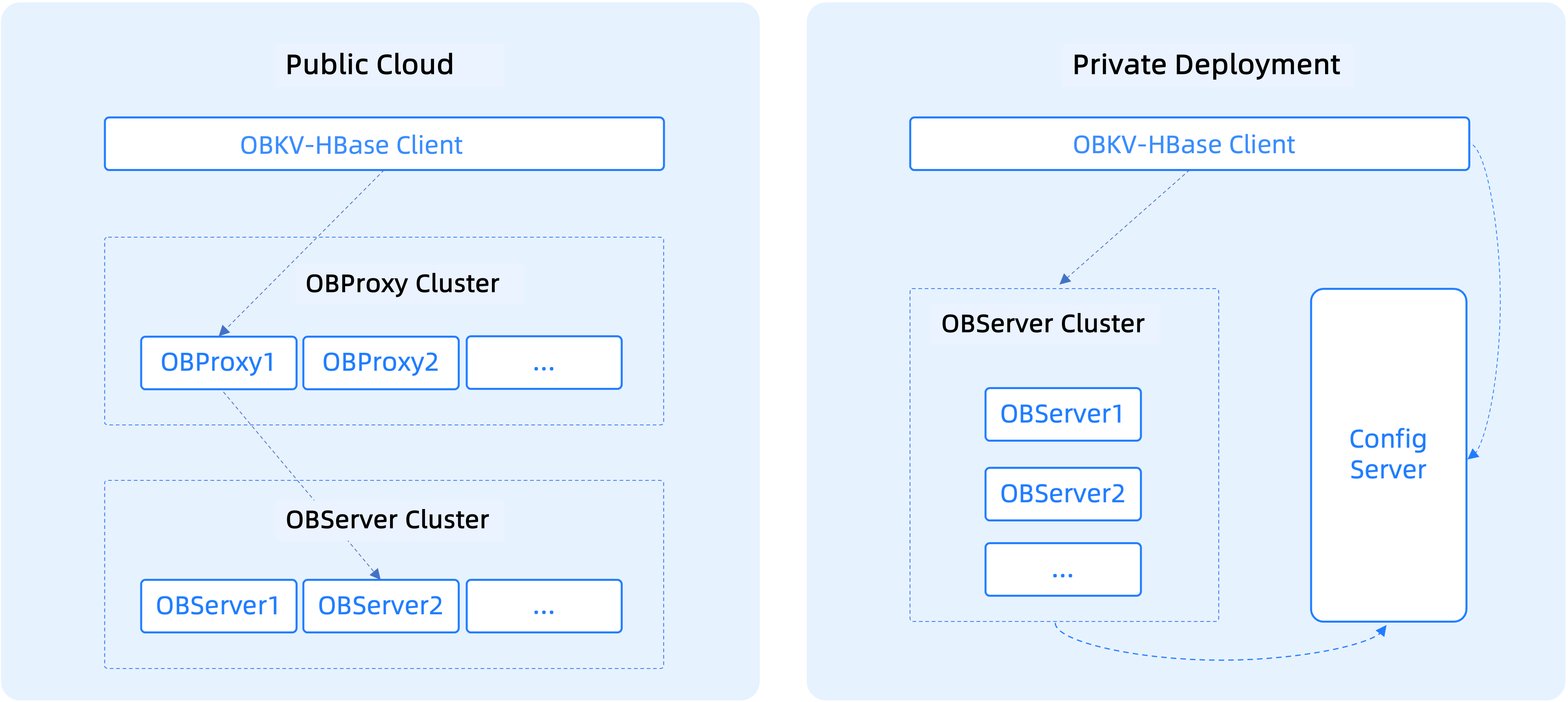
The following figure shows the differences when OBKV-HBase is deployed in a public cloud and in a private environment.
client-config

Direct connection mode

When you deploy OBKV-HBase in a private environment, you can choose the direct connection mode.

  • The Config Server of OceanBase Database provides metadata registration, storage, and query services.
  • The client of OBKV-HBase comes with the data routing feature. In direct connection mode, data is directly delivered to the destination data node.
  • When the RegionServer list of an OceanBase cluster changes, the changes will be pushed to the Config Server. OBKV-HBase can obtain the RegionServer list from the Config Server in real time. Generally, OBKV-HBase can detect the changes in the RegionServer list by itself. If the client is initialized and the RegionServer list is offline, OBKV-HBase needs to access the Config Server.

Notice

You do not need to deploy ODP in direct connection mode.

Public cloud mode

When OBKV-HBase is deployed in a public cloud, network isolation exists between the business and database clusters. In this case, ODP is required to route messages.

Notice

When OBKV-HBase is deployed in a private environment, network isolation also exists between the business and database IDCs in some scenarios. In this case, you can also deploy ODP. Based on IP address mapping and the load balancer, business requests are sent to ODP. Then, ODP forwards the requests to the database.

Previous topic

Compatibility with HBase
Last

Next topic

Overview of OBKV-HBase application development
Next
What is on this page
Deploy an OBKV cluster
Select an appropriate product form
Select an appropriate deployment solution
Select an appropriate deployment method
Plan resources
Configure the OBKV client
Direct connection mode
Public cloud mode