

OceanBase logo

OceanBase

A unified distributed database ready for your transactional, analytical, and AI workloads.

DEPLOY YOUR WAY

OceanBase Cloud

The best way to deploy and scale OceanBase

OceanBase Enterprise

Run and manage OceanBase on your infra

TRY OPEN SOURCE

OceanBase Community Edition

The free, open-source distributed database

OceanBase seekdb

Open source AI native search database

Customer Stories

Real-world success stories from enterprises across diverse industries.

View All
BY USE CASES

Mission-Critical Transactions

Global & Multicloud Application

Elastic Scaling for Peak Traffic

Real-time Analytics

Active Geo-redundancy

Database Consolidation

Resources

Comprehensive knowledge hub for OceanBase.

Blog

Live Demos

Training & Certification

Documentation

Official technical guides, tutorials, API references, and manuals for all OceanBase products.

View All
PRODUCTS

OceanBase Cloud

OceanBase Database

Tools

Connectors and Middleware

QUICK START

OceanBase Cloud

OceanBase Database

BEST PRACTICES

Practical guides for utilizing OceanBase more effectively and conveniently

Company

Learn more about OceanBase – our company, partnerships, and trust and security initiatives.

About OceanBase

Partner

Trust Center

Contact Us

International - English
中国站 - 简体中文
日本 - 日本語
Sign In
Start on Cloud

A unified distributed database ready for your transactional, analytical, and AI workloads.

DEPLOY YOUR WAY

OceanBase Cloud

The best way to deploy and scale OceanBase

OceanBase Enterprise

Run and manage OceanBase on your infra

TRY OPEN SOURCE

OceanBase Community Edition

The free, open-source distributed database

OceanBase seekdb

Open source AI native search database

Customer Stories

Real-world success stories from enterprises across diverse industries.

View All
BY USE CASES

Mission-Critical Transactions

Global & Multicloud Application

Elastic Scaling for Peak Traffic

Real-time Analytics

Active Geo-redundancy

Database Consolidation

Comprehensive knowledge hub for OceanBase.

Blog

Live Demos

Training & Certification

Documentation

Official technical guides, tutorials, API references, and manuals for all OceanBase products.

View All
PRODUCTS
OceanBase CloudOceanBase Database
ToolsConnectors and Middleware
QUICK START
OceanBase CloudOceanBase Database
BEST PRACTICES

Practical guides for utilizing OceanBase more effectively and conveniently

Learn more about OceanBase – our company, partnerships, and trust and security initiatives.

About OceanBase

Partner

Trust Center

Contact Us

Start on Cloud
编组
All Products
    • Databases
    • iconOceanBase Database
    • iconOceanBase Cloud
    • iconOceanBase Tugraph
    • iconInteractive Tutorials
    • iconOceanBase Best Practices
    • Tools
    • iconOceanBase Cloud Platform
    • iconOceanBase Migration Service
    • iconOceanBase Developer Center
    • iconOceanBase Migration Assessment
    • iconOceanBase Admin Tool
    • iconOceanBase Loader and Dumper
    • iconOceanBase Deployer
    • iconKubernetes operator for OceanBase
    • iconOceanBase Diagnostic Tool
    • iconOceanBase Binlog Service
    • Connectors and Middleware
    • iconOceanBase Database Proxy
    • iconEmbedded SQL in C for OceanBase
    • iconOceanBase Call Interface
    • iconOceanBase Connector/C
    • iconOceanBase Connector/J
    • iconOceanBase Connector/ODBC
    • iconOceanBase Connector/NET
icon

OceanBase Database

KV - V4.3.5

  • OBKV overview
  • Architecture
  • OBKV-Table
    • Introduction to OBKV-Table
      • Overview
      • OBKV-Table operation types
      • Core features of OBKV-Table
      • Differences between replace and insert_or_update
      • Supported value types
      • OBKV-Table data models
    • Use the OBKV-Table Java client
      • Java development guide for OBKV-Table
      • Prepare for development with OBKV-Table
      • Use the OBKV-Table Java client to connect to a cluster
      • Set client parameters
      • Supported client interfaces
      • Use the OBKV-Table Java client
    • Use the OBKV-Table GO client
      • Use the OBKV-Table Go client to connect to a cluster
      • Overview of the Go client
      • Individual API operations
      • Batch operations
      • About queries
      • Aggregation API
      • Filters
    • FAQ
  • OBKV-HBase
    • Overview
    • OBKV-HBase core features
    • Compatibility with HBase
    • Deployment
    • Application development with OBKV-HBase
      • Overview of OBKV-HBase application development
      • Data model
      • Data model design
      • Connect to a cluster using the OBKV-HBase client
      • Migrate HBase business code to OBKV-HBase
      • Data operation examples
      • Delete expired data
    • OBKV-HBase migration guide
    • Performance test
    • OBKV-HBase integrations
      • Flink
        • Synchronize data to OBKV-HBase by using Flink
    • Views
    • FAQ
    • OBKV-HBase management
      • Overview
      • High availability
      • Security and permissions
      • Monitoring metrics

Download PDF

OBKV overview Architecture Overview OBKV-Table operation types Core features of OBKV-Table Differences between replace and insert_or_update Supported value types OBKV-Table data models Java development guide for OBKV-Table Prepare for development with OBKV-Table Use the OBKV-Table Java client to connect to a cluster Set client parameters Supported client interfaces Use the OBKV-Table Java client Use the OBKV-Table Go client to connect to a cluster Overview of the Go client Individual API operations Batch operations About queries Aggregation API Filters FAQ Overview OBKV-HBase core features Compatibility with HBase Deployment Overview of OBKV-HBase application development Data model Data model design Connect to a cluster using the OBKV-HBase client Migrate HBase business code to OBKV-HBase Data operation examples Delete expired data OBKV-HBase migration guide Performance test Views FAQ Overview High availability Security and permissions Monitoring metrics
OceanBase logo

The Unified Distributed Database for the AI Era.

Follow Us
Products
OceanBase CloudOceanBase EnterpriseOceanBase Community EditionOceanBase seekdb
Resources
DocsBlogLive DemosTraining & Certification
Company
About OceanBaseTrust CenterLegalPartnerContact Us
Follow Us

© OceanBase 2026. All rights reserved

Cloud Service AgreementPrivacy PolicySecurity
Contact Us
Document Feedback
  1. Documentation Center
  2. OceanBase Database
  3. KV
  4. V4.3.5
iconOceanBase Database
KV - V 4.3.5
SQL
KV
  • V 4.3.5

Overview

Last Updated:2025-10-14 13:02:48  Updated
share
What is on this page
Working process of OBKV-Table
Client
RPC framework
OBServer node
Comparison with OceanBase SQL mode

folded

share

OBKV-Table provides an interface for manipulating data within table models. Under the hood, OBKV-Table defines a set of standardized interaction protocols between the client and the database server. This guide aims to offer a comprehensive explanation of the implementation principles of OBKV-Table.

Working process of OBKV-Table

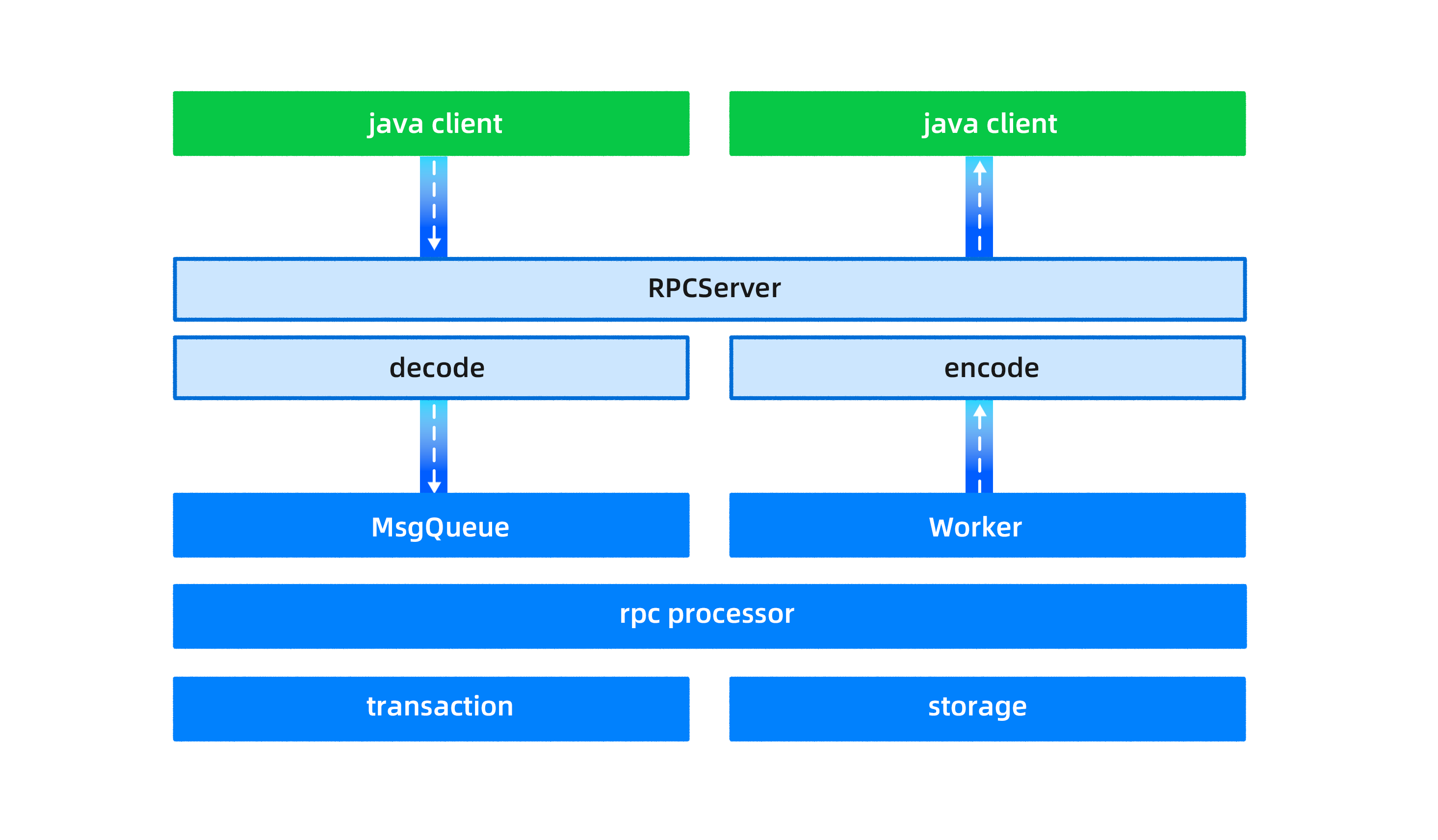
The working process of OBKV-Table involves the client, RPC framework, and an OBServer node, as shown in the following figure. These three parts are described in the following sections.
OBKV-Table

Client

OceanBase Database is a distributed database in which each table, or even different partitions of the same table, may be stored on different servers. This means that in order to read or write table data, you must first determine the location of the table or partition where the data is stored.

Specifically, for OBKV-Table, the OBServer node does not perform routing forwarding and only executes commands locally. Any routing errors could lead to unintended data being read or written. As a result, in each operation, the client first computes the specific partition id based on the table name and rowkey. Then, using the partition ID, it determines the specific location of the OBServer node to execute the command, and subsequently sends the request to the corresponding OBServer node.

In addition to providing basic read and write functionality, the client also plays a crucial role in calculating routes.

RPC framework

OBKV-Table uses a custom RPC protocol of OceanBase Database for communication, which follows the standard request-response model.

Different requests are independent of each other, and the server concurrently processes multiple requests. Multiple TCP connections can be established between the same client and server. This model is encapsulated by using libeasy.

The libeasy package contains the package header and data of the OceanBase RPC package. After the data is passed through the RPC layer to the server, it needs to be parsed by the decode module to analyze the data packet, and finally, the server extracts the message type and data body from the request package.

OBServer node

An OBServer node processes OBKV-Table requests from the client by using the producer-consumer model. The maximum number of concurrent messages a client can send depends on the queue length and the OBServer node's processing speed.

When the OBServer node receives a client request, an independent thread places the request message into a message queue, and a worker thread retrieves and processes the message from the queue.

To differentiate between message types, the OBServer node uses a priority queue, enabling hierarchical processing of different message types (MySQL, RPC, etc.). This ensures that high-priority requests are not "starved" due to timeouts.

Furthermore, OBKV-Table and OceanBase SQL use the same transaction framework and storage engine. The storage engine employs a two-level partitioned table and LSM tree, supporting various combinations of hash and range partitioning. This setup addresses partition hotspots and machine hotspots through automatic range partitioning and load balancing, all transparent to the user.

Note

Currently, OBKV-Table does not support cross-partition transactions.

Comparison with OceanBase SQL mode

The table API provided by OBKV-Table seamlessly integrates with and can be used alongside OceanBase SQL. Below, we outline the advantages and disadvantages of OBKV-Table when compared with the SQL mode.

Advantages:

  • OBKV-Table is designed based on a distributed storage layer, bringing shorter data access paths and better performance for equivalent functionality. Its simpler semantics make it easier to optimize, leading to more predictable performance.
  • Batch operations have more flexible and efficient semantics when compared with the SQL mode. For example, a multi-get operation can select different columns for different rows.
  • The API interface is straightforward, providing entity semantics directly without the need for complex ER mappings.
  • It uses a simple RPC protocol, eliminating the need for reconnection that is typical with traditional JDBC/ODBC interfaces. It is also largely unrestricted by connection numbers (though currently limited by the RPC framework).

Disadvantages:

  • The query functionality of OBKV-Table does not match that of the SQL mode, offering limited features such as get, scan, and limit. For aggregation and sorting features, the SQL mode should be used.
  • OBKV-Table does not provide interactive transactions or complex transaction capabilities. Unlike traditional relational databases, OceanBase Database itself operates as a feature-rich NewSQL relational database, where the consideration for using OBKV-Table is not solely based on its high scalability and availability.
  • OBKV-Table does not support global indexes and therefore cannot operate on tables related to global indexes.

Previous topic

Architecture
Last

Next topic

OBKV-Table operation types
Next
What is on this page
Working process of OBKV-Table
Client
RPC framework
OBServer node
Comparison with OceanBase SQL mode