







This topic describes how to locate and troubleshoot common problems with Oracle Store.
Oracle Store delay due to absence of incremental data
Background
Oracle Store obtains timestamps based on incremental data and heartbeat packets. When the database has no incremental data for a long time, Oracle Store obtains timestamps based only on heartbeat packets. Heartbeat packets come from changes of the system tables in the Oracle database. However, the system tables are not always changed in a timely manner, and change data is generated once per five minutes or longer. That is why the incremental data displayed on the OMS control page is delayed. When the Oracle database does not generate a large amount of incremental data, the delay varies from a few seconds to a few minutes.
Issue analysis
On the console page, the curve of the delay caused by zero incremental data in a long time is generally a sine wave periodically increased and decreased.
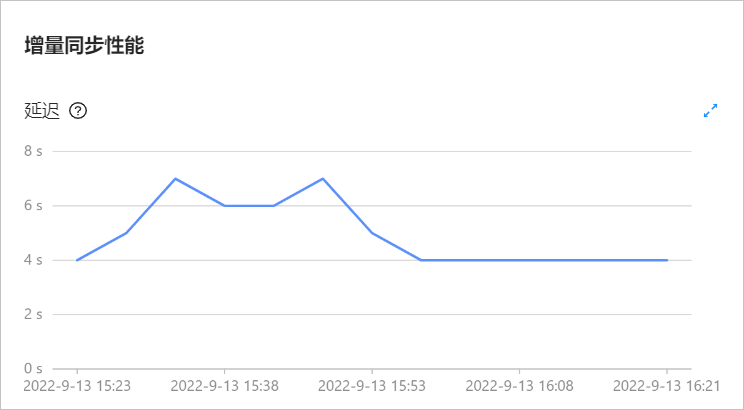
In the OMS container, go to the corresponding /home/ds/store/storexxxx directory, and run the following query command to view the log file being analyzed. If the log file is online, it indicates that Oracle Store extracts incremental data in real time. To further verify that the incremental data extraction is in real time, you can perform a full check on the console page. If the check result is consistent with the query result, the incremental data is not delayed.
grep 'log entries from log file' log/connector/connector.log | tail -n 1
Query the number and size of logs in the Oracle database within the specified time
Scenarios
You may need to query the number and size of logs generated in the Oracle database when you troubleshoot Oracle Store.
Query method
Use the following SQL statement to query the number and size of archives generated in the Oracle database per hour and per day in the last 3 days. In a RAC environment, THREAD# has multiple different values. You need to distinguish the values for different nodes. To change the query interval, modify the sysdate - 2 parameter in the SQL statement.
alter session set nls_date_format='yyyy-mm-dd hh24:mi:ss';

//The number of logs generated per hour in the last three days.
select THREAD#,logtime,count(*),round(sum(blocks * block_size) / 1024 / 1024 / 1024) GBSIZE from (select a.THREAD#,trunc(first_time, 'hh') as logtime,a.BLOCKS,a.BLOCK_SIZE from v$archived_log a where a.DEST_ID = 1 and a.FIRST_TIME > trunc(sysdate - 2)) group by THREAD#, logtime order by THREAD#, logtime;

//The number of logs generated per day in the last three days.
select THREAD#,logtime,count(*),round(sum(blocks * block_size) / 1024 / 1024 / 1024) GBSIZE from (select a.THREAD#,trunc(first_time, 'dd') as logtime,a.BLOCKS,a.BLOCK_SIZE from v$archived_log a where a.DEST_ID = 1 and a.FIRST_TIME > trunc(sysdate - 2)) group by THREAD#, logtime order by THREAD#, logtime;