







OceanBase Migration Assessment (OMA) is a database compatibility assessment tool provided by OceanBase Database. OMA provides precise compatibility assessment, efficient performance assessment, comprehensive recommendations on the distribution mode, and application reconstruction suggestions to help you effectively migrate data to OceanBase Database.
Features and benefits
Lightweight installation and ease of use
You can directly decompress the downloaded OMA package without installing a CLI tool.
When you use OMA for compatibility and performance assessment, you need to only specify the assessment parameters and run the assessment script to obtain an assessment report.
Security and reliability
OMA uses a single thread to scan the metadata of databases. This ensures data security.
Comprehensiveness
OMA supports the assessment of various database types such as Oracle, MySQL, PostgreSQL, and DB2 LUW. It also supports compatibility, performance, and distribution mode assessments of database objects, such as tables, indexes, views, sequences, synonyms, functions, procedures, packages, and triggers, and all SQL statements in the databases.
Smart recommendations
If OMA identifies that your existing database is not fully compatible with the distributed architecture of OceanBase Database, it provides a transformation solution for migrating your database to OceanBase Database based on the best practices accumulated over the years.
Features
OceanBase Database uses OMA to assess the compatibility and performance of migrating data from the source database to OceanBase Database before the migration.
Compatibility assessment: This feature can assess the compatibility with all objects in the source database, including database objects, SQL statements, and PL statements.
Performance assessment: This feature captures the workload of the source database and precisely replays it in the target OceanBase instance to assess the performance of the same workload in OceanBase Database.
Compatibility assessment
Compatibility assessment is a core prerequisite for database migration. It involves systematically detecting differences between the source database (such as Oracle and MySQL) and the target OceanBase Database, including syntax, supported system package functions, and data types, and formulating a migration strategy based on these differences. Compatibility assessment serves as the first line of defense for successful data migration, quantifying risks and implementing precise solutions to ensure that enterprise-level database migrations are smooth, stable, and high-performing.
OMA assesses the compatibility of converting database objects of Oracle Database, MySQL, PostgreSQL, TiDB, DB2 LUW, RDS for MySQL, PolarDB for MySQL, PolarDB for Oracle, DRDS, SQL Server, openGauss, and OceanBase Database instances (both MySQL and Oracle tenants) to database objects of OceanBase Database during data migration or synchronization. OMA also generates an assessment report after the assessment is complete. The assessment report for compatibility with the Oracle and MySQL databases lists specific causes of the incompatibility and suggests corresponding solutions. The assessment reports list only the reasons for the incompatibility with other types of database instances.
The compatibility assessment feature supports database object assessment, database SQL or PL statement assessment, and full database assessment:
Database object assessment
You can directly connect OMA to the source database, automatically obtain information about objects in the source database, and assess the compatibility of OceanBase Database with the source database.
OMA can assess the compatibility of DDL statements in Oracle and MySQL databases. It can also assess DDL statements separated with double dollar signs ($$) in TEXT files.
You can use a lightweight client to connect OMA to an Oracle database and export DDL statements for compatibility assessment.
OMA can directly read the DDL statements exported by using MySQLDump for compatibility assessment.
OMA allows you to use db2look to export DDL statements for compatibility assessment.
Assessment of SQL or PL statements
You can directly connect OMA to an Oracle database, scan the V$SQL view to obtain SQL statements of the corresponding schema, and then assess the compatibility of these SQL statements with OceanBase Database.
OMA can assess the compatibility of SQL or PL statements that are separated with semicolons (;) or double dollar signs ($$) in TEXT files.
OMA can directly parse SQL statements in MyBatis and iBatis files to assess the compatibility of these statements.
You can directly connect OMA to an Oracle database, periodically scan the V$SQL view to obtain all SQL statements in a specific period, and then assess these SQL statements.
You can directly connect OMA to a DB2 LUW database, periodically scan the snapshots for dynamic SQL statements to obtain all SQL statements in a specific period, and then assess these SQL statements.
Database assessment
The database assessment feature allows you to assess objects, SQL statements, and database profiles in one assessment task and view the corresponding assessment results in one report.
OMA supports different database assessment modes for Oracle, MySQL, TiDB, PostgreSQL, and DB2 LUW databases. For more information, see Database assessment.
The advantages of using the compatibility assessment feature are as follows:
Avoid catastrophic risks of data migration
Case: A financial institution identified that the target did not support DBMS_JOB packages through compatibility assessment and made necessary modifications in advance, avoiding the risk of business interruption.
The role of compatibility assessment: It helps identify over 1,000 incompatible SQL syntaxes and allows for their modification to ensure zero-fault migration.
Precisely control modification costs
The compatibility assessment report can quantify the number of modifications needed. For example, 32 out of 200 stored procedures needed rewriting, and there were 15 instances of incompatible functions.
The role of compatibility assessment: It helps control modification costs and avoid budget overruns. For example, a company reduced the estimated project duration from six months to two months through compatibility assessment.
Ensure the performance of the distributed architecture
The distributed nature of OceanBase Database can lead to significant changes in SQL execution plans.
Compatibility assessment helps detect issues such as full table scans caused by the absence of filtering conditions in query SQL statements and multi-table join SQL statements involving more than five tables.
The role of compatibility assessment: It helps identify SQL statements that may impact performance before data migration, allowing for necessary restructuring to avoid performance degradation.
Case: An e-commerce platform identified 120 SQL statements that needed restructuring through compatibility assessment. After data migration, the TPS actually increased by 40%.
Performance assessment
Performance assessment is a key component of the OceanBase Database migration toolchain, specifically designed to capture the workload of the source database and accurately replay it in the target OceanBase instance.
The performance assessment feature supports SQL replay and stress testing:
You can connect OMA to the source database, collect SELECT statements, and then replay the SQL statements in an OceanBase database to verify the compatibility of the SQL statements and the performance of OceanBase Database.
OMA allows you to collect the workload capture replay (WCR) files of an Oracle database, parse the WCR files to obtain SQL statements, and then assess the compatibility of the SQL statements. You can also replay the SQL statements in an OceanBase database to verify their accuracy and performance.
OMA can parse and replay the general log files of MySQL databases.
During the upgrade of an OceanBase database, OMA supports pulling query statements from the database before the upgrade and replaying the statements in the database after the upgrade.
The benefits of using the performance assessment feature are as follows:
Reduce migration risks
Simulate real scenarios: Capture real SQL traffic from the production environment before data migration.
Pre-detection of issues: Expose compatibility issues, performance bottlenecks, and configuration defects in advance.
Zero-downtime verification: Conduct comprehensive testing without affecting the production environment.
Test performance benchmarks
Objective comparison: Quantitatively measure the performance differences before and after data migration.
Capacity planning: Verify whether the OceanBase instance configuration meets business requirements.
Optimization basis: Identify SQL statements and access patterns that need optimization.
Assess the impact of changes
Verify architectural changes: Evaluate the impact of transitioning from a centralized to a distributed architecture.
Test version upgrades: Securely verify the performance of the new OceanBase version.
Assess hardware changes: Test performance across different hardware configurations.
The core value and role of performance assessment are as follows:
Comprehensive compatibility assurance
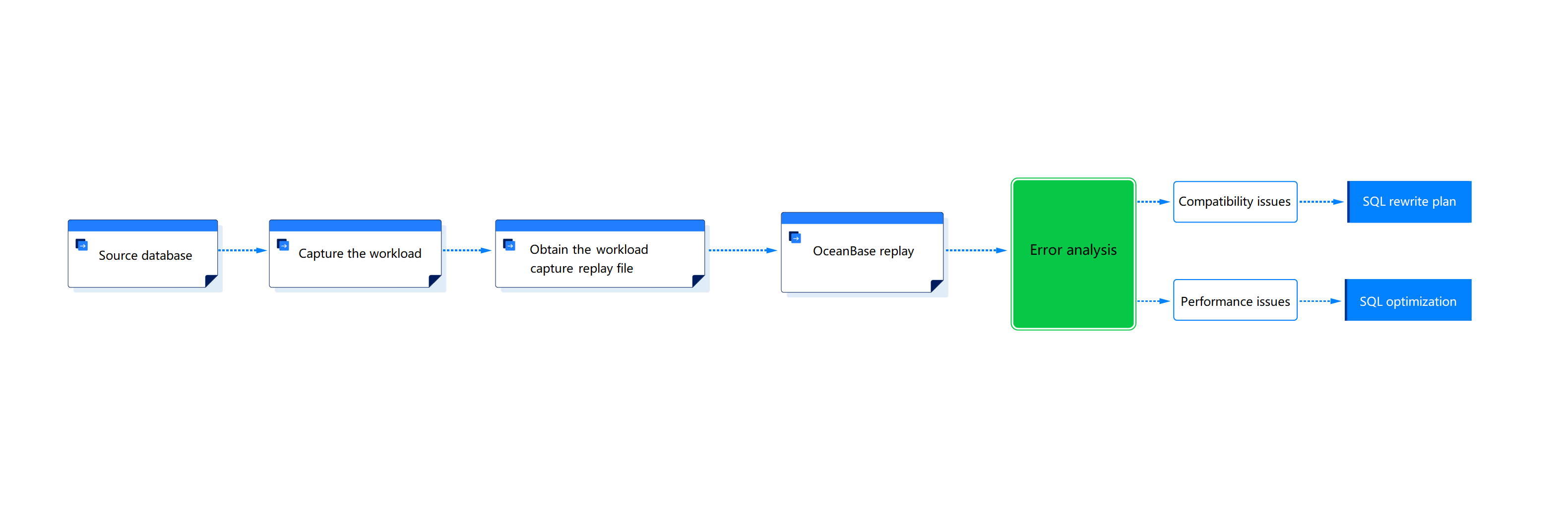
Identify incompatible SQL syntax.
Optimize the performance of slow SQL queries.
Precise performance analysis
MetricSource DatabaseOceanBase DatabaseQPS 10000 12000 Average Latency 6.3ms 5.2ms You can quickly locate the following based on the sample data in the table:
Compare the latency of the source and target databases.
Count the number of successful and failed SQL executions.
Identify SQL statements with high execution latency for optimization.
Object and SQL statement export from OceanBase Database
OMA allows you to export DDL statements for objects in the corresponding schema from an OceanBase database.
OMA allows you to export all SQL statements in the SQL_AUDIT view for a specific period from an OceanBase database.