







Alert description
This alert is triggered when the total memory occupied by OB 500 tenants (special statistics, not referring to a specific tenant) on an OBServer node exceeds the threshold.
Alerting principle
The following table describes the key parameters involved in the alert monitoring logic.
Parameter |
Value |
|---|---|
| Monitoring metric | ob_tenant500_mem_hold_percent The value of this metric indicates the percentage of the total memory occupied by OceanBase 500 tenant on the OBServer node. An alert is triggered when this value exceeds the threshold (default value: 95%). |
| Data source | select sum(hold), sum(used) from __all_virtual_memory_info where tenant_id = 500 and svr_ip = @svr_ip and svr_port = rpc_port();
|
| Metric collection interval (unit: GB) | mem_hold, mem_total |
| Monitoring expression | 100 * sum(mem_hold{metric_group="tenant500_memory_info",@LABELS}) by (@GBLABELS) / sum(mem_total{metric_group="all_virtual_server_stat",@LABELS}) by (@GBLABELS) |
| Metric collection interval | 60 seconds |
Rule information
Monitoring metric |
Default threshold (unit: %) |
Duration |
Detection cycle |
Elimination cycle |
|---|---|---|---|---|
| ob_tenant500_mem_hold_percent | 95 | 0 seconds | 60 seconds | 5 minutes |
Alert information
Alert trigger method |
Alert level |
Scope |
|---|---|---|
| Based on the expression of the monitoring metric | Severe | Server |
Alert template
Alert summary
- Template: ${alarm_target} ${alarm_name}
- Example: ob_cluster=obcluster-1 OceanBase 500 Tenant Memory Usage Exceeded
Alert details
- Template: Cluster: ${ob_cluster_name}, Host: ${host}, Alert: ${alarm_name}. Memory usage ${value_shown} exceeds ${alarm_threshold} %.
- Example: Cluster: obcluster-1, Host: xxx.xxx.xxx.xxx, Alert: OceanBase 500 Tenant Memory Usage Exceeded. Memory usage 96.0 % exceeds 95.0 %.
Alert recovery
- Template: Alert: ${alarm_name}, OceanBase 500 Tenant Memory Usage: ${value_shown}
- Example: Alert: OceanBase 500 Tenant Memory Usage Exceeded, OceanBase 500 Tenant Memory Usage: 93 %
Impact on the system
Excessive memory usage by OceanBase 500 tenants can lead to exhaustion of memory resources on the server, and tenants on the OBServer node may be unable to operate normally due to insufficient memory.
Possible causes
Some known defects can cause continuous increase in memory usage by OceanBase 500 tenants in specific scenarios.
Resolution
Log in to the Resource Management page of the sys tenant of the OceanBase cluster in OCP, and view the Resource Usage Tendency section to check the Memory line chart to determine whether the memory usage meets expectations.
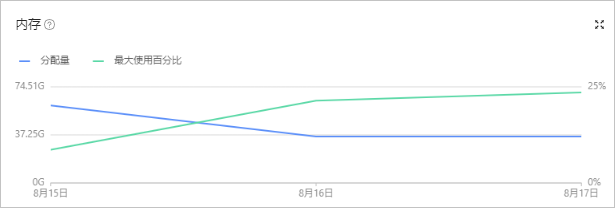
If the memory usage meets expectations, you can adjust the threshold to avoid continuous alert triggering.
On the Alert Item Configuration tab of the Systems Management > Alerts page, find the corresponding alert and click Edit to modify the alert threshold.
If the memory usage does not meet expectations, you need to restart the observer process to prevent the OBServer node from being unable to operate due to insufficient memory.
On the Restart page of the Overview page of the OceanBase cluster's OBServers section, click Restart to restart the observer process.