An OceanBase cluster spans one or more regions. A region consists of one or more zones, and one or more servers are deployed in each zone. A region refers to a city or a geographic region. If an OceanBase cluster spans two or more regions, the data and services of the database have the geo-disaster recovery capability. If a cluster has only one region, the data and services of the database will be affected when a city-wide failure occurs. A zone corresponds to an IDC with an independent network and power supply. The OceanBase cluster that spans two or more zones in the same region has the disaster recovery capability when servers in one zone fail. Generally, each zone of an OceanBase cluster retains only one data replica. If the cluster has only one zone, this cluster has no disaster recovery capability. If your cluster has several servers deployed in only one IDC, you can create virtual zones and distribute your servers among them to have disaster recovery capability.
OceanBase Database provides innovative disaster recovery capabilities in several deployment modes. For example, you can deploy your cluster in five IDCs across three regions to implement lossless disaster recovery for city-wide disasters or in three IDCs in the same region to implement lossless disaster recovery for IDC failures. OceanBase Database retains data replicas in multiple regions or zones and uses the Paxos consensus protocol to ensure strong consistency among replicas. When city-wide disasters or IDC failures occur, OceanBase Database ensures and balances the data reliability and the database service availability.
A multi-region cluster:

A multi-zone cluster:

The zero-loss disaster recovery capability of OceanBase Database also facilitates operations on the cluster. When you replace or repair an IDC or server, you can delete the corresponding IDC or server, replace or repair it, and then add a new one. OceanBase Database automatically replicates and balances data to avoid impact on the database service.
OceanBase Database runs the observer process on each server of the cluster. The observer process manages various features of the database service, including resource management, tenant creation, data distribution management, Paxos protocol for data replicas, and standalone or distributed data query and modification. OceanBase Cloud Platform (OCP) supports automatic startup of the observer process along with the OCP-Agent service upon power-on. When a server is restarted, the observer process is automatically started and restored to the status before the server is restarted. For more information, see OCP-Agent processes.
Prerequisites
To view information on the Overview page of a cluster, make sure that you have the following permissions:
- Resource Permissions: Cluster Read-only or Tenant Read-only permission
- Menu Permissions: Permission on the Overview menu of Clusters
View cluster overview information
Log in to the OCP console. In the left-side navigation pane, click Clusters. The Clusters tab automatically appears.
The Clusters page displays the overview information about clusters of the current user in the following sections: Top 5 Clusters by QPS, Top 5 Clusters by Elapsed Time of Major Compaction, and Clusters.
You can also take over a cluster or create a cluster. You can create a standalone database or create a distributed cluster.
Create a standalone database
OceanBase Database in standalone mode is deployed on a single server or computer. All core components (such as the database engine, storage, and transaction processing) run on the same physical or virtual host. Compared with a distributed cluster, a standalone database is lightweight and small in size. You can deploy OceanBase Database in standalone mode for quick experience. For more information, see Create a standalone database.
Note
Only OceanBase Database V4.1.0 and later support the standalone mode.
Create a distributed cluster
OceanBase Database in distributed mode supports multiple hosts, multiple zones, and multiple OBServer nodes for multi-replica data protection. Compared with a standalone database, a distributed cluster provides financial-grade high availability and smooth scaling capabilities. It is highly compatible with Oracle and MySQL databases and is suitable for core business systems that demand high data security. For more information, see Create a distributed cluster.
Clusters
This section displays the information of each cluster in columns such as Cluster Name:Cluster ID, Tag, Status, Actions, Allocated CPU, Allocated Memory, Data Disk Used, Tenants, OceanBase version number, Deployment Mode, Created On, and Alert information. You can search for multiple clusters at a time by specifying their names separated with spaces.
- You can click the name of a cluster to go to the cluster details page. For more information, see View the details of a cluster.
- You can click the copy button on the right to copy the cluster name.
- When a cluster is in the Maintaining state, you can click View Task in the Actions column to go to the task details page of the cluster. On the task details page, you can perform operations such as viewing task logs, rolling back a task, and retrying a task. For more information, see Manage tasks.
- You can hover over the
Tagfield to view all tags of this cluster. You can click the Edit icon to manage the tags. For more information, see Manage tags.

Top 5 Clusters by QPS
This section displays top 5 clusters sorted by a specified performance metric in descending order in a specified time range. You can specify the performance metric and the time range as needed. You can click the icon in the upper-right corner to zoom in the chart for a better view.
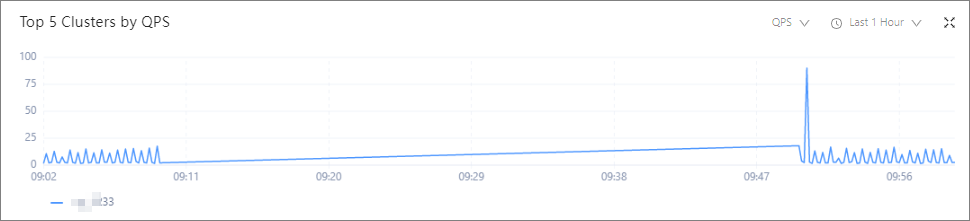
The following performance metrics are available: QPS (time/s), SQL response time (µs), Number of active sessions, and CPU Usage (%).
MetricDescriptionQPS The number of queries per second of the cluster. It reflects the SQL statement processing performance of the OceanBase cluster. Query response time The average query response time of the cluster, in µs. Number of active sessions The total number of active sessions in the selected time range. CPU Usage (%) The average CPU utilization of all OBServer nodes in the cluster. The following time ranges are available: Last 1 Hour, Last 24 Hours, and Last 7 Days.
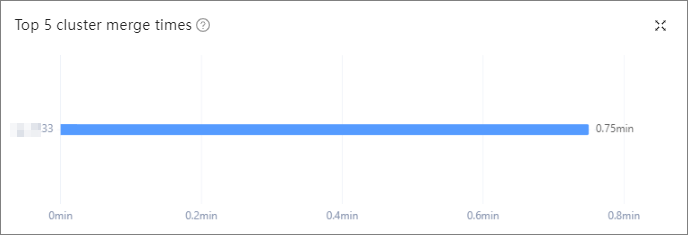
Top 5 Clusters by Elapsed Time of Major Compaction
This section displays a bar chart of top 5 clusters with the longest major compaction time in the last three days. A major compaction merges all dynamic and static data, which is time-consuming. When the incremental data generated through minor compactions reaches the specified threshold, a major compaction of data is performed to obtain a major version.
This section is empty if no major compaction has been performed in the last three days. You can click the icon in the upper-right corner to zoom in the chart for a better view.