







Alert description
In multi-VPC mode, OCP needs to manage OceanBase clusters across multiple VPCs. OCP accesses services within these VPCs through a secure cross-VPC channel established by IC-Server and IC-Agent. IC-Server provides a VIP for OCP and proxies its access to other VPCs.
This alert is triggered when OCP cannot connect to other VPCs while managing the VPCs.
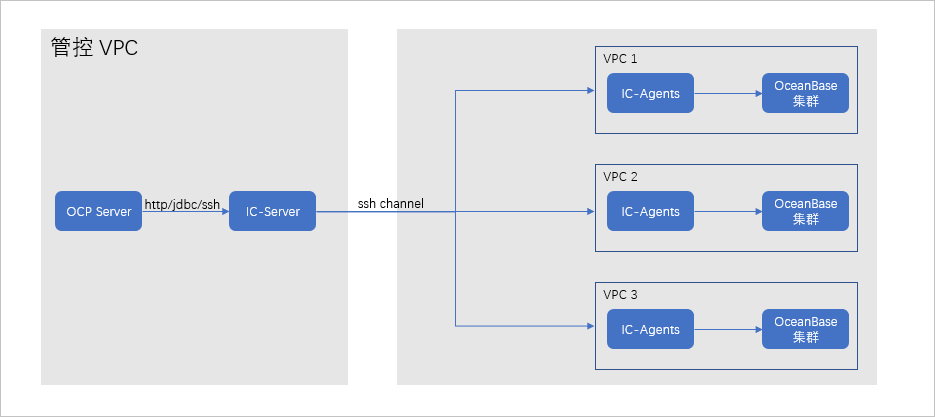
Alert principle
The following table describes the key parameters involved in the monitoring logic of this alert.
Parameter |
Value |
|---|---|
| Monitoring metric | vpc_network_health The value of the monitoring metric indicates the result of the health check interface. A value of 1 indicates that the connection is unavailable and the alert is triggered. |
| Metric source | The health check interface is accessed. The URL is http://ip:8088/api/v1/clusters/all/agents. Here, IP is the IP address of the host monitored by the alert. |
| Metric collection | vpc_network_health |
| Monitoring expression | min(vpc_network_health{@LABELS}) by (@GBLABELS) |
| Metric collection interval | 1 minute |
Rule Information
Monitoring metric |
Default threshold |
Duration |
Alert cycle |
Elimination cycle |
|---|---|---|---|---|
| vpc_network_health | 1 | 0 seconds | 15 seconds | 5 minutes |
Alert Information
Alert trigger method |
Alert level |
Scope |
|---|---|---|
| Based on the expression of the monitoring metric | Severe | Server |
Alert Template
Alert Overview
- Template: ${alarm_target} ${alarm_name}
- Example: VPC-2 User VPC Connection Failed
Alert Details
- Template: ${alarm_target} ${alarm_name}
- Example: VPC-2 User VPC Connection Failed
Alert Recovery
- Template: Alert: ${alarm_name}, Is VPC Healthy (Accessible): ${recover_value}
- Example: Alert: VPC Connection Failed, Is VPC Healthy (Accessible): 1
Impact on the System
OCP cannot manage the OceanBase clusters and related resources in the VPC.
Possible Causes
In the alert VPC, all hosts with IC-Agent installed have failed, causing the VPC to be inaccessible.
All IC-Agent processes in the VPC are unavailable.
Network issues prevent OCP from establishing connections with all IC-Agent instances in the VPC.
Solution
Check if the ic_server_connect_failed Inter-Connector Server Connection Failed alert is being reported, confirming that the IC-Server connection is normal.
If the connection is not normal, resolve the IC-Server connection issue first.
Verify that the hosts with IC-Agent installed in the VPC are running normally.
Check if they can be logged in to normally, and if the memory and CPU resources are sufficient. If all is normal, proceed to the next step.
Check if the IC-Agent processes are running normally and if there are any error logs.
Run the following command to check if the ic-agent process is running normally.
ps -ef|grep ic-agentIf the process is not started, contact the O&M engineer to restart the process and observe if the alert continues to be reported.
If the process is already running, proceed to the next step.
Run the following command to check if there are any error logs in the
~/logs/ic-agent/agent.logfile of the IC-Server.grep -r "error" ~/logs/ic-agent/agent.log~/logs/ic-agent/agent.logfile: Replace the tilde (~) with the actual path based on the deployment situation of IC-Agent.If there are error logs, refer to the error logs for troubleshooting.
If there are no error logs, proceed to the next step.
If the above steps cannot resolve the issue, contact technical support for assistance.