







The Binlog service collects transaction logs of OceanBase Database and converts them into MySQL binlogs. It is mainly used in scenarios such as real-time data subscription. OCP supports GUI-based deployment of Binlog service in standalone mode or cluster mode, and allows you to perform basic O&M operations on Binlog instances and clusters. OCP also supports monitoring and alerting for Binlog service. It provides resource usage views of Binlog clusters and allows you to associate them with alerts to help you quickly locate and resolve issues.
Background information
In MySQL, binlogs serve as the starting point for data subscription. Users can enable binlogs with relatively low performance and resource consumption to support various downstream business scenarios.
OceanBase Binlog Service is a feature introduced to ensure compatibility with MySQL binlogs. It allows customers to reuse their existing MySQL binlog incremental parsing systems to synchronize incremental data from OceanBase Database in MySQL mode, without requiring secondary development or setting up a new environment. OceanBase Binlog Service aligns with MySQL Binlog V4 protocol, offering the same features (such as support for multiple subscription connections), capabilities (such as support for GTID pull mode), and ensuring the uniqueness of data in binlogs. You can seamlessly use your existing MySQL-based incremental data subscription solutions and migrate them to OceanBase Database.
Notice
For now, OceanBase Binlog Service is not suitable for scenarios such as primary-standby deployment and incremental recovery.
Architecture overview
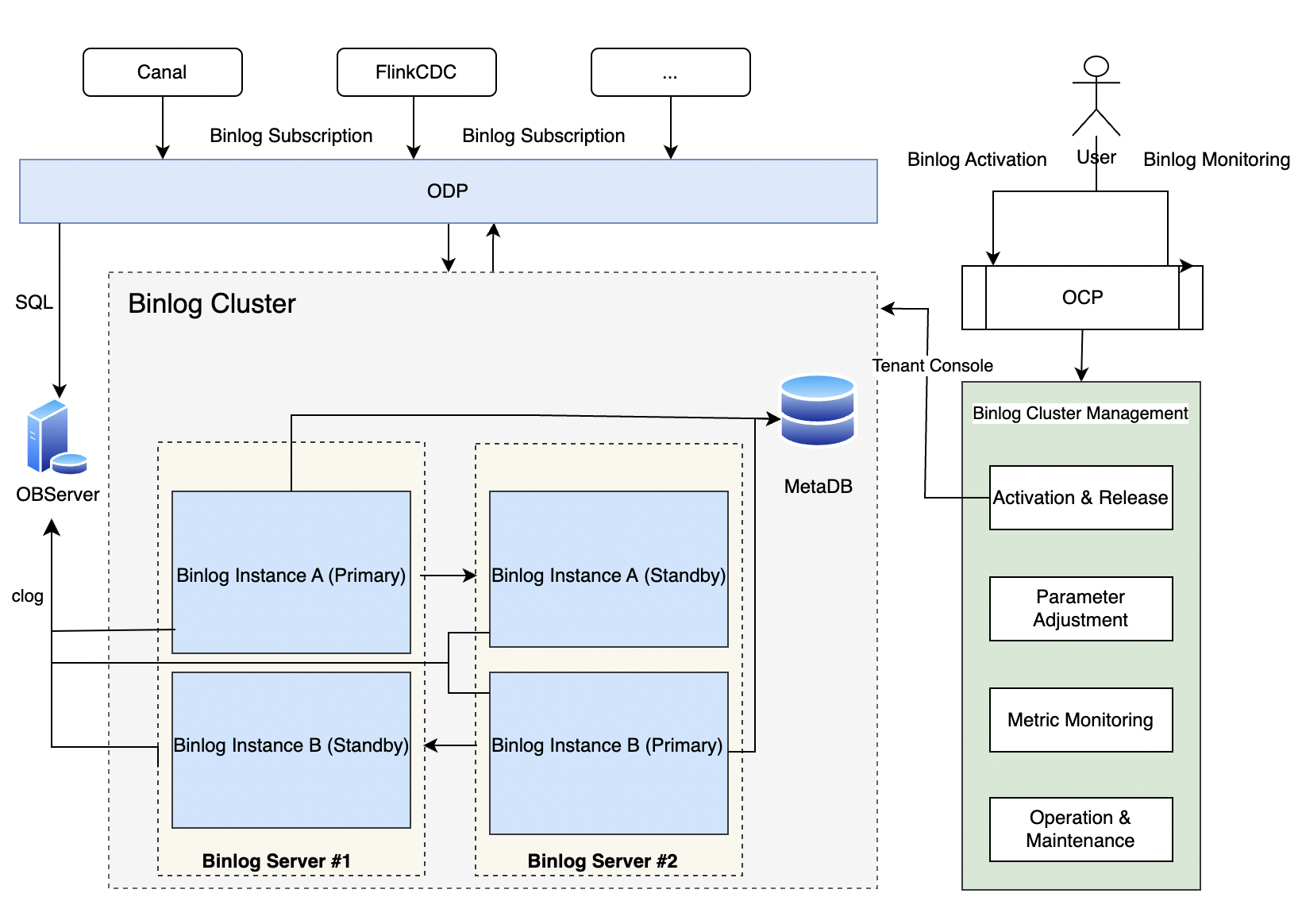
Binlog Cluster
A binlog cluster is a unified service composed of one or more binlog servers. If multiple binlog servers exist within the binlog cluster, when the tenant binlog service is started, the load balancing logic selects an appropriate binlog server. If any binlog server fails, the other normal binlog servers take over its binlog service.
Binlog Server
The binlog server manages several binlog instances on the node and processes SQL requests. Multiple binlog servers share information through MetaDB. The binlog server supports custom SQL APIs, primarily for managing binlog instances.
Binlog Instance
A binlog instance is a tenant-level binlog instance that generates and sends binlog logs and enables TCP monitoring to process SQL requests based on the MySQL protocol. An OceanBase binlog instance can be likened to a MySQL instance. Multiple OceanBase binlog instances within the same tenant can be likened to primary and standby MySQL instances. They support MySQL binlog-related SQL statements, protocols, and variables, such as SHOW MASTER STATUS.
Use Binlog Service in OCP
Service limitations
Binlog Service has the following limitations in different services and tenant modes:
- The OBServer version must be V4.1.0.1 or later.
- The OBProxy version must be V4.2.1 or later. We recommend that you use V4.3.1.0-402024062810 or V4.2.1.0-20240604114727.
- The Binlog Service version must be V4.0.0 or later.
- The MetaDB version must be 2.2.77 (Built Feb 14 2022 18:11:59) or later.
- Only the tenants in MySQL mode are supported.
Environment preparation
Binlog Service depends on jq, mysql, java, and diff. You need to install these tools on the host before you start. Here is an example of installation. Please install them based on your actual environment:
# 1. jq
sudo yum install jq

# 2. mysql
sudo yum install mysql

# 3. java
# If you have a Java environment, you can directly configure the environment variables.
sudo yum install java-1.8.0-openjdk*
echo "export JAVA_HOME=/usr/lib/jvm/java-1.8.0" >> /etc/profile
echo "export JRE_HOME=${JAVA_HOME}/jre" >> /etc/profile
echo "export CLASSPATH=${JAVA_HOME}/lib:${JRE_HOME}/lib:${CLASSPATH}" >> /etc/profile
echo "export PATH=${JAVA_HOME}/bin:${JRE_HOME}/bin:${PATH}" >> /etc/profile

# 4. diff
sudo yum install diffutils
Note that you need to replace the actual Java directory in the command
echo "export JAVA_HOME=/usr/lib/jvm/java-1.8.0" >> /etc/profilewith your environment. You can run thels /lib/jvm | grep javaorwhich javacommand to view the directory.Check whether the dependencies are installed:
# 1. jq
command -v jq

# 2. mysql
command -v mysql

# 3. java
echo $JAVA_HOME

# 4. diff
command -v diff
Quick start
You can use Binlog Service in OCP by following the steps below:
Create an OceanBase cluster, an OceanBase tenant, and an OBProxy cluster that meets the version requirements.
For more information, see Create a cluster, Create a tenant, and Create an OBProxy cluster.
The OceanBase Binlog Service feature depends on the Binlog component, which is provided separately. You can obtain the component by creating a Binlog cluster.
For more information, see Create a Binlog cluster.
Enable Binlog Service for the OceanBase tenant to collect transaction logs of OceanBase and convert them into MySQL Binlogs.
For more information, see Manage tenant Binlog Service.
References
For more information about Binlog Service, see Overview.